


We can mix without headphones hehe, for entertainment I better look at the hercules djcontrol mix bluetooth
Hi you are wasting your time, i also use Samsung - android and while mine does connect to the controller and play tracks it does not show tracks in their respective folders, shows folders but when i click them they are blank. Oddly reloop and algariddum have zero interest. Got rid of my beat pad, move over to pioneer they at kesst work 100% (so clearly not 'there are so many android blagh blagh), wedj works fine, tracktor works fine crossdj discdj… its just the djay-algoriddum that do bot same with djuced sadly not good for thier business odly just suporting ipad as why woild you buy one of thier aligned controllers if algoriddum dont care about the growing android community and software functionality !!!
I have the same problem with my new Lenovo Tab M9 not working with my Pioneer DDJ-WeGo3 controller. I also tried it with my Samsung S10e phone and it doesn’t work properly with that either.
My 6 year old Lenovo Tab4 8 works perfectly with the controller but its getting slow and old now and stuck on Android 8 which is why I brought a new tablet.
I wonder if its because the new devices use USB C instead of MicroUSB and that’s where the audio problem comes from?
The heaphone output on my Reloop Buddy is not working on my Samsung Galaxy Tab S8+ either.
So friggin frustrating!
Hi all,
DJ Algoriddim Pro works well with Acer Iconia M10 tablet. Android is connected and all the staff is working fine. You need to connect your Android device properly as indicated on the manual.
But I couldn’t get it work with my Android phone yet.
Regards.
Great news. I could run DJ Algoriddim with Reloop Buddy on Acer Iconia M10, Lenovo Tab 7 tablets and on Tecno Pro Spark 10 phones. No problem faced.
It seems that the problem is related to USB connections and unreliable cables. Reloop Buddy is working fine with DJ Algoriddim on Android devices.
Regards.
1 Like
Thanks for sharing @suatozturk
Hi all bit of an update. . .
And all about remapping…
I spent over a month sending video’s - bun fighting with pioneer (no mic with ddjwego4), various issues, said it was my system… nope.
Bought another reloop beatpad and remapped the living day lights out of it (within djpro)… now excellent with loads more functiobs you could ever need (not forgetting the shift key gives x2 on ALL buttons) 8 cue, 8 fx 8 sample etc etc (oddly reloop said it could not be done also but it can) … I’ve even remapped the pitch bend to give sync fine tune shift+sync to return to track sync etc.
So back to ddjwego 4 and mic not working plus various othere functions aligned with djpro.
Once comfortable with the remap process as seams well aligned with reloop (takes bit of getting head round) I then just basically followed same learnings process over to wego4, few less buttons but again can access everything my flx4 had and more, again utalise shift button… .
In summary djpro can work wonders and i think its great if any thing under rated be it you have to dig arround a bit and in my case i run with a lenovo think pad/yogi so have benefit of key board or touch screen or mouse controlling or decks, yes the all in controllers are great but id rather a 10-15 screen as without would bever see all functions in djpro I’m sure.
Hope this helps, remapping sorted my issues (be it still agrived by lack of support for android files/folders sadly), my Samsung now a back up works fine on automix, but found most fixes within the remap process for buddy and wego4.
2 Likes
Any update from the devs in getting precuing to work with Android phones and tablets, such as Samsung Galaxy Tab S8+
Hi @Blammo, please refer to the linked FAQ below:
I still don’t get it… What adapter exactly do I need? Your link expired but from the name of the link it looks like this one: Apple USB-C Digital AV Multiport Adapter - which makes no sense…
Do I need to find an adapter with USB-B on one side and two USB-C on the other side, one for data and one for power? Unfortunately I didn’t find one… :-/
Hi @smashedup, per the Reloop Buddy User Manual, I recommend that you use a USB-A to C cable and connect it directly between the USB-A socket of the Buddy and the USB-C socket of your tablet. Make sure the switch on the left side of the Buddy is set to iOS Mode. Then use a USB-B to A cable to connect the Buddy to a 5V/2A power supply.
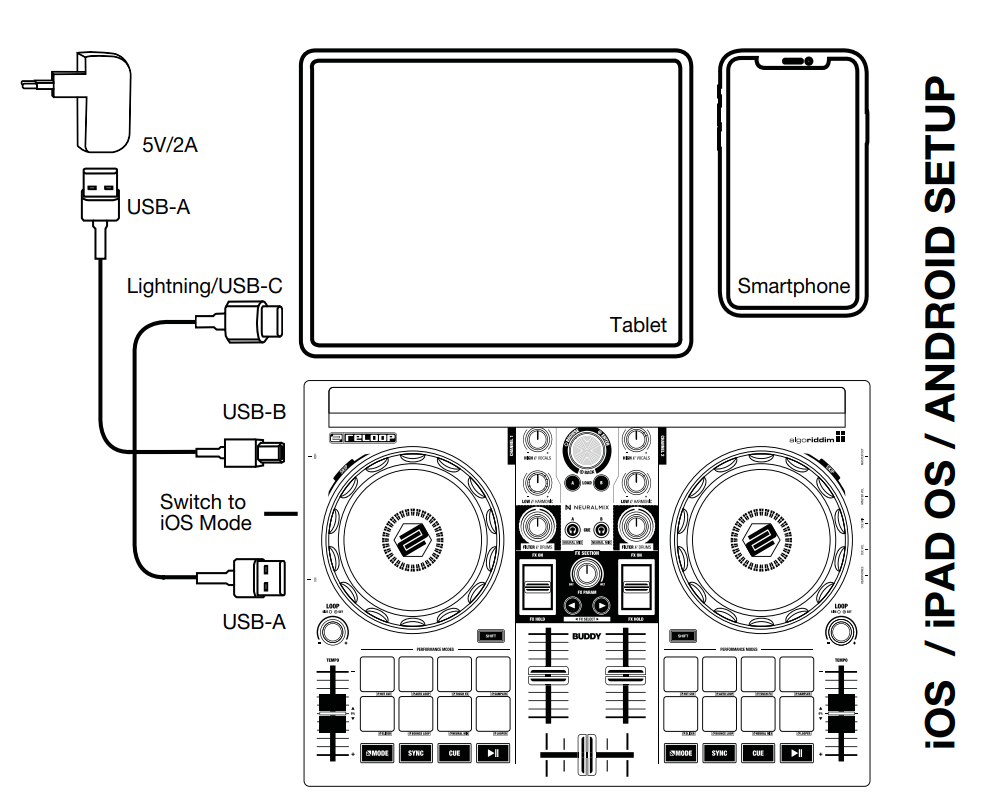
Thanks for your quick reply. Of course I tried that first, which didn’t work for two Android devices. So I wanted to try what your colleague suggested instead in this thread but I did not understand completely…
You’re welcome @smashedup. I recommend that you try some different USB-A to C cables. Please note that not all USB cables are equal. Some only send data, some only send power and some can do both.
Thanks, but I don’t think that’s the problem. I tried several cables, most of them I use on a regular basis with external harddrives, supporting data transfer and power (which shouldn’t be necessary anyway, since I use USB-B for power, no?).
Well, now I just found out that I could use the Reloop Buddy why my Android devices when I connect them over the USB-B port and set to PC. Everythings works as expected, only that sometimes (I didn’t find out yet) I get a jittering output (maybe depending on the battery level of the phone? idk…). So maybe with a Y-cable to power up the phone it will work…!?
Interesting @smashedup.
- In this case, I would try a high quality USB-C hub/dock from a reputable company like Belkin, Anker, UGreen or Baseus.
- Make sure you select one that has pass through Power Delivery so you can also charge you tablet.
- You will connect the hub directly to your tablet, then you tablet charger to the Power Delivery socket on the hub.
- Finally you will connect your USB-A to B cable between the hub and you Reloop Buddy.
Below are some suggestions that I found on Amazon:
- Amazon.com: UGREEN Revodok 1071 USB C Hub for Laptop 7 in 1 Dock 4K HDMI, 100W PD Charging, USB-C & 2 USB-A 5Gbps Data Ports, SD/TF Card Reader for MacBook Pro/Air, iPad Pro, XPS, Thinkpad : Electronics
- Amazon.com: UGREEN Revodok Pro 107 USB-C Hub 7 in 1 10Gbps USB C 3.2 & 2 USB-A 3.2 4K HDMI, 100W Power Delivery, SD/TF Card Reader for MacBook Pro/Air, iPad Pro, iPhone 15 Pro/Pro Max, Thinkpad and More. : Electronics
- Amazon.com: Belkin USB-C Hub, 7-in-1 MultiPort Docking Station for MacBook & Windows - 85W USB-C Power Delivery 3.0, 4K HDMI 1.4, 2x USB-A 3.0, SD 3.0, Micro SD 3.0, & 3.5mm Audio Jack
- Amazon.com: Anker Laptop Docking Station, 14 in 1 USB C Hub, Triple Display with 2 x 4K HDMI, 1080p VGA, 80W Power Delivery, 5Gbps USB-A/C Data Ports for MacBook, Dell XPS and More : Electronics
Thank you very much! Will try this as a last resort…
You’re welcome @smashedup
Okay, this really seems to work now:
Android phone → UGREEN USB-C Hub with active power supply → Reloop Buddy via USB-B.
Unfortunately my Android tablet (Nokia T21 (Unisoc T612, 4 GB RAM)) is not working so well, there’s a lot of crackling in both, the main output as well as the phones output.
I already tried switching off WiFi/BT and closing all other apps, but this didn’t help… If you have any further recommandations, please let me know… (I’m afraid there’s no latency option in djay app, like there is on my macOS/Windows, right?)
edit: but thanks again for the workflow, that is at least working with my phone…
You’re welcome @smashedup. There are no latency options on iOS or Android. Unfortunately, I don’t have any additional suggestions for you. I suspect this is simply a device specific limitation. Sorry I couldn’t be of more help.


