Device model: iPad Pro M5
iPad OS 26.0.1
DJay 5.5
No Controler
Issue #1
I have synced all of my music to iCloud. Folder = “DJ Music” (Also, selected “keep downloaded” option). I want to create playlists from the folders located in “DJ Music”. This works on the Mac version of DJay 5.5. I would just right-click on the folder and choose “Add To My Collection”. I don’t see this option on the iPad version of the App.
Is there another way to do this on the iPad app without 1) manually creating a play new list in my collection and then adding all the files in that folder to that new playlist (I have over 50 folders in that folder).
On my Mac I just right-clicked on “DJ Music” folder and clicked on “Add To My Collection” and it created all the playlists and added all the files. It was great!
Issue # 2
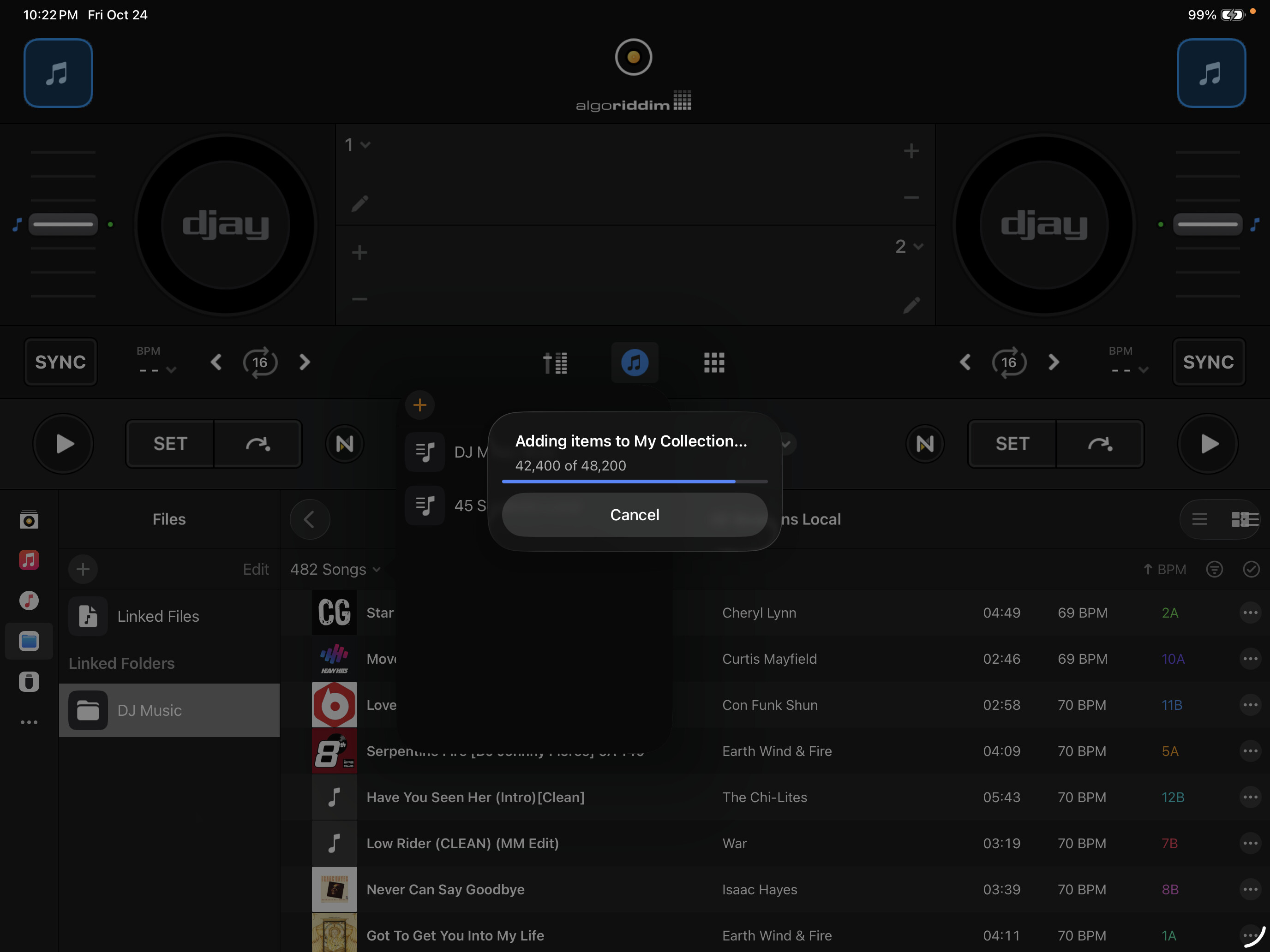
While I was testing and creating playlists manually I noted a bug. Looks like the dialogue box that shows progress is showing the wrong number of files. There are only 482 files in that folder (see pic) so it looks like DJay is multiplying the number of files by 1000. Should be an easy fix.