


Hi @TheBarbaryGhost. welcome to the Community! Our engineering team is still working on this. I’ll share more news here when I have it. Thanks!
1 Like
Yo! Please fix this soon! Kill that bug! Hardware mode is uncomfortable!
Hi @thegrandmassive, welcome to the Community! Thanks for the feedback. Our dev team is working on it. I’ll share more news when I have it.
Yes please fix this! It’s really hard not to be able to see track overview.
Hi @DJHAYLZ, welcome to the Community! Our team
Is working on this and it should be fixed in the next update. Thanks!
It also happens when I just try to move forward or backwards in the track using the overview. Please fix this as well!
2 Likes
Understood. Thanks for the additional info.
+1 to this as well, same issues. Thanks for working on this!
Thanks for the feedback. The fix should be released soon.
Hello everyone, 5.6.3 was released today and should address this issue.
Confirmed this is now fixed, thanks for the quick turnaround on this guys!
1 Like
You’re welcome @TheBarbaryGhost. Thanks for confirming.
1 Like
This exact issue exists in the One Deck view on iPad as well. The exact same issue that is mentioned here by others and the original poster in the thread is happening in the One Deck view. If i activate loop, both waveforms zoom in redundantly. It’s a useless feature and definitely feels like a bug. I can’t view how much longer is left of the loop it leaves me blind in the one deck view. and i actually feel like it didn’t always behave this way in One Deck view - i feel like these are newly introduced bugs.
If it’s noted as an issue in one view it should then be fixed for the remaining views as well.
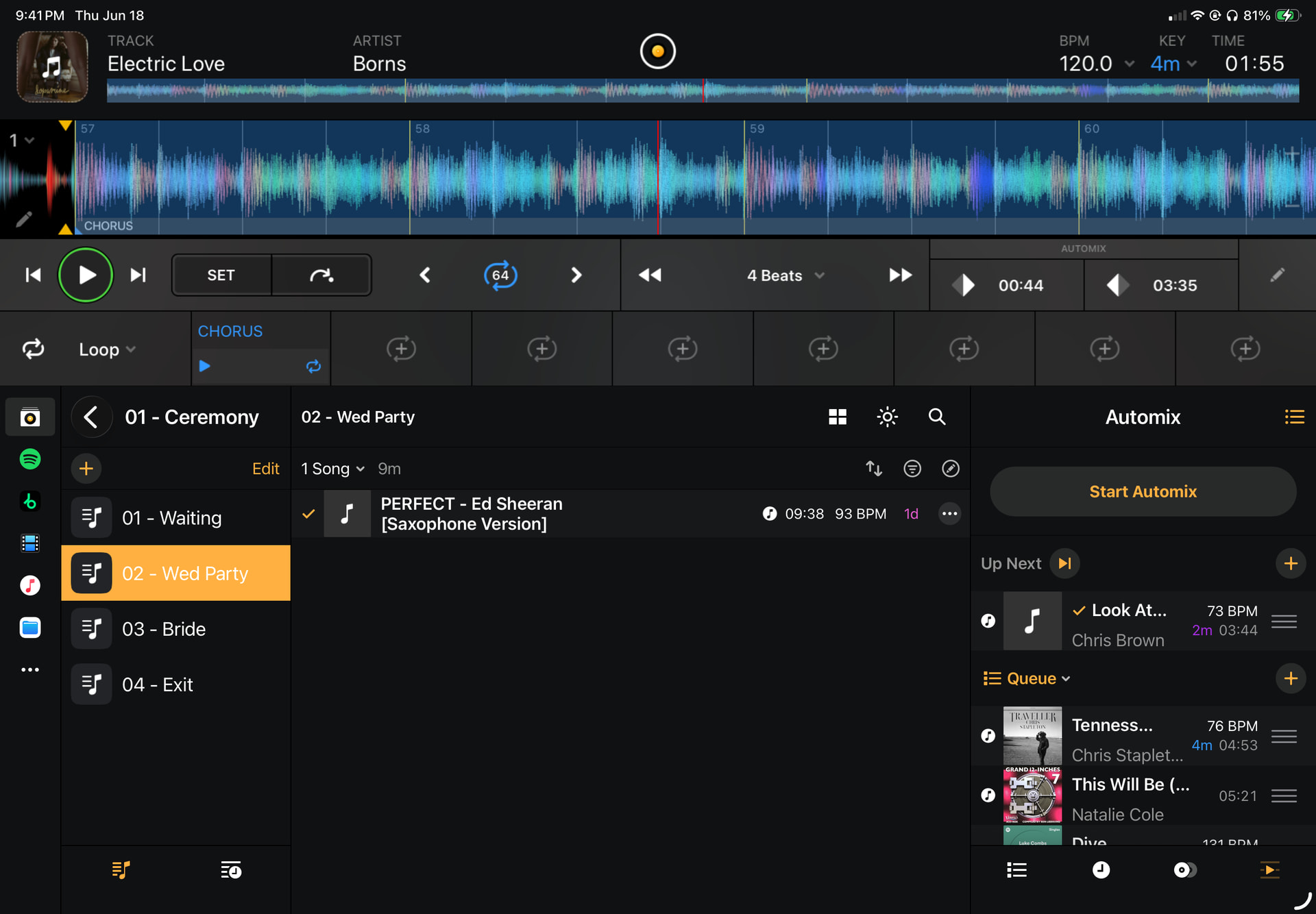
1 Like
Hi @backyardwoodworksla, good catch! Thanks for the screenshot and detailed issue description - this is very helpful. Can you please also share the full details about your setup so I can try to reproduce this on my end? Thanks!
Device Model (ex. 2020 iPad Air 4th Gen):
Version of operating system (ex. iOS 17.3.1):
Version of djay (ex. 5.1.3):
Hardware/controllers used (ex. Reloop Ready):
Hardware Firmware Version (ex. 2.7):
- If you are using DJ Hardware, does the same issue occur without your hardware connected?
- Is this a new issue to djay 5.6.5 or did you also observe this on previous versions?


