


I also havbe the mixtour Pro, and the double press need is unwelcome indeed
Thanks for the feedback DJ Estrela
I actually agree with this mentality that too many features can hinder the learning experience.
Whenever I use engineos, which is pretty barebones compared to djay pro, I find myself struggling to mix “manually” compared to when I’m mixing and am able to use some of the crossfader effects that is available in djay pro. Djay pro is magical like that.
1 Like
I will often have a mixing session using engine on my prime go to keep my basic skills intact. With so few automations it does make an honest DJ of you.
1 Like
My feelings exactly, especially when a track has a janky beat grid. Immediately reminds me of how much I use the sync button lol
Thanks for sharing @eyeseeyou01 and @daniel_curley.

I want to create a midi mapping for selecting deck 1 and 2 so that I can get this view, I can’t find it in the midi mapping options.
Plz any help regarding this.
Hi @DjSasha_DelhiDevils, currently there are no MIDI commands for this. I’ve merged your question topic with this existing suggestion. Please Vote at the top left of this page. Thanks.
1 Like
We’re nearly three years on from your original post @Slak_Jaw
Any news or updates you can share with us yet? 

You can reply publicly here on the internet, I promise I won’t tell anyone 

1 Like
Thanks for checking in @TheSouthernDJ. We have no news to share from our dev team. All I can say is this is on the roadmap.
3 Likes
Hi everyone,
Adding my voice to this! I’m currently using the Reloop Mixon 8 Pro with djay Pro on iOS (iPad) and hitting this exact wall. It’s really frustrating that pressing the Pad Mode buttons (like Sampler, Hot Cues and Neutral Mix) on the controller doesn’t automatically switch the on-screen UI. Constantly reaching for the touch screen just to see what I’m doing completely breaks the workflow.
Since this has been highly requested for a while, has anyone managed to figure out a solid workaround for iOS in the meantime? I’ve been digging into the .djayMidiMapping XML files recently and noticed something interesting: the Reloop Buddy controller actually has the ability to switch UI view modes natively in djay Pro.
Does anyone know if it’s possible to extract or borrow the specific XML code/keyPath commands from the Reloop Buddy’s mapping file and adapt them for the Mixon 8 Pro? Or is there perhaps an undocumented command we could manually script into the XML to force the screen to change when a specific MIDI note is triggered?
Any hints or hacks would be hugely appreciated while we wait for official support!
2 Likes
Hi @jvrzv, welcome to the Community! Thanks for the feedback.
When I had the reloop buddy I also noticed this and asked a similar question. I don’t know enough about how this stuff works to even guess if it’s possible to reverse engineer that functionality from the reloop buddy
1 Like
While it might have the ability, does it actually do it? 
Anyone got a Reloop Buddy to confirm?
If so, can you share the XML file please 
1 Like
The somewhat finicky soundcard on the reloop buddy is a hit or miss known issue, mine had a bad one so I sold it. That being said..
It does do it for sure change the screens based on the pad mode.
Out of all the controllers I’ve tried out, and I’ve tried many, the reloop buddy is hands down the most out of the box djay pro integrated controller. If it had hi mid low eq knobs and the sound card wasn’t hit or miss on quality I’d say it is one of the best 2 channel djay pro controllers out there. Even has a iPad slot.
It’s probably due for an update but for djay pro users it could be worth the more expansive asking price it normally goes for
4 Likes
I don’t suppose you’d have a copy of the XML file for it anywhere?
I don’t
Hi @TheSouthernDJ, here’s the XML file for the Reloop Buddy:
3 Likes
Some feedback of a necessary update to the Algoriddim Team:
I understand how challenging it can be to develop and synchronize multiple platforms simultaneously, especially when working to ensure that mobile operating systems, desktop software, and hardware products such as the Meta glasses all function seamlessly together.
That said, I believe this is a very important issue that deserves attention in a future software update.
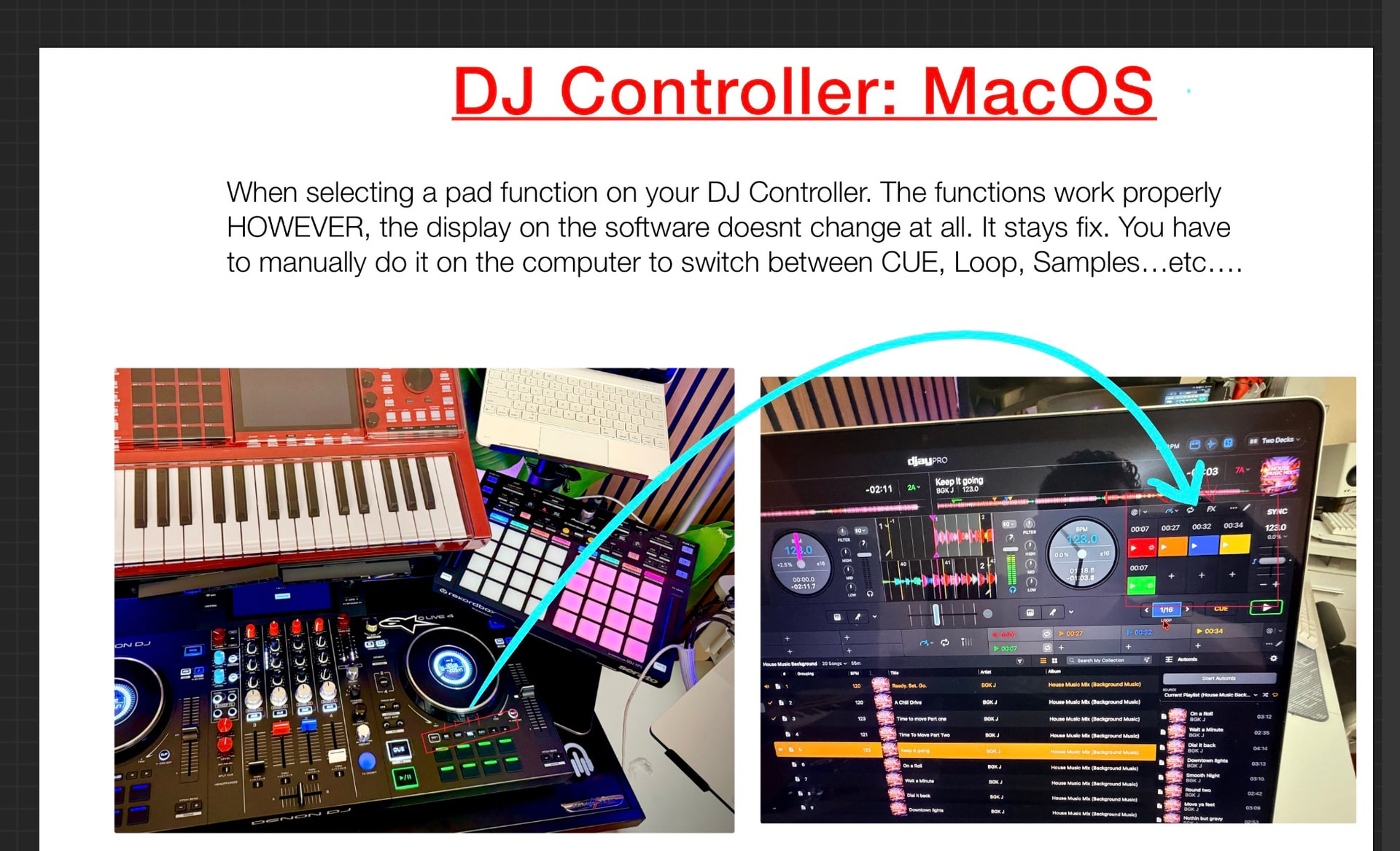
Currently, when any of the pad mode selection buttons are pressed (Hot Cues, Loops, Samples, etc.) on the controller, the software interface does not update to reflect the selected mode. The only way to change the displayed pad mode within the software is by manually selecting it on the laptop.
I attempted to investigate the issue through the MIDI mapping settings. However, when pressing any of the pad mode selection buttons, the software does not appear to register them as assigned MIDI commands. In fact, they do not appear anywhere within the MIDI mapping interface when activated, making it impossible to remap or troubleshoot through standard MIDI controls.
What’s particularly interesting is that the performance pads themselves function correctly. Hot Cues, Loops, Samples, and other features work as expected once selected. The issue seems to be limited to the pad mode selection buttons, which do not communicate their status back to the software interface.
If feature requests and voting are still being considered, I would strongly encourage the team to address this behavior. Ideally, whenever a user selects Hot Cues, Loops, Samples, or any other pad mode on the controller, the software should automatically switch and display the corresponding screen. Having to manually update the software view creates confusion, interrupts workflow, and can be distracting during a performance. This request has been opened for over 2 years, we voted and the consumer is still waiting for a resolution.
Thank you for your continued work on the platform and for considering this feedback.
3 Likes
Thanks for the additional feedback @bikerboi3. Our dev team is aware of user demand for this functionality.
1 Like


