


Please creat a new bug report topic and share your full setup details and a short video @eyeseeyou01
1 Like
Thank you.
Filed. Hopefully it’s an easy fix since a lot of marketing for these products seems to be out right now.
Thanks @eyeseeyou01. I saw your new topic and will review it soon.
1 Like
Ordered mine. Should arrive early next week!
2 Likes
I’m enjoying mine… I just wish I could change the default loop pads to be the longer loops. I rarely ever use ½, 1, and 2 beat loops… but regularly use 8, 16, 32, and even 64.
Hi @skymakai, thanks for the additional feedback. If you are using a macOS, iOS or Windows device, you can easily customize the (built-in) MIDI mapping and change the loop sizes for each pad.
macOS:
iOS
Windows:
1 Like
Thanks, but editing MIDI is locked behind the Pro subscription even with this controller connected. It’ll let me change the MIDI, but as soon as I press “Save” I’m prompted to sign up for the Pro subscription and my edits are lost. I have the djay 2 free upgrade, but still MIDI is not included.
Yes, you need a Pro subscription to access MIDI mapping
However, if you’ve done the legacy upgrade process as outline below, you should have access to MIDI mapping.
I’m not too sure about that… it works for me on Djay on MacOS. I have everything unlocked. It’s just not working on iOS… nor are any of the Pro layout unlocks. I’ve submitted a ticket.
edit: reminder, I have the djay 2 free upgrades, as well as the unlocks through the controller.
Okay great! The support team should be able to dig a little deeper into your license and figure out what’s going on. In the meantime, I recommend you log into your My djay Account using the same email address and password as on your Mac.
Yep, I’m signed in on the same account… all show up with the same djay 2 unlocks… but for some reason djay (5.6.7) works fully on MacOS, is limited on iPadOS, and doesn’t work at all on iOS (iPhone) with the Mixtrack Go.
Edit: scratch the last part about iOS (iPhone). I uninstalled and re-installed and now it works with the Mixtrack Go…
Fader FX and Neural Mix are enabled…
but still no Hardware Mode layout.
Thanks for the additional info @skymakai. At this point, I think it’s best to wait for our official support team to reply to you via email so they can look into your existing license(s) in more detail. Thanks.
1 Like
Are they not tied to the looping interface values?
Yes, they can be changed (at least on djay MacOS)… but at least for me I cannot change them on iOS w/o getting a pop up that I need to subscribe.
1 Like
Here’s my personal MIDI Mapping for the Mixtrack GO.

Numark Mixtrack GO(SJ1).djayMidiMapping (54.6 KB)
4 Likes
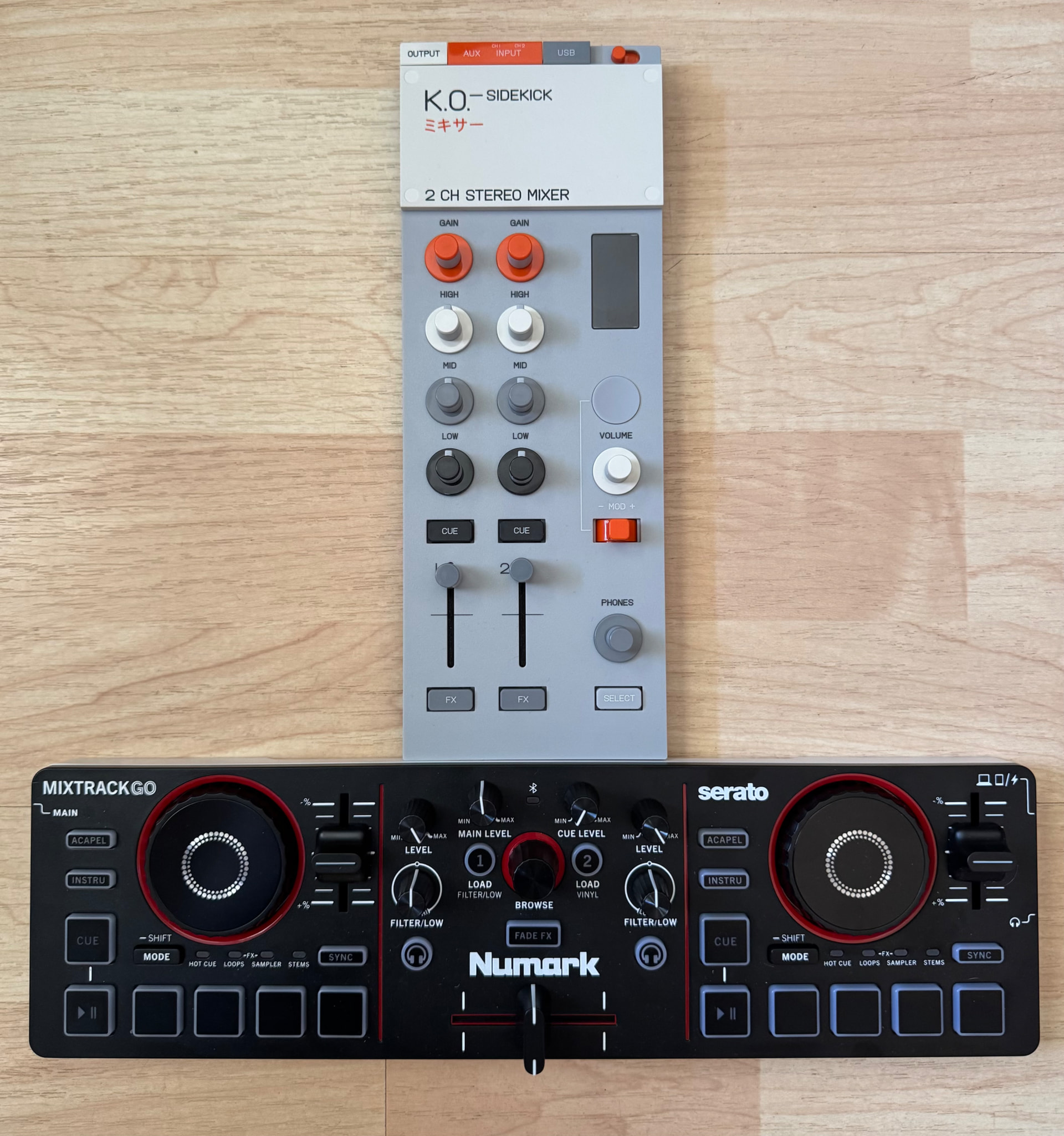
Two mixer options that I’ve been testing with this controller:
Reloop Mixtour Pro

Teenage Engineering EP-136 K.O. Sidekick
2 Likes
While working through my own custom mapping, I thought it would be helpful to build and share a MIDI Mapping Key for the Numark Mixtrack Go (built-in) mapping for reference.
Numark Mixtrack GO — djay 5.6.7 MIDI mapping
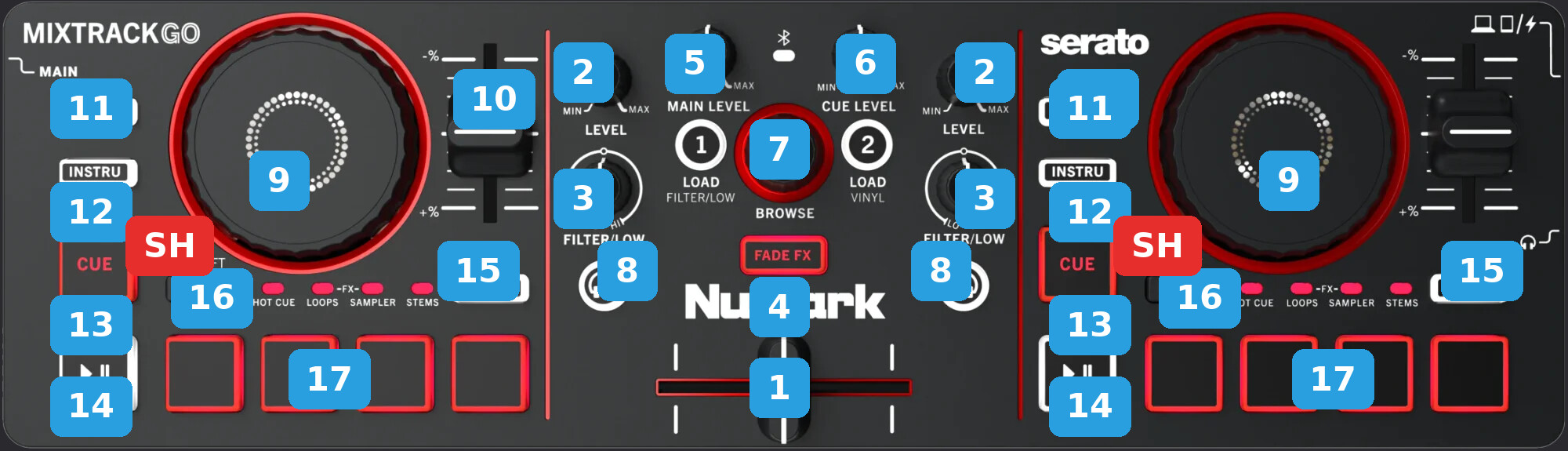
| KEY | ACTION | SHIFT (SECONDARY) ACTION |
|---|---|---|
| 1 CROSSFADER | — | — |
| 2 LEVEL | Deck channel volumes | — |
| 3 FILTER/LOW | Filter Mode: Filter. Low Mode: Low EQ | — |
| 4 FILTER/LOW MODE | Toggles FILTER/LOW Mode knobs. | — |
| 5 MAIN LEVEL | Master Volume | — |
| 6 CUE LEVEL | Headphone Volume | — |
| 7 BROWSE | Browse library. LOAD 1 / LOAD 2 load a deck. | — |
| 8 PFL / CUE (headphones) | Headphones pre-listening. | — |
| 9 JOG WHEEL | Vinyl Mode On: Scratches. Vinyl Mode Off: Nudges | Track scrub |
| 10 TEMPO | Tempo | — |
| 11 ACAPEL | Acapella (Custom): isolate Vocals, Mute FX off. | Same, Mute FX on. |
| 12 INSTRU | Instrumental (Custom): isolate Drums - Bass - Harmonics, Mute FX off. | Same, Mute FX on. |
| 13 CUE | Sets a temporary cue point when paused, or returns to it when playing. | Load previous track |
| 14 PLAY | Play/Pause | Play from start |
| 15 SYNC | Sync | Tempo Reset |
| 16 MODE | Cycle pad mode: Hot Cue - Loops - FX - Sampler - Stems. | — |
| 17 PADS | HOT CUE: Set/Trigger Hot Cue 1 - 2 - 3 - 4. LOOPS: 1 - 2 - 4 - 8 beats. FX: Instant FX1 - FX2 - FX3 - FX4. SAMPLER: Slots 1 - 2 - 3 - 4. STEMS: Drums - Bass - Harmonics - Vocals. | HOT CUE: Clear Hot Cue 1 - 2 - 3 - 4. LOOPS: 16 - 32 - 64 - 128 beats. FX: Instant FX5 - FX6 - FX7 - FX8. SAMPLER: Pause slots. STEMS: Solo Drums - Bass - Harmonics - Vocals. |
| SH SHIFT | Hold for secondary actions in the SHIFT column. | — |
1 Like


