v1.2.2 is up — three real bugs fixed since v1.2.1, plus a follow-up for @skymakai and an answer for @Jay_Dizzle.
Releases page — same setup as before, compile from source or grab the prebuilt .app.
What’s fixed
-
Cue points could be missing, or occasionally show a nonsense value or a phantom entry. Two separate bugs, both found by checking the decoder against a known cue list instead of guessing: a rare case where a garbage huge number appeared instead of a real countdown, and a subtler one where the binary tag marking a cue’s stored time turned out not to be a fixed width — so some cues were silently dropped. (A same-day fix attempt at that briefly introduced a phantom “cue” that was actually a loop’s start time, before the real cause was found.) Your cue points should now match djay’s list exactly.
-
The panels could overlap, or need more screen width than a laptop has. The per-deck width was capped to a flat number regardless of screen size — it now scales with djay’s own window width instead.
-
A denied “access data from other apps” permission looked identical to “track not analyzed yet.” Both showed “Searching djay’s database…” forever, with no way to tell them apart from the outside. The panel now says explicitly when djay’s data folder isn’t accessible.
@Jay_Dizzle — on the bar/beat countdown to the next cue
I dont see the bar/beats countdown to next hot cue clearly. Just seconds counter. It’s the most important part of this imo.
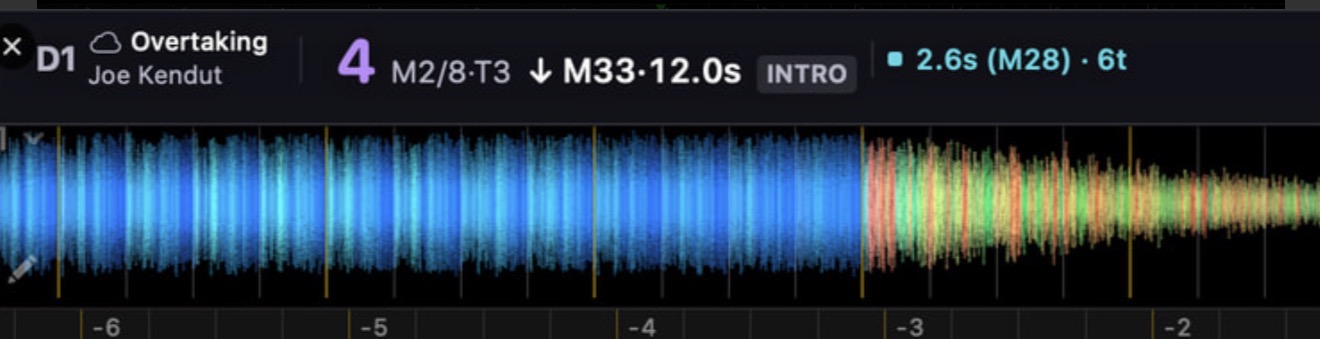
It is there, but I clearly haven’t made it readable enough — in your screenshot it’s the cyan group: 2.6s (M28) · 6t, meaning next cue in 2.6 seconds, at bar 28, 6 beats away. So seconds, bar number and beats are all present, just packed tight and in the same size as everything else.
If that’s the single most important number for you, it shouldn’t be competing with the rest for attention. I’d rather fix the hierarchy than add anything: give the beats/bars countdown the same visual weight the phrase number has now, and let the seconds be the small secondary detail rather than the first thing you read. Does that match what you’re after, or would you rather have the bar/beat figure on its own line entirely?
@skymakai — a specific test, if you’re still up for it
Thanks for going through all of that so carefully. Everything you ruled out in your last post is genuinely ruled out on my side too — library view, naming/metadata, tracks being analyzed, resizing. That leaves the “access data from other apps” popup as the main suspect: it’s a different macOS permission from Accessibility, and the 8-step routine in this thread doesn’t touch it — which would explain why running through it several times changed nothing for you.
Until v1.2.2 the app had no way to tell you that. If that permission was denied, it just sat on “Searching djay’s database…” indefinitely, exactly like an unanalyzed track would. Now it should say so outright.
Could you:
-
Grab v1.2.2 and see what the panel says — a “can’t access djay’s data” message, or still just “Searching…”?
-
If the “access data from other apps” popup appears again at launch, click Allow this time rather than dismissing it.
-
If it does report denied access, run this in Terminal and relaunch:
tccutil reset SystemPolicyAppData com.yannick-djay-phrase-tool.phrasecounterapp
On macOS 15.7.8 — I don’t think that’s the cause in itself; nothing here depends on a version newer than that. But I’m only testing on my own machine, so if v1.2.2 still says nothing useful, your OS version becomes worth a proper look rather than a guess.
Whatever it reports now should point at the actual cause instead of more guessing from a distance. Appreciate you sticking with it.