Dear Slak_Jaw,
as I could see is the last update from June this year… even if there are no news…
thanks for sharing an update… maybe if this feature already made it the backlog 
Best regards and merry christmas 
djay55555
Dear Slak_Jaw,
as I could see is the last update from June this year… even if there are no news…
thanks for sharing an update… maybe if this feature already made it the backlog
Best regards and merry christmas
djay55555
Thanks for the feedback @djay55555. We don’t have any news to share regarding this. However, the dev team is aware of user demand for this. Thanks!
I’m looking at getting back into events and weddings in the near future. I have been transitioning over to Djay but the lack of a lighting solution is a concern. Is there any hope for Sound Switch integration? If not, do we have any other options for lighting if I want to use Djay rather than Serato or Virtual DJ?
Thanks for the feedback @BillPayer. We don’t have any news to share regarding Soundswitch integration, but I’ll pass you comments onto our devs.
This would be the biggest game changer !
Hi @djrynoevents, welcome to the Community! Please use search before creating new topics. I have merged your new topic with this existing one. Thanks.
Currently running soundswitch and patiently waiting for the intergration, in the meantime whats the best way to dial in the lights as best as possible? bpm or albeton?
@djrynoevents I currently use Soundswitch for my autoloops with BPM detect from my Macbook’s mic, and it works well enough with DJay. If you have a midi controller like an Akai mini, or the Control One, then you can easily use the Cue button to bring the autoloops back on beat whenever an autoloop gets out of sync.
It’s not ideal, and I still REALLY wish there was native DJay integration, ESPECIALLY with those fluid beatgrids just begging to sync perfectly with the autoloops and autoscripts, but it can work once you get used to it.
Please DJay and Soundswitch let’s make this happen!
Thanks for sharing @djmikelujan
Could you elaborate on this ? Do you mean pressing the cue button on the control one?
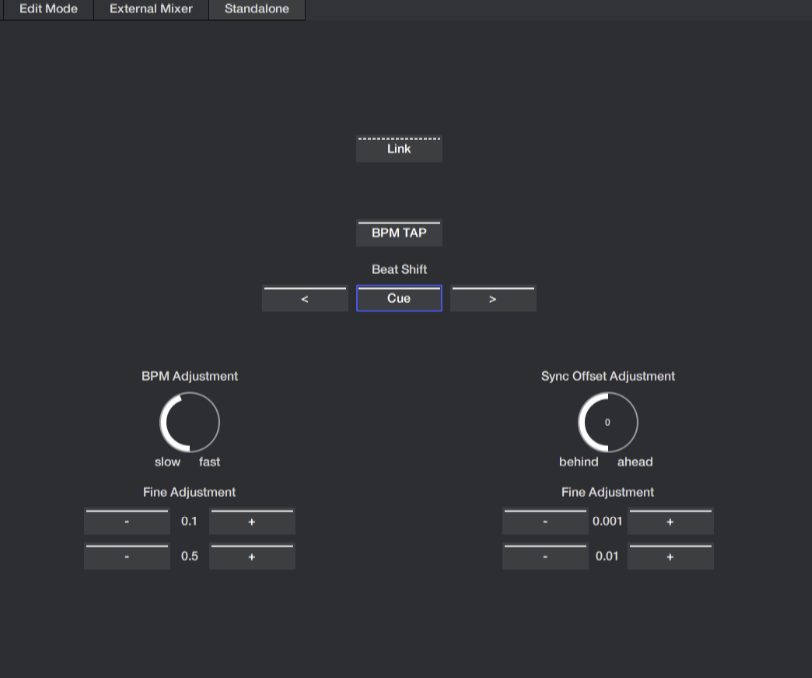
@djrynoevents yes, but a slight correction. I really meant pressing the Cue in Soundswitch’s standalone mode, which can be mapped to midi controllers. When using autoloops, the cue button brings the autoloop back to the beginning, so when the autoloop and the music are off sync, I would for example press cue on the one beat of a song’s chorus to sync it back up.
I do not have a control one, so I just now checked and it doesn’t look like it has a Cue button, so I don’t know if it has another way to do this or not, maybe with the shift button. Below is a screenshot in Soundswitch in standalone mode, it’s the cue button under beat shift.
Thanks @djmikelujan
Thanks @djmikelujan
This orginal post was made in 2021.. jeez come on developers, figure something out! Or at least respond and say, “we won’t ever do it” 
Thanks for sharing your thoughts @djrynoevents.
@Slak_Jaw sure.. just wish someone would come out and say “we are trying to” or “we don’t plan to integrate”
no news is good news sometimes but to have no official statement is wild
@djrynoevents our dev team hasn’t made a definitive decision either way regarding this suggestion. As you can imagine, we get a LOT of user suggestions and consider them all carefully. Please refer to the linked topic below for more on how we manage these. I hope that helps!
@Slak_Jaw oh I can understand the amount of ideas that must come but with other platforms offering this, and this actual post being created in 2021 is wild, why can’t there be some sort of statement made. I know vote clicks matter but this isn’t just some small feature, it’s THE tool we all need who run lighting
I’ve shared your comments with our devs to see if they can provide you with a Yes or No answer…
That would be great, when I have a paid gig with my “massive” lightning stuff I’m forced to use Serato just because of the native SoundSwitch integration, please consider to have a Yes or No Answer
Thanks for the input