NOTE: Please use the search function above before posting to avoid creating duplicate topics.
Device model (e.g. 2020 iPad Air 4th Gen): Mac Mini M4
Version of djay (e.g. 5.1.2): Pro 5.6.5
YOUR QUESTION:
Coming from Serato. My external USB library is structured in the following manner:
ROOT >
ALBUM ARTIST 1
ALBUM TITLE 1
SONG 1
SONG 2
ALBUM TITLE 2
SONG 1
SONG 2
ALBUM ARTIST 2
ALBUM TITLE 1
SONG 1
SONG 2
ALBUM TITLE 2
SONG 1
SONG 2
And so on.
Is there a way to import to my library the ROOT DIRECTORY structure above without having to create a Playlist for each individual album and artist? And also, can I point my USB ROOT to this directory when connected to my iPad without having to create new Playlists?
I don’t use CRATES or PLAYLISTS.
I see the files in the MY COLLECTION folder, but when I right click and say add to USB LIBRARY, it creates a duplicate copy.
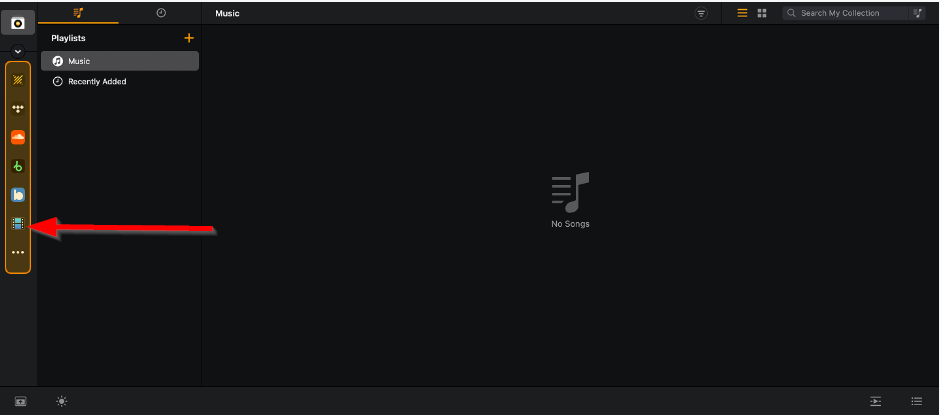
Hi @alf_ie, sorry for the delayed reply - I must have missed this one the other day. Actually, you don’t need playlists at all for this. The My Files source should achieve what you’re after. It’s a direct folder browser that gives you access to your drives exactly as they’re laid out on disk, completely separate from My Collection. Here’s how to point it at your USB root on Mac:
Your folder hierarchy (Artist → Album → Song) should then be navigable directly from that panel and you can load tracks straight into a deck from there — no collection setup, no playlists required.
On the “Add to USB Library” / duplicate issue: you can skip that step entirely for your goal. Add to USB Library is part of djay’s OneLibrary feature, which is a separate workflow for building a portable djay library with djay metadata baked in — cue points, BPM analysis, beatgrids, waveform data. It’s not the right tool for simply browsing files that are already on the USB. The duplicate you’re seeing is almost certainly a result of mixing those two workflows. Sticking to My Files sidesteps it completely. Here’s more info on OneLibrary if you’re interested though: OneLibrary | Algoriddim Support
Hello! It’s been a week since my last reply. I’m going to consider this topic completed for now so I can focus on others. However, please feel free to respond and we can definitely revisit this. Thanks!