Thank you for your reply.
Sorry, My bad english seems to be misleading.
My post is different from this thread.
I posted a problem with sync when using the same song on deck1 and deck2.
Thank you for your reply.
Sorry, My bad english seems to be misleading.
My post is different from this thread.
I posted a problem with sync when using the same song on deck1 and deck2.
Just posting to keep this thread alive…
This would be so easy to implement and would be such a huge QOL improvement. It’s hard to understand how its still not there. I love djay but it’s super sad how there are months and months of non-updates and it’s big time frustrating. Please listen to the votes of the community and prioritize stuff like this!
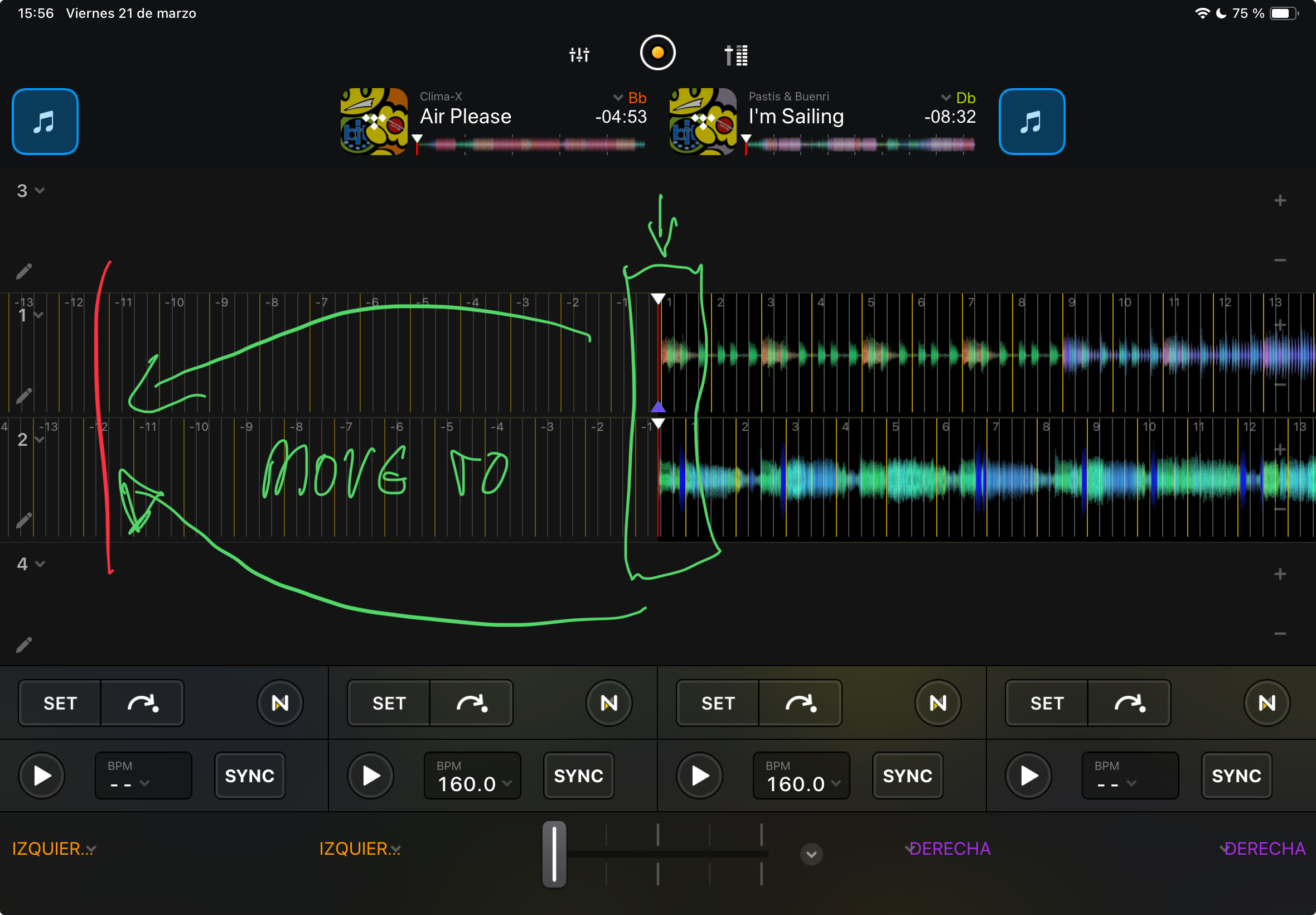
Podríais desplazar la barra de visualización de onda a la izquierda para tener mejor lectura y poder tener más tiempo para la mezcla
Gracias
@Ernesto_Kta there is already a thread for this suggestion. Please cast your vote for this feature there:
@Ernesto_Kta I have merged your thread with this existing one. Thanks.
Option to adjust playhead position (the red bar in the middle of waveform), so the more (or less) of the upcoming waveform is visible.
For me, I want to see the waveform ahead and do not care that much about the waveform that passed, so around 20/80% (past/future) would be ideal for me instead of fixed 50/50.
Hi @dinomaskot, I’ve merged your new topic with this existing one. Please recast your vote here. Thanks!
This is a must have, I am surprised that it is still not implemented after all this time.
Hi @Chapalo, welcome to the Community! Thanks for the feedback.
When you play, you’ll be able to move the red line at the beginning of the song back or zoom in further to see the entire track.
Hi @Maertinedeejay, welcome to the Community! Could you please rephrase your question? I’m afraid I don’t understand what you are asking. Perhaps you can share some screenshots to help clarify things?
Also, when creating new topics, please do not forget to answer the questions in our template with specific details about your setup not just “iPad” or “Latest Version”. This helps all of our community moderators to provide the most effective support to users with the utmost efficiency. Thanks!
Device Model (ex. 2020 iPad Air 4th Gen):
Version of operating system (ex. iOS 17.3.1):
Version of djay (ex. 5.1.3):
Hardware/controllers used (ex. Reloop Ready):
Hardware Firmware Version (ex. 2.7):
Hello, thank you for your attention. It is difficult for me to explain myself because I do not speak English. I need to use a translator.
My question is regarding the red line at the beginning of the song, whether it would be possible to move it to the left side to see a larger section of the track.
I use DJ Pro on iPad with an Reloop Mixon 8 controller.
iPad Air 5 gen
iPad os 18.3.1
Djay pro 5.2.9
Reloop mixon 8
Reloop buddy
Thank you @Maertinedeejay, that explains things perfectly! I have merged your new topic with this existing Suggestion topic. This is not currently possible in djay, but you can use the blue Vote button at the top left of this page to show your support for adding this feature. Thanks!
Really need this feature.
Hi @contium, welcome to the Community! Thanks for the feedback.
NOTE: Please use the search function above before posting to avoid creating duplicate topics.
YOUR SUGGESTION:
This gets better if the crossover point is moved left. Anyone else think this is a good Idea?
Best Regards.
DJ Larsa, Stockholm, Sweden
djlarsa@slipstream.se
i think this topic already exists on the forum.