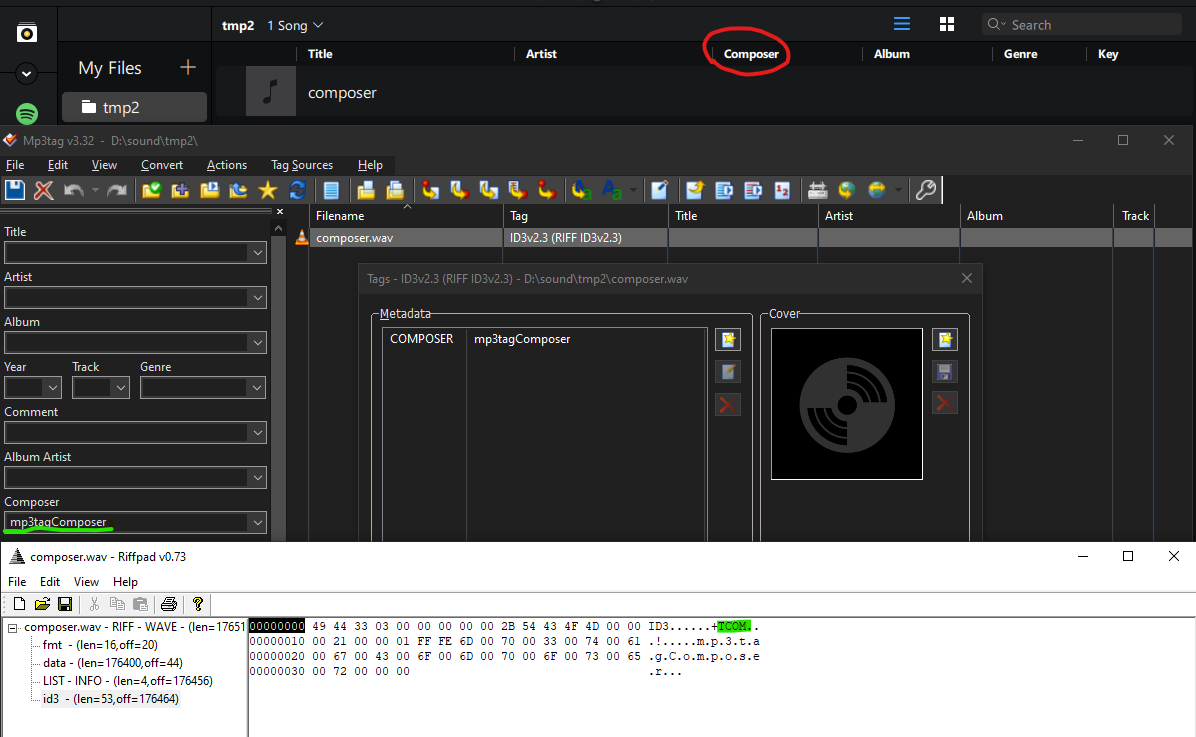
In my case, djay Pro 5.6 correctly reads the artist from the TPE1 frame (the standard artist frame), but the “Composer” column does not display properly. TCOM frame is not recognized.
Here is another test file. It includes every possible tag available through Mp3tag’s extended tags dialog—around 70 frames total. File uses ID3v2.3 with UTF-16LE text encoding (default mode of mp3tag after installation). Still no value in “Composer” column.
(Windows 10, mp3tag 3.32)
Here is a test WAV file with only the “Composer” field filled in.
Hi @TheSilverStreak, sorry for the delayed reply on this one. Our engineering team was able to reproduce this issue and they’re investigating further. I’ll share more updates when I have them. Thanks!
Thanks very much. I should add that I’m having (what may be) a related problem in djay Pro. In working with files, including mp3 files, often, but not always, when I edit the meta tags, always wih djay Pro closed, once I re-start djay Pro, my previously completed file analysis, as well as all my hot cues, are gone. I have duplicated this using Windows’ File Explorer, Mp3Tag and Foobar2000 (to edit the meta tags).
Hi @TheSilverStreak, engineering has identified the issue and is working on a fix which should be included in an upcoming update (likely 5.6.2). Thanks!