NOTE: Please use the search function above before posting to avoid creating duplicate topics.
- Device model (e.g. 2020 iPad Air 4th Gen): Thinkpad T14 gen 2, I5-1245u, 16 GB ram
- Version of operating system (e.g. macOS 14.4.1): Win11
- Version of djay (e.g. 5.1.2): 5.6.1
- Hardware/controllers used (e.g. Reloop Mixon 8 Pro):none
- Hardware firmware version (e.g. 1.0.1): n/a
- Please consider sharing a short video or screenshots to help clarify your issue
A) SUMMARY OF ISSUE:
- audio goes silent while using Neural mix to blend 2 tracks.
B) DETAILED STEPS TO REPRODUCE:
-
Got one track playing.
-
Crossfader in middle.
-
Cut vocals on second track with Neuralmix.
-
Start second track (synced).
-
Audio goes silent. Display acts normally.
-
Stop second track and audio returns to normal.
C) EXPECTED RESULTS:
D) ACTUAL RESULTS:
Hi @nattyphysicist, thanks for the details about the issue and your setup - this is very helpful. Since this sounds repeatable, can you please capture and share a short video of the issue to help clarify what’s happening? Thanks!
Here is a video. Initially audio is cut out but tracks are still playing. I goto the cue point on track 2 and audio comes back for a moment. None of this happens within the first ~5 minutes of mixing.
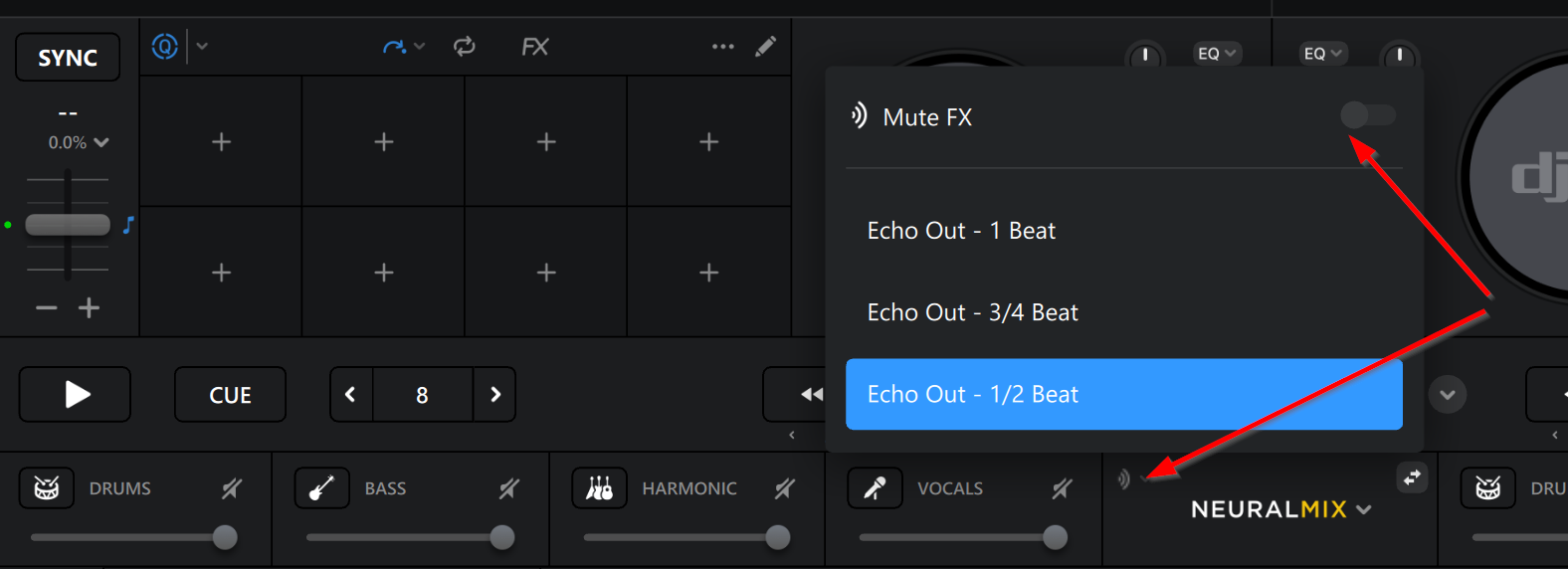
Thanks for the video @nattyphysicist. I was able to reproduce this on my Windows 10 laptop, but not consistently. I have passed this onto our engineering team for further review. In the meantime, can you please try disabling the Neural Mix Mute FX to see if that helps?
Hi again @nattyphysicist,
- I tried to reproduce this issue again today and it’s no longer happening on my Windows laptop.
- Can you please confirm what Neural Mix Quality setting you are using in the djay Settings>Advanced section?
- Can you please share another screen recording with the exact steps required to reproduce this issue (you can upload your video here directly instead of to your Google Drive)? I want to make sure we follow them precisely as the issues seem very intermittent. Thanks!
Hi @nattyphysicist, this should be addressed in the recently released 5.6.2 update. Thanks!
1 Like