


I really want to be able to use an automatic jump to another cue point or a saved loop in different part of a track after song reaches a cue point or a marker. Is there a way to do that? Could that be implemented?
1 Like
Thanks for the suggestion! Good idea. I have forwarded this to the dev team for consideration. In the meantime, please use the blue Vote button at the top left of this page so we can gauge user demand for this feature. Thanks!
3 Likes
This topic was automatically closed 30 days after the last reply. New replies are no longer allowed.
There was a similar request made in the past:
Hi team,
First off—love the djay app! I often use it to prepare playlists tailored for specific parties and events, and the Automix feature is a big part of my workflow.
However, I’d love to see more advanced control over how Automix behaves, particularly when working with cue points. Right now, we’re limited to setting Automix start and end times based on fixed time values, but that doesn’t always reflect the natural flow or energy of a track.
My suggestion:
Rather than defining “Start Automix” (SaM) and “End Automix” (EaM) as separate time markers, allow users to assign SaM and EaM roles directly to existing cue points. This could unlock more creative transitions and allow for intentional skips within a track.
Possible modes:
- A) QP1 (SaM) → QP2 … [skip part of track] … QP3 → QP4 (EaM)
- B) QP5 (SaM) → QP6 (EaM)
- C) QP7 (SaM) → QP8 (EaM)
- Or simply: “Don’t follow cue point for Automix”
This would let us:
- Avoid less impactful parts of a song
- Rejoin a track at a more suitable moment
- Make Automix transitions smarter and more performance-like
I think this could be a powerful feature for DJs who prep and automate their sets with detail.
Thanks for considering!
Thanks for the additional feedback. Interesting ideas @Fermioncool. I will share this with the devs.
Hello @Fermioncool ,
I hope I’m not misunderstanding your quote.
“ Right now, we’re limited to setting Automix start and end times based on fixed time values, but that doesn’t always reflect the natural flow or energy of a track.”
Start and End Cue points can be Set anywhere the user sets them.
Maybe i have to enable a setting, not sure, I could have overlooked this one.
But this is what i am thinking about:
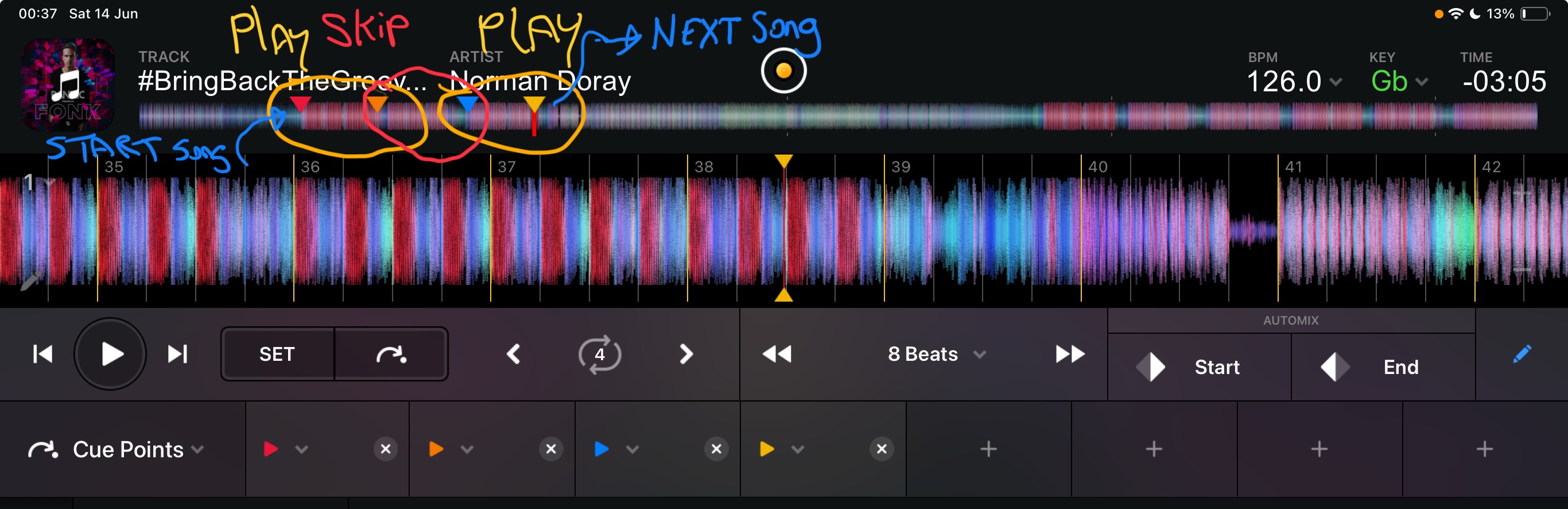
1 Like
Hey there @Fermioncool
Is this what you mean?
This an old video.
1 Like
Yes… thank you.
But i was hoping for this could be done automatically within a single deck and without preparing a second track. Within a track It starts at the 1st queu point, but it doesn’t stop at the 2nd queue point within the same track.
2 Likes


