Automix Queue issues - 5.6.2 & 5.6.10

  • Device model : Old iMac 2015 - But still works great
  • Version of operating system Monterey 12.7.6 - Because my Mac is old
  • Version of djay (e.g. 5.1.2): 5.6.2 (Overnight update just happened).
  • Hardware/controllers used : Not in use here
  • Hardware firmware version : NA
  • Source : Apple Music

A) SUMMARY OF ISSUE:

  • Automix gets often lost since release of 5.6.2 - Especially when the source is the Queue

  • This is actually how I understood there had probably been a new version overnight. Immediately noticed unusual instability. Everything worked fine yesterday (5.6.1).

  • By “lost”, I mean : Instead of moving to next song… It will hang for a second or two, then restart at the top of the open playlist, although I was playing from the Queue. So, it is lost, doesn’t go to next song, hangs, then restarts at top of playlist (exiting the queue).

  • Then, if I stop Automix, try to restart from a song in the queue, I see the “active playlist of Automix” doesn’t stay on the queue. It sticks to the open playlist.

B) DETAILED STEPS TO REPRODUCE:

  1. Unfortunately, I cannot propose a repetable scenario right now (would take some time I do not have rn).

  2. It doesn’t happen every time. Sometimes it works for ten songs, or more. Then suddenly the problem will kick in. But then, once the problem is “activated”, it is staying. And I have to shut down Djay, and restart DJay. Until the next time. Already restarted about 10 times this morning in just 2 hours of preparation work.

  3. So, for now, I am aware that I may not providing enough consistent information for debugging. But I am already warning something is wrong.

  4. Note, I have a solid experience of Automix on Djay Pro. So I am sure it is not a misunderstanding, or wrong workflow on my side. Something is broken in Automix 5.6.2 (Something between Automix and the Queue). Or maybe it has something to do with the Apple Music connection.

  5. I must also clarify that this happens when I am working on my tracks in queue, meaning : tuning queue points, changing songs, etc… But anyway, all of this was working perfectly in 5.6.1 (yesterday).

PS : I am very happy with Djay. But this particular issue specific to 5.6.2 is very annoying. Needs a quick patch.
Hi @Davidv100, thanks for the detailed info. Since this sounds repeatable, can you please capture and share a short screen recording of the issue to help clarify what’s happening? Thanks!

Hello @Slak_Jaw ,

Here are a few screenshots.

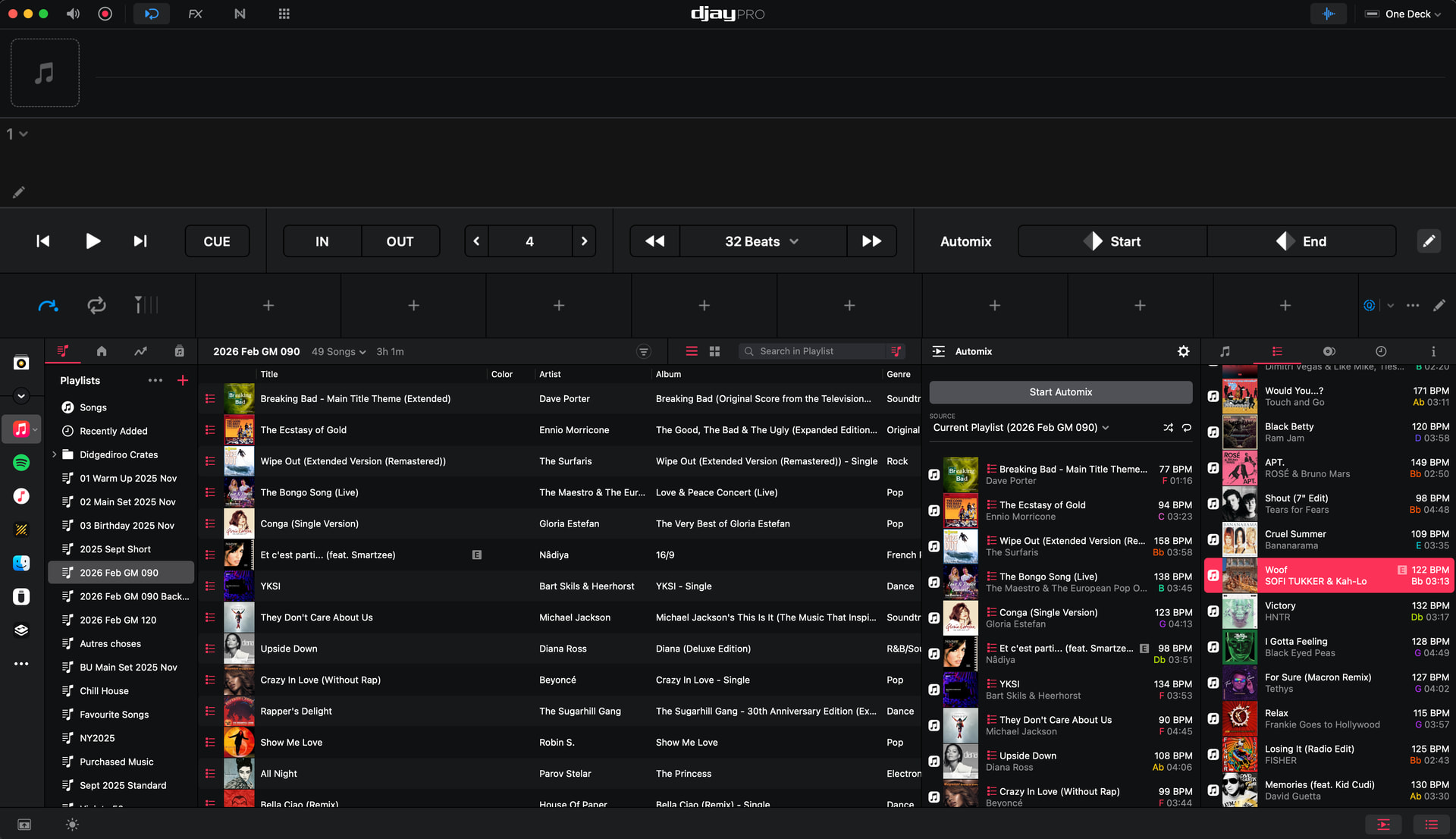
Step 1 : I Launch Djay Pro 5.6.2.
Everything is clean, nothing is playing.

Step 2 : I am on the queue, and from the queue, I double-click on a track (Woof).
Which is then loaded and playing on deck 1.

Step 3, now I want to start Automix.
In Djay Pro 5.6.1, Automix automatically understands that current playlist is “Queue” and would load the Automix Queue starting with the current song in the Queue.

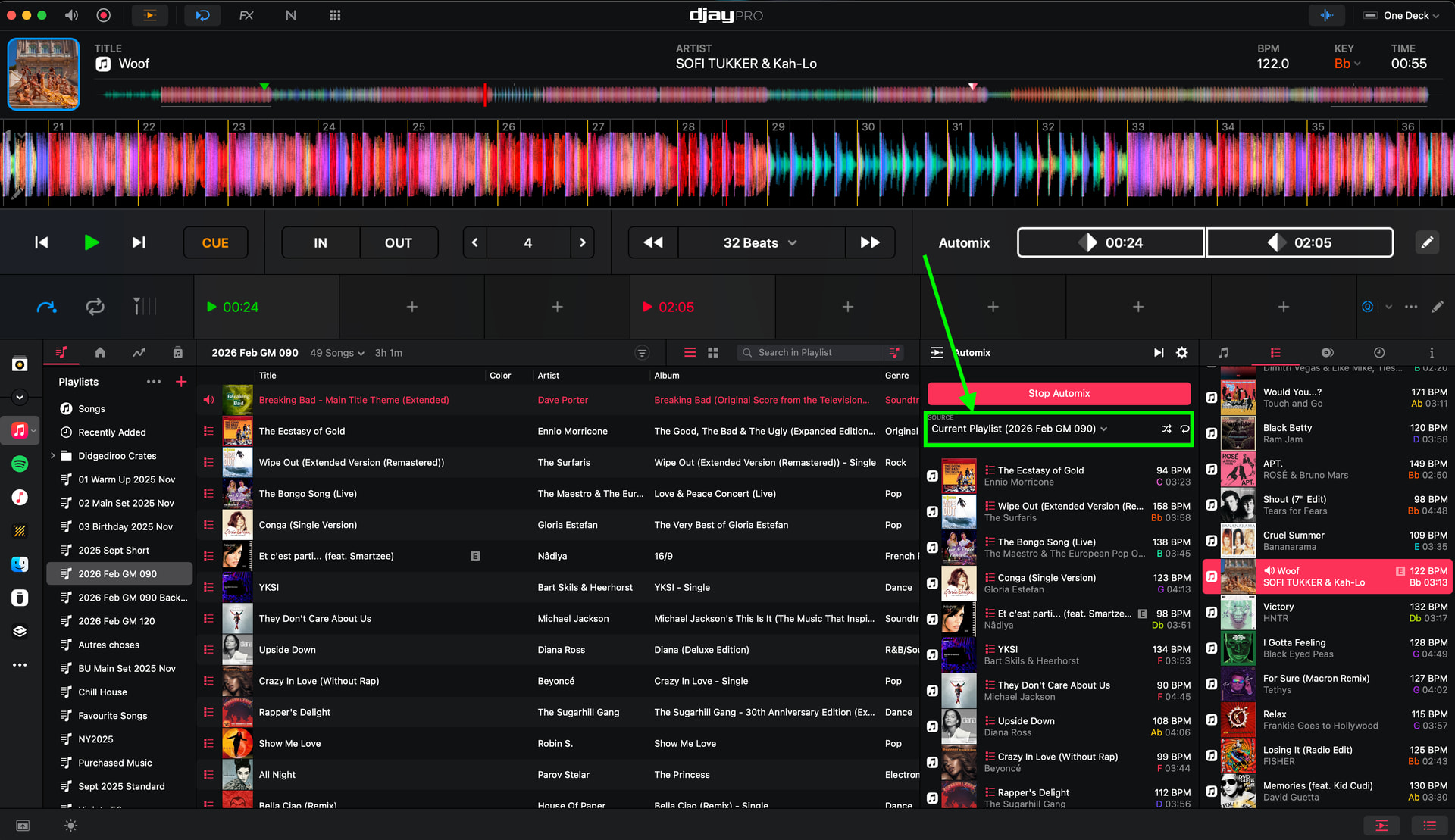
But 5.6.2 fails to do this, when launching Automix, Automix will indeed switch “Current Playlist” to “Queue”, for about just half a second (just enough to see it is indeed trying to do the right thing). Then goes back to the open playlist (Here “2026 Feb GM”).
See green box below.

So, in the picture above, this is wrong, current playlist should be “Queue”.

By changing songs in the Queue, and toggling Automix on and off several times, is would end up finally understanding that current Playlist is the “Queue”. But this would only last a few songs. As soon as I do some other Automix Start/Stop, the problem will come back, and Automix will go back to the head of the open Playlist.

And at some point it will never go back to the queue, and I have to close and restart Djay Pro.

So, it is super instable, and honestly, totally impossible to work with, without a high risk of throwing the computer to the wall.

I am absolutely sure this is a 5.6.2 issue, as my workflow has always been this way…
And when something you have done 1000 times (including the two days before release of 5.6.2) suddenly doesn’t work overnight anymore, there is something wrong.

Thanks for the screenshots and additional info @Davidv100 - this is very helpful. I was able to reproduce this on my Mac, but I’ve never used the Queue for Automix on previous versions, so I cannot confirm if this used to work before or not. As far as I know, Automix using the Queue is not currently supported on macOS. Do you also have an iOS device? I know that Automix with the Queue is a selectable Automix option on iOS. Anyway, I have have passed this onto our engineering team for further review and comment. I’ll report back when I have more news. Thanks!

Hello @Slak_Jaw ,

The Automix & Queue relationship is indeed different on MacOS vs IOS.
I actually complained about this a year ago (the MacOS way being the best one, so why is the IOS version different).

But it was no big deal for me as I use

  • Djay Pro on Mac OS to prepare DJ-Sets (using the Queue as working environment).
  • Djay Pro on IOS to play the set (My Set has become a playlist at this stage).

But I am 100% sure this worked perfectly on Mac OS in 5.6.1.
It is easy to see it is a bug, as you see Djay 5.6.2 trying to stay on the Queue for half a second, then surrendering and switch to the head of open playlist. Not Djay Pro standard behaviour.

Thanks for the additional info @Davidv100.

Hi again @Davidv100, our engineering team was able to reproduce this issue and they’re investigating further. I’ll share more news here when I have it. Thanks!

Hi @Davidv100, 5.6.4 was released today and should address this issue. Please update and confirm. Thanks!

Hi @Slak_Jaw ,

I just checked and I confirm it has been solved.
Nice !
Thank you very much.

You’re welcome @Davidv100. That’s great news. Thanks for the follow up!

Hi @Slak_Jaw ,
This issue had been solved - but it is back in 5.6.10 (Using MacOS 27 - Golden Gate).
Automix doesn’t want to stay on the Queue, and goes back to playlist.
Then with a bit of back and forth, it finally understands it must stay on the queue, but then there are some issues with the next songs in Automix.

It is exactly the same issue as exposed above.

Super annoying tbh.
Especially because it had been fixed !..

Note : I unchecked “Solved”.
The title should be updated to 5.6.10 in order to keep history (I cannot do it myself as you created the title).

Thanks for letting me know @Davidv100. Sorry to hear this issue has returned. I’ve added 5.6.10 to the topic title and reopened it.

  1. What is the full version number of your macOS?
  2. Is it a beta version?
  3. If you can catch this on a short screen recording that would also be great.

@Slak_Jaw , my MacOs version is the public 27.0.1 version, no beta.
About sending screenshots, or videos, please no.
It is EXACTLY the same problem coming back, and largely described above with full pics.

The same material that led Algorddim so say “Ok we can reproduce it, we will fix it”.
And it had indeed been fixed.

Exactly the same. Someone did a wrong copy-paste between versions, or a bad fork, and it is back.

If you try to use AutoMix on the Queue (last panel right), you will immediately find yourself in the middle of a very obvious total mess. Such a mess that at some point you will have to quit and restart.

Thanks

Hi again @Davidv100, engineering was able to reproduce this on 5.6.10 and they are investigating further.

Thank you @Slak_Jaw .

A word of explanation : I do mix live most of the time, but I find Automix an incredibly useful tool while building/prepping sets - It is a good way to have a first sorting and feeling what goes together - and where to insert bangers. And when building the set, I use Main Queue + Automix Queue (hence the bug detection above).

I think Automix deserves a bit more love : an interesting live tool, but also a very good preparation tool : not just a beginner (or bar music) tool.
Once the rush is over with all more urgent requests (including the famous top three), I will come with more suggestions I have asked before and I really think would be useful, like an Automix timer : showing total time, based on “In” and “Out” AutoMix points. Something I am currently doing in Excel (a bit tedious and stupid).

Thank you again.

You’re welcome. Thanks for the additional input.