NOTE: Please use the search function above before posting to avoid creating duplicate topics.
- Device model (e.g. 2020 iPad Air 4th Gen):
- Version of operating system (e.g. macOS 14.4.1):
- Version of djay (e.g. 5.1.2):
- Hardware/controllers used (e.g. Reloop Mixon 8 Pro):
- Hardware firmware version (e.g. 1.0.1):
- Please consider sharing a short video or screenshots to help clarify your question
YOUR QUESTION:
- I’m a working DJ running DJay Pro on a Macbook Pro. Love this thing but I have 1 big issue: I can’t seem to force the app to just play a list WITHOUT effects, mixing, ducking or adding a break. Sometimes I play 2 tracks from a live concert. I want DJay Pro to play them back to back seamlessly, without Automix ai or anything. Just start the next deck at the end of the current track. Is there something I’m missing? What’s the trick?
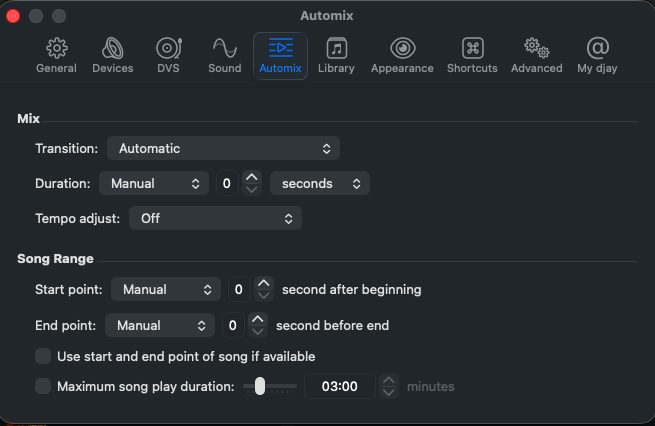
Automix settings to play tracks back-to-back.
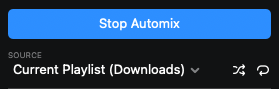
Turn OFF Automix Shuffle and Repeat
1 Like
Thanks. I’ve had it set up basically like this. This is so close but it still inserts a fraction of a second of silence. I want it to play seamlessly like a simple music player. Apple Music runs track to track with no audible break. I wish there was a button in the Two Decks layout that just allowed auto switch to next deck. Going to Automix and then hitting Automix loads a different track into the second deck. (No clue why) Too much fiddly juggling when I’m mixing on the fly.
A good example song into song transition is any live Grateful Dead version of Scarlet Begonias into Fire on the Mountain. (If you need a tester to hear what I’m talking about.) They do a lot of live song transitions and that shift needs to be seamless. There’s basically no way to do that in DJay Pro
Maybe a ‘trigger’ option where you set up a trigger point near the end of the song, then activate the ‘trigger’ button and it automatically goes to the other deck. When you dont want the trigger option, just turn the button off (like sync).
Yes, try setting the Endpoint in Automix settings to Manual between 1-5 seconds, see if that works.
Good suggestions @Michael_Wisniewski and @David_Bielby. I can’t think of anything else to recommend.
Sounds like I’m just going to have to play seamless live tracks on another music player. Shaving beats out of the transition is not a solution. That’s too bad. Still love me some DJay Pro, but for this, I need simple seamless playthrough. Thanks for the suggestions, everybody.
You’re welcome. Thanks for the feedback