I get the same on my IPhone 16 pro max definitely a bug
Hello, I have an iPhone 16 Pro Max running iOS 26. DJay was working perfectly on the older version, but since I updated to this latest version, I’m only getting a grey background when I launch it. I can’t see the decks or the layout. I’ve tried uninstalling and reinstalling DJay without any luck. Any help you can offer would be greatly appreciated. Thanks
Hi @evansphil, welcome to the Community! Thanks for the details about your setup and the issue - this is very helpful! Thanks for the info as well @Den, I’ve merged your comment from the other topic here as well.
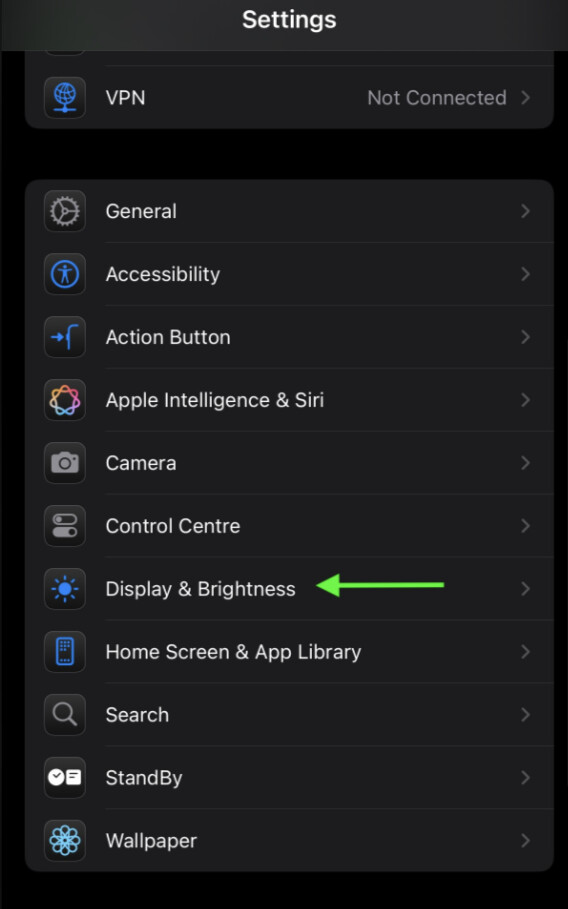
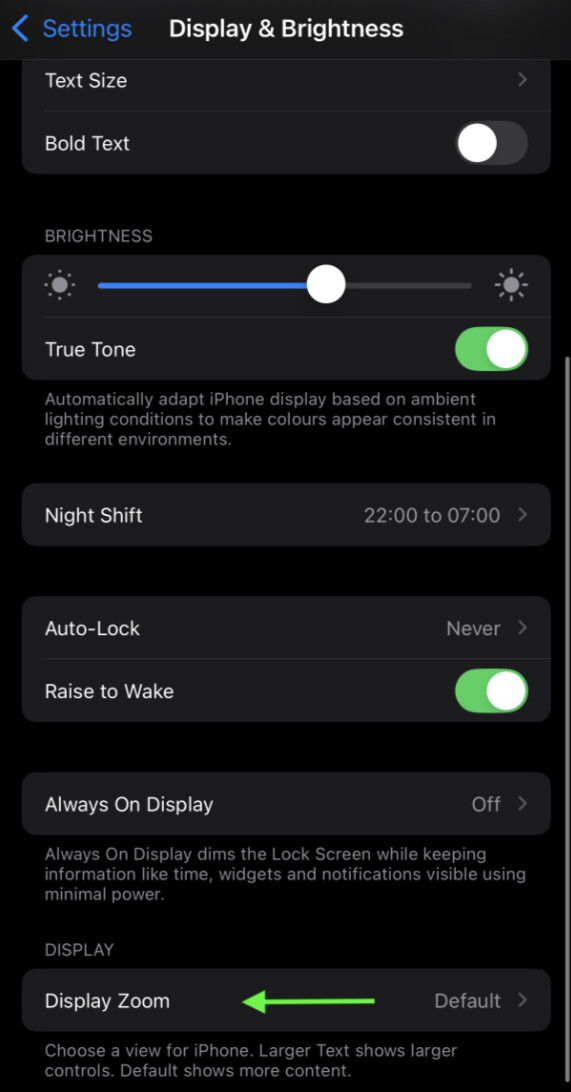
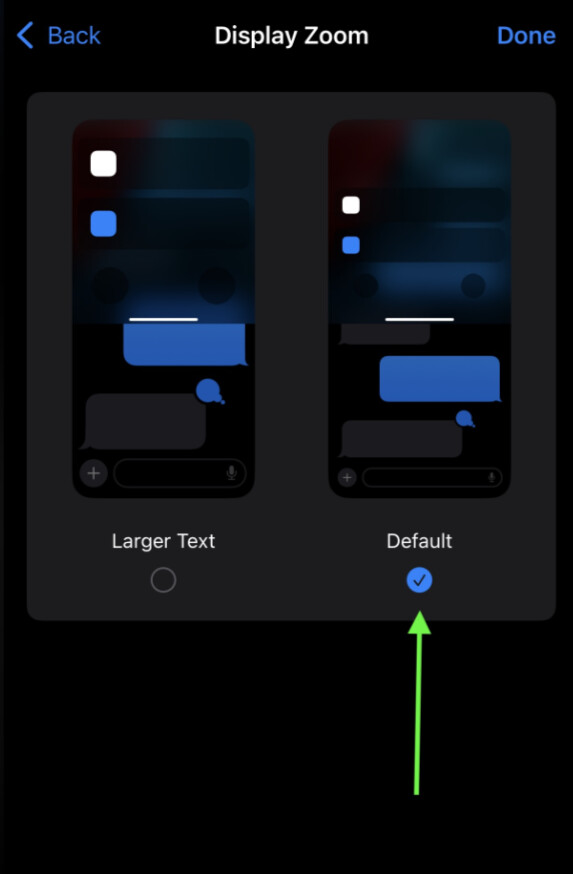
We’ve identified that this may be related to the system setting Display → Zoom → Larger Text.
Please confirm if you have this setting enabled.
If so, please trying switching it back to Default and let us know if that resolves the issue.
We’re working on a permanent fix, but in the meantime it would be very helpful to confirm whether this workaround solves the problem. Thanks!
When I open DJay Pro on my iPhone 16 pro max running iOS 26.1, all I am getting is a plain gray screen. It is working fine on my iPad running iPadOd 26.1
NOTE: Please use the search function above before posting to avoid creating duplicate topics.
Device model (e.g. 2020 iPad Air 4th Gen):
Version of operating system (e.g. macOS 14.4.1):
Version of djay (e.g. 5.1.2):
Hardware/controllers used (e.g. Reloop Mixon 8 Pro):
Hi @Kevin_Starr, welcome to the Community! Please use search before creating new topics. I have merged your new topic with this existing one. This is a known issue that our team is working on. Please see above for a potential workaround. Thanks!
I recently updated to iOS 26 on my iPhone 17 Pro, and now djay has become unusable.
After launch, the app loads to a black screen and the UI is gone.
Sometimes I can bash around on the black screen and get the “select playlist” screen to load, then once selected it disappears and it plays music but the screen is black. Once that happens can still control music playback via the lock screen, but the UI is completely gone.
At first it would display the upcoming songs and not the current track, but not anymore.
I’ve tried:
Reinstalling the app
Offloading and reinstalling
Not connecting it to Apple Music
Turning off background refresh, streaming integrations, notifications
No external hardware is connected
It worked briefly after updating to iOS 26, then gradually got worse — now it’s completely black on open.
Any ideas? Anyone else seeing this?
I’ve emailed support too, but wanted to flag it here in case others are having the same issue or found a workaround.
Same her with iOS26 and iphone 16Pro Max. The screen is just grey but by clicking into the invisible menu items it’s possible to pull up the settings, song selection etc.
no problem on iPad.
Hi @BruceTheDJ and @durchland, welcome to the Community! I suspect your issues are related to this existing one so I’ve merged them here. Please try the workaround that I shared above and let me know if that helps. Thanks!