NOTE: Please use the search function above before posting to avoid creating duplicate topics.
- Device model (e.g. 2020 iPad Air 4th Gen): Apple M2 Pro
- Version of operating system (e.g. macOS 14.4.1): mac OS 13.6.7
- Version of djay (e.g. 5.1.2): 5.6.5
- Hardware/controllers used (e.g. Reloop Mixon 8 Pro): None
- Hardware firmware version (e.g. 1.0.1):
- Please consider sharing a short video or screenshots to help clarify your issue
A) SUMMARY OF ISSUE:
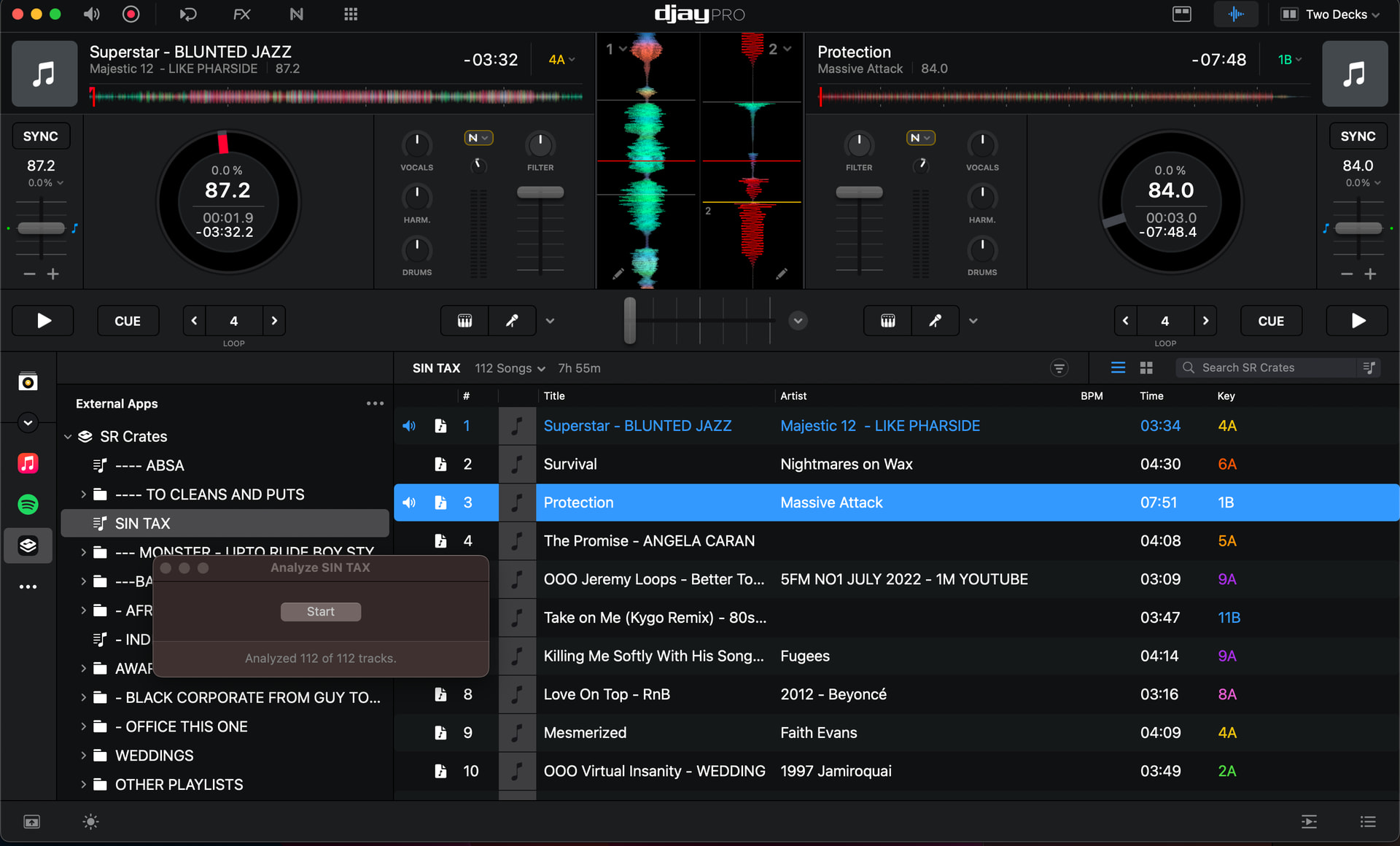
- BPMs are not displayed in the BPM column in the library although all my songs are guaranteed 100% analysed., also my DJay pro cue points are not there on my tracks.
B) DETAILED STEPS TO REPRODUCE:
- Re installed a fresh copy of DJay Pro
C) EXPECTED RESULTS:
- Bpms to display in library
D) ACTUAL RESULTS:
Thanks for the detailed info and screenshot @DJRedwood. We were able to reproduce this internally and I have passed this onto our engineering team for further review. I’ll share more news when I have it. Thanks!
Hi Slak,
Thank you. I have a string of events coming up, although I can and will play as it is, I will feel far more confident if I could see my bpms in the library view.
Hope to have a solution soon.
Many thanks.
DJ Redwood
You’re welcome @DJRedwood. Do the BPMs populate if you reanalyze the songs?
Please note, there are three ways to analyze tracks:
- Loading them on a deck.
- Selecting “Analyze” on a playlist.
- Selecting one or multiple tracks and then “Analyze” (using Right/Control-Click on macOS, or track selection mode on iOS)
For options 1 and 2 the track is not analyzed again if it has been previously analyzed. Option 3 will re-analyze the track and overwrite existing information like Key and BPM.
No absolutely not. Nothing populates the bpm in the library. This is my main problem. Also I noticed my cue points have disappeared.
Red Wood
0844001076
I spent 6 hours trying everything from restoring the Time Machine backups for all relevant DJay folders, removing the app with cleanmymac then reinstalling from the App Store, and also restoring the app from the Time Machine, re analyzing the folders over and over, nothing. My DJay pro is broken , and nothing I try will fix it. I sat with Caude AI asking its advice with coding in my terminal, we tried multiple things. Nothing works. Gigs are looming.
Okay, thanks for the additional info @DJRedwood. I have passed this onto our engineers for further review. I’ll report back when I hear back.
This is what claude told me to tell you ‘djay Pro on macOS Ventura 13.6.7. After complete uninstall via CleanMyMac and fresh reinstall, BPM analysis runs but never populates in the library column. BPM shows correctly on deck when track loads. This affects all tracks across all Serato crates. Over 15,000 tracks affected.’
Device: MacBook Pro, macOS Ventura 13.6.7 (22G720), M-series chip
App: djay Pro (com.algoriddim.djay-iphone-free) from Mac App Store
Problem: BPM analysis runs successfully but BPM values never populate in the library column. BPM displays correctly on deck when track loads. Affects all 15,000+ tracks across all Serato crates.
Diagnostic findings:
-
Main database location: ~/Music/djay/djay Media Library.djayMediaLibrary/MediaLibrary.db
-
Database integrity check: PASSED (PRAGMA integrity_check returns ok)
-
BPM records in database: 15,076 in secondaryIndex_mediaItemAnalyzedDataIndex
-
When tracks are re-analysed, nothing is written to the database — file system monitoring confirmed no files change during analysis
-
BPM data exists in database but djay is not reading it into the library display layer
-
Problem persists after complete uninstall via CleanMyMac and fresh reinstall
-
Problem persists after full system rollback via Time Machine
-
Controller: Pioneer DDJ REV1
Thanks for the additional info @DJRedwood
Hi again @DJRedwood, can you please upload your ~/Music/_Serato_ folder and your djay Media Library database file to your Google Drive/Dropbox, enable sharing permissions, then share a link to them here or send them to me in a DM? On macOS it can be found in ~/Music>djay. Thanks!
Hi, it turns out that as soon as I removed the Djay folder from backing up to Google drive, it works again. All back to normal.
Good to hear @DJRedwood. Thanks for the follow up.
Hi again @DJRedwood, our engineering team is following up on this one. Can you please confirm what exactly you did for the “fresh install”? In particular, did you delete the djayMediaLibrary file in ~/Music/djay?