NOTE: Please use the search function above before posting to avoid creating duplicate topics.
Device model MacBook Pro M2
Version of operating system MacOS 2026
Version of djay 5.6.2
Hardware/controllers used Rane Performer
Hardware firmware version (e.g. 1.0.1):
Please consider sharing a short video or screenshots to help clarify your question
YOUR QUESTION:
Is there any way to streamline or avoid this process altogether?
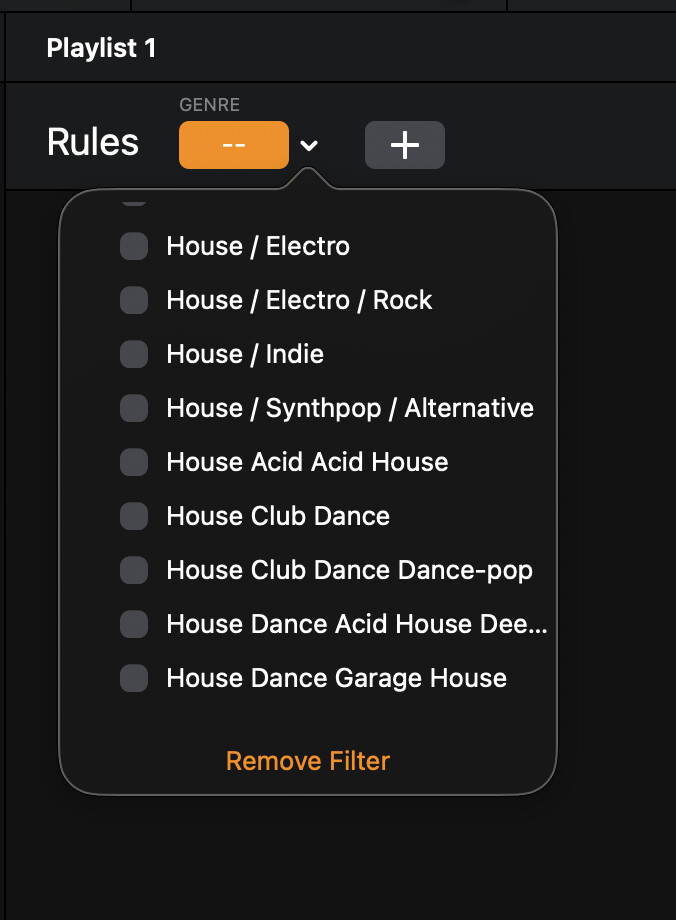
I download my music from record pools, and the files already include detailed genre metadata. The challenge with the current filter is that it displays every genre tag in the library, creating an extensive, unstructured list that requires excessive scrolling.
I’ve consistently found the genre and subgenre classifications provided by record pools to be highly effective when building smart playlists, particularly because I can apply conditional filters such as “contains” to refine results with precision. Unfortunately, djay does not appear to offer comparable functionality. Without flexible filtering options, the system becomes difficult to manage—especially when genres are not organized in a consistent or logical sequence.
For example, my library may include tags such as:
House / Electro House / Dance House
House / Dance / Electro
House / Electro House / Indie—and the endless variations continue from there.
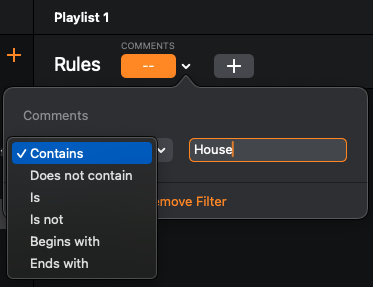
Introducing a dropdown menu that allows users to select conditional parameters such as “contains” or “is” would significantly improve workflow efficiency and overall usability.
Filtering Genre using a “Contains” is a good idea, but, I want to keep the option to select from a Genre List (constructed from the data). Hopefully, Algoriddim can give us both options.
A simple solution, duplicate Genre to → Comments or Grouping, those columns can be searched with a “Contains”.
Notes: Many people put the top-level genre in Genre (e.g. House) and then put sub-genres in Comments or Grouping. For example, tags like this:
Genre | Comments
House | Electro/Rock
House | Indie
House | Acid/Alternative
House | Club Dance
This Lets You:
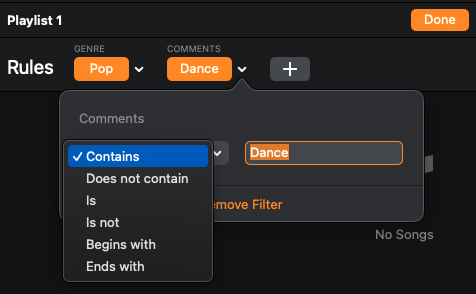
Make a playlist for a Genre, and use regular Search (set to “Search in Playlist”). Probably the fastest and most direct way to filter.
Alternatively, make a playlist for a Genre, with a second filter for Comments (using a “Contains”). Unfortunately, this 2nd option is fiddly. You have to go into “Edit” mode to change the filters.
NOTE: Please use the search function above before posting to avoid creating duplicate topics.
Please also consider sharing a short video or screenshots to help clarify your suggestion
YOUR SUGGESTION:
Hello, I’m writing because I find Serato’s smart playlists quite difficult to use. Would it be possible, instead of having a specific genre, to use a “contains” and second filter don’t contains option like Serato? Sometimes I want to create a playlist with all my “pop” music, and other times the genre might be “2000s International Pop,” but I could also create a “French Dance Pop” genre, or a playlist with all my French or international music. I hope you understand my request.
Hi @JulienScooby, welcome to the Community! Please use search before creating new topics. I have merged your new topic with this existing one. You can re-vote for this topic above. Thanks!
It would also be great if we have an option to select whether the list is case sensitive or not to avoid double genre listings.
For example, House vs house , Funk vs funk, ect…. upper and lower case are showing as two different genres and it’s very time consuming to update your naming constantly.