NOTE: Please use the search function above before posting to avoid creating duplicate topics.
- Device model: 2025 Mac Book Air 15”M4
- Version of operating system:Tahoe 26.2
- Version of djay: 5.6.4
- Hardware/controllers used: Rane Performer
- Hardware firmware version: 1.3.0.13 (displays: 1.3.0.1)
YOUR QUESTION:
Hi, I’m just switching over to Djay Pro with my Rane Performer and everything was working fine for the first couple of hours of initial testing and configuration
I noticed after about 2 hours of mixing, when the crossfader is all the way over to the left (deck 1)… I can hear deck 2 still playing
When I slide the crossfader fader over to deck 2, everything works fine
The bleed is only when the crossfader is all the way to the left
I rebooted my performer and Djay pro, but the problem still persists.
FYI: when my crossfader is all the way to the left, the channel 1 fader kills audio from channels 1&2 when lowered
Any help would be greatly appreciated Thanks🫡
I found the problem: I was messing with the “pre cueing” settings and selected “Rane PERFORMER” and the audio was being routed to the Deck 1 side of the crossfader. So the original problem has been resolved.
So then my question would be, how do I route the pre cueing function to my headphones coming out of the Rane PERFORMER?
I read the pre cueing link from previous threads and I’m a little confused as to how to get this working.
Thank you in advance. 
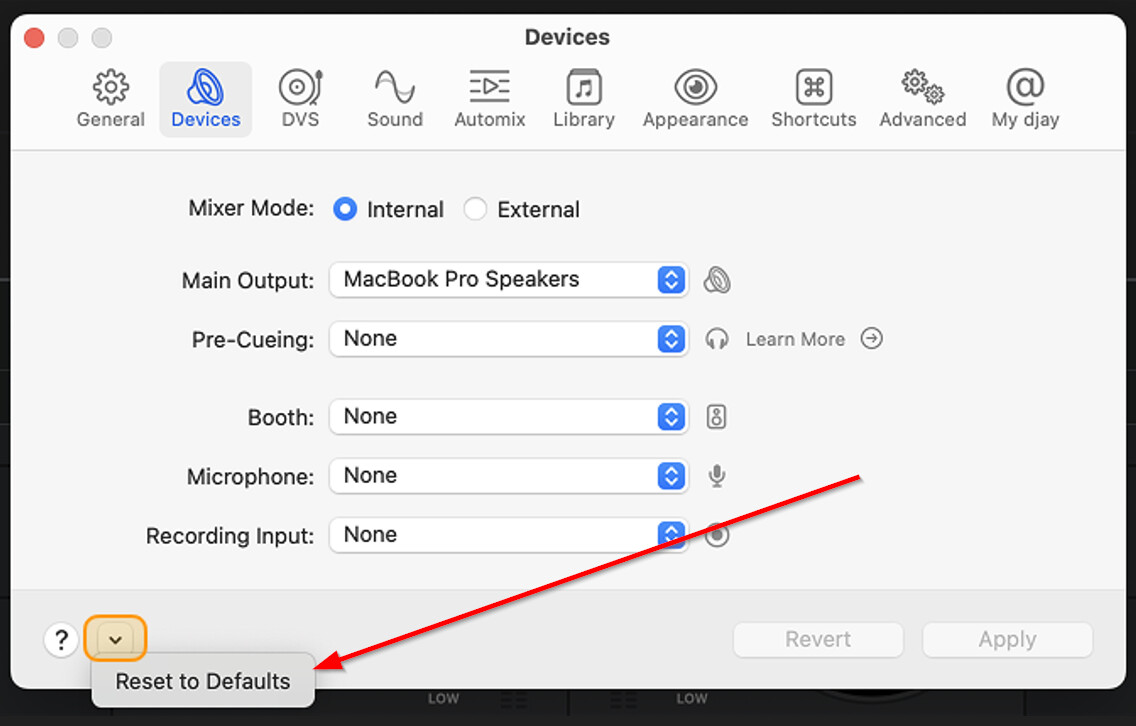
HI @DJRemixDetroit, glad to hear you sorted out the first issue. In the djay Settings>Devices page, please select the dropdown menu at the bottom left and select Reset to Defaults. This should configure out of the correct audio setting for the RANE Performer. Please note, the Performer is and External Mixer Mode ONLY device and should not be used in Internal Mode.
1 Like
Thank you for your response.
Is there any way I can route the pre cueing audio from the library section of Djay to my headphones while using the Rane Performer?
You’re welcome @DJRemixDetroit. Unfortunately, this is a limitation of the RANE Performer hardware. It doesn’t not provide a routing channel that djay can use for the Library Preview function.
Dang it! I was really looking forward to using that feature. But that’s ok.
I also have a DDJ Rev 1, DDJ FLX2, and a Rane One MK2…will the pre cueing function work with any of those?
The REV1 and FLX2 are Internal Mixer Mode devices so Library Preview in the headphones will work. The RANE One MKII is an External Mixer Mode device so I don’t thing the Library Preview works on it.
1 Like
Ok cool. I’ll give those a test run in the next few days.
Thanks for all the help and quick response @Slak_Jaw. Much appreciated!
1 Like
You’re welcome @DJRemixDetroit. Happy to help!
1 Like