Device model: MacBook Pro 14" (M4 Pro) / MacBook Air (M1)
Version of operating system: macOS Sequoia 15.7.9
Version of djay: 5.6.4
Hardware/controllers used: Pioneer DJM-S11 (and DJM-S7 for reference)
Hardware firmware version: 1.05
A) SUMMARY OF ISSUE:
I am transitioning from a Pioneer DJM-S7 to a Pioneer DJM-S11. On my DJM-S7, I had a custom MIDI mapping where I assigned the BACK button as a Controller Shift Key. This allowed me to hold BACK and turn the BROWSE knobs to adjust tempo, giving me 3 distinct control layers (primary functions, physical hardware Shift for Vocal Stems control, and BACK as a modifier for tempo).
On the DJM-S11, this exact same setup fails: mapping the BACK button to Controller Shift Key causes the modifier state to get permanently stuck ON after a single press/release, locking the software into the shift layer until restart.
B) DETAILED STEPS TO REPRODUCE:
Connect a Pioneer DJM-S11 (Firmware 1.05) to djay Pro v5.6.4 on macOS.
Open the MIDI Configuration tool and map the BACK button (Deck 1 or Deck 2) to action: Controller Shift Key.
Map a secondary action (e.g., Tempo adjust) to Controller Shift Key + BROWSE knob rotation. (Possibly this problem can occur with any other button mapped as a modifier, I did not check. Only checked back buttons on left\right decks)
Press and release the BACK button once.
Rotate the BROWSE knob or press any other control on the mixer.
C) EXPECTED RESULTS:
The BACK button should act as a momentary modifier (holding it down activates the secondary Controller Shift layer, and releasing it immediately restores normal control functions, just like it works on the DJM-S7).
D) ACTUAL RESULTS:
Pressing the BACK button once triggers the Controller Shift Key modifier, but it acts like a sticky one-way toggle instead of a hold function.
Even after releasing the physical BACK button, djay Pro continues to interpret every subsequent action on the mixer as Controller Shift Key + [Control].
The shift status remains locked/stuck ON. There are no settings within the MIDI Mapping editor to fix this behavior, and the only way to clear it is to restart djay Pro completely.
Hi @Akrilovy, thanks for the detailed info — this is very helpful.
There is a setting for this, it’s just easy to miss: in the MIDI Configuration window, select the BACK button’s mapping entry, open Advanced Options > Button mode, and set it to Hold. The three options are Default (performs the action when pressed), Toggle (alternates between two states with each press), and Hold (only active while the button is held down) — Hold is the momentary behaviour you’re describing from the DJM-S7.
Also worth confirming on the mixer side: when using the DJM-S11 as a controller for MIDI software other than Serato DJ Pro, you need to change that setting in the Utility menu, and power the unit off and back on after switching software. If the S11 is still in Serato mode, it may not be sending a matching note-off for BACK, which would leave the modifier latched exactly as you’re seeing.
Give those two a try and let me know if that helps!
I checked the mixer settings, but I couldn’t find anything related to Serato or a Serato/software mode setting. Could you point me to the exact menu path or share a screenshot? It looked to me like nothing relevant is present in mixer settings.
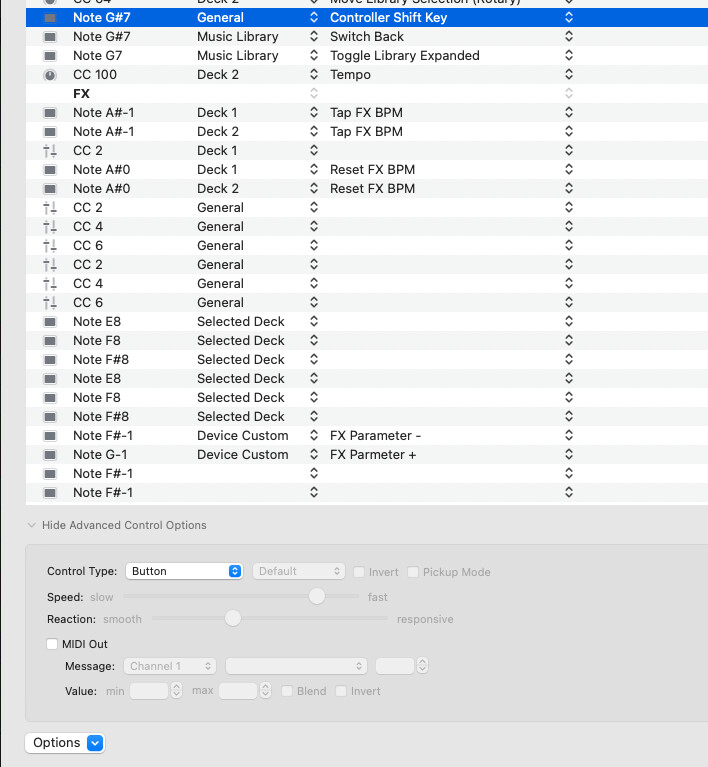
In the MIDI Configuration window, the BACK button mapping options are grayed out, including Advanced Options > Button mode, so I can’t change it to Hold. Please see the attached screenshot.
Hi @Akrilovy, apologies, I went back through the DJM-S11 Instruction Manual and you’re right: there’s no software-mode setting in the S11’s Utility menu. That line in Pioneer’s support article is boilerplate that also appears on the DJM-S9 and DDJ-S1 pages. So, there’s actually nothing to change on the mixer.
Better news from your screenshot. Pioneer’s official MIDI message list shows the BACK button sends Note 104 / G#7 with OFF = 0 and ON = 127 — so the mixer is correctly sending a release when you let go. That matches the Note G#7 in your mapping. I double check on my setup with and different controller and you’re right that Button mode is greyed out at Default for Controller Shift Key, so there’s no way to set it to Hold. I don’t have access to a DJM-S11 to check for myself so I’m passing this along to the hardware engineering team to see if they can reproduce it on their setup. Thanks for the clear screenshot — it made the difference.
One thing that would help narrow it down: Note G#7 is mapped twice in your configuration, to General > Controller Shift Key and to Music Library > Switch Back. Could you right-click the Switch Back entry, delete it, and test the shift layer on its own? Also, if you could look through you mapping for any other commands mapped to Note G#7 that would be great. Thanks!
that double mapping is actually not a mistake. First one is deck one button, and below is the same from deck two. For some reason they give same code, but different string in mapping. Maybe that’s also some sign of a problem btw.
Hi again @Akrilovy, that makes sense, and it checks out against Pioneer’s spec. Deck 1’s BACK and Deck 2’s BACK both send note 104 (G#7), but on different MIDI channels — channel 1 and channel 2 respectively. So they really are two separate controls; djay’s mapping list just shows the note name without the channel, which is why they look like duplicates. Nothing wrong on your end.
You can see the same pattern confirmed in your own screenshot: Note G7 (that’s BACK + SHIFT) appears only once, because Pioneer sends that one on a single global channel rather than per deck.
That said, your instinct is worth chasing. If djay is tracking the shift state by note number without accounting for the channel, those two entries could be stepping on each other — which would fit the one-way latch you’re seeing. So the test I mentioned is still a good one, just for a different reason than I first thought: temporarily delete the Deck 2 Switch Back entry, restart djay, and see whether the modifier still sticks. You can add it straight back either way.
Sorry for taking long time to try that out. I followed up with this, deleted one “back” button action completely, restarted application and mapped the other one as a “modifier”. Even I did restart the app after evert step of this. It still behaves the same. just pressing and releasing the button keeps the state locked. even the second (temporary unmaped) back key on the other deck is reporting (shift)+ state when pressed.
Hi @Akrilovy, no problem! Thanks for the follow up. That’s exactly what I was looking for, and it rules out the theory cleanly. One mapping, restarts in between, still latches. That takes it out of “configuration quirk” territory entirely.
Quick note on the other deck’s BACK reporting shift+ while unmapped: that’s the latch doing its job rather than a second problem. Once the modifier is stuck on, everything on the mixer reads as shift+ — so that’s consistent with what you first reported, not a new symptom.
I’m writing this up for the engineering team now. One last thing that would strengthen the report, if you still have the S7 to hand: could you try the same BACK → Controller Shift Key mapping on the DJM-S7 with djay 5.6.4? If it latches there too, we’re looking at something that changed in djay rather than anything S11-specific, and that’s a much easier thing for the team to track down. Worth knowing which djay version your S7 setup was last working on, too.
I still do have an S7 at hand. But on S7 nothing was latching from the beginning, working perfectly. same 5.6.4 version I was using from the beginning. So it is S11 specific, it looks like
Thanks @Akrilovy, So, same djay version, same mapping, S7 fine and S11 latching. That makes it device-specific with a clean reproduction, so I’m writing it up for engineering now.
One thing worth mentioning: I pulled Pioneer’s MIDI specs for both mixers and the BACK button sends identical messages on each — note 104 (G#7), 127 on press and 0 on release. So on paper the two units look the same to djay. There is one real difference nearby: on the S11, BACK + SHIFT is sent on a single shared channel, whereas the S7 looks like it sends it per deck.
Two small things would make the report airtight, if you have the time:
Was the S7 result a fresh test just now on 5.6.4, or from your earlier use of it? Since it’s the pivot of the whole report, I’d rather be certain than assume.
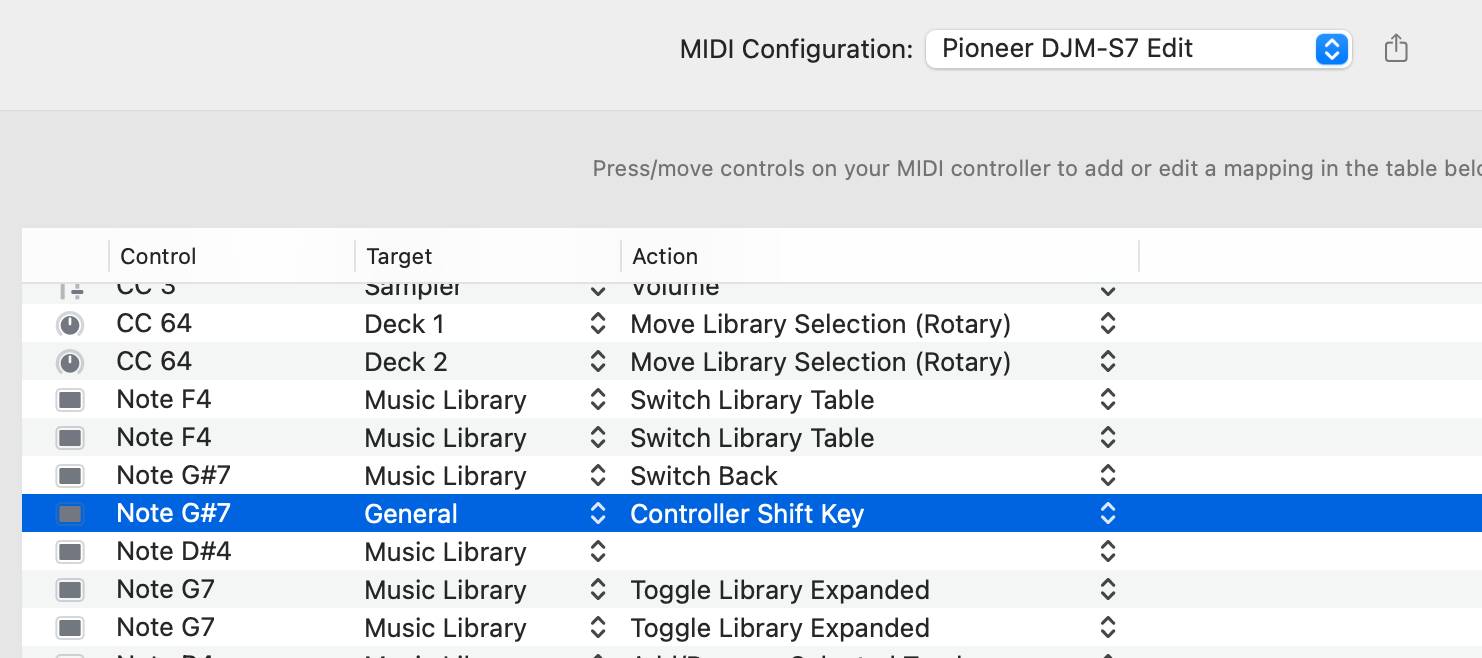
On the S7, does the mapping list show Note G7 once or twice? One row on the S11, two on the S7 is what I’d expect — confirming it would tell us the difference is real in practice and not just on paper.
Either way, thanks for the persistence on this one.
Perfect, that screenshot answers more than I asked for. Note G7 showing up twice on the S7 is exactly what Pioneer’s specs predicted — the S7 sends BACK + SHIFT separately per deck, while the S11 sends it on one shared channel, which is why you only see a single G7 row there. Small detail, but it confirms I’m reading the hardware specs correctly. Thanks again for your help @Akrilovy. I’m going to pass this onto engineering for further review.
Hi @Akrilovy, sorry for the late reply. I just heard back from engineering and we don’t support mapping any button on this controller to have the shift button functionality. The native shift button needs to be used.