NOTE: Please use the search function above before posting to avoid creating duplicate topics.
Version of operating system (e.g. macOS 14.4.1): windows 11
Version of djay (e.g. 5.1.2): 5.6.3
Hardware/controllers used (e.g. Reloop Mixon 8 Pro): hercules control mix
Please consider sharing a short video or screenshots to help clarify your issue
Hi Algoriddim Community and Support Team,
I’m reaching out because I’m experiencing a persistent issue with the Sampler in djay Pro for Windows.
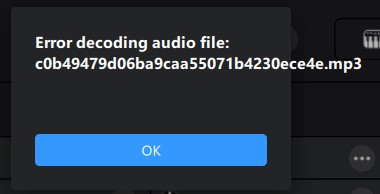
The Problem: My custom samples (DJ Drops/Personal audio files) are no longer playing. When I try to trigger them, I get the message: “Error decoding audio file”.
The weirdest part: These exact same files were working perfectly just a few days ago. I haven’t moved the files from their folders, and they still play correctly if I load them into a main deck, but they fail completely in the Sampler.
What I have tried so far:
App Repair: Ran the Windows “Repair” tool on the application.
Clean Reinstall: Fully uninstalled djay Pro and reinstalled it from scratch.
File Formats: I’ve tried both .WAV (16-bit) and .MP3 (320kbps) formats.
Audio Drivers: Verified my sample rates match between Windows and the app (44.1kHz).
Despite all these steps, the error persists even with the samples that used to work. It seems like a database or internal decoding glitch.
My Setup:
OS: Windows
11
Hardware: Hercules DJControl Mix / Laptop Audio Jack
App Version: Latest djay Pro for Windows
Has anyone else encountered this sudden failure? Is there a hidden cache folder I should clear manually? Any help would be greatly appreciated!
Hello! It’s been a week since my last reply. I’m going to consider this topic completed for now so I can focus on others. However, please feel free to respond and we can definitely revisit this. Thanks!
I have the same issue, “error decoding audio file” when adding custom samples. It won’t work with neither desktop buttons or with controller pads (FLX4), niether with controller connected or disconnected. The samples don’t play, error window displayed. Windows 10
Hi @aika_vrdj, welcome to the Community! Please provide full details about your setup:
Device Model (ex. 2020 iPad Air 4th Gen):
Version of operating system (ex. iOS 17.3.1):
Version of djay (ex. 5.1.3):
Hardware/controllers used (ex. Reloop Ready):
Hardware Firmware Version:
Since this sounds repeatable, can you please capture and share a short screen recording of the issue to help clarify what’s happening? Thanks!
Device: Custom PC Desktop (Intel i7-10700F / RTX 3060)
Operation System: Windows 10 Pro 22H2
Version of djay 5.6.4
Hardware: Pioneer DDJ-FLX4
FLX4 firmaware: USB\VID_2B73&PID_0045&REV_0107&MI_00
I can’t upload video: “New users cannot add attachments.” But you can see the video here:
Thanks @aika_vrdj. Can you please upload your video directly instead of linking to it? I’ve changed your community privileges to enable direct video uploads Thanks!
That file contains a list of all audio decoders installed on the system. I suspect there’s some codec missing on your machine, so this should help us to figure out which one. Thanks!
Can you please check if you are able to play these files with other apps on you Windows machine (e.g. Groove Music or Movies & TV. Not VLC or any other app that use their own codecs)?
Hello @aika_vrdj, 5.6.5 was just released today and should be rolling out the various app stores over the next 24-48 hours. This issue should be addressed in this release. Thanks!