NOTE: Please use the search function above before posting to avoid creating duplicate topics.
Device model (e.g. 2020 iPad Air 4th Gen): Macbook Air G4
Version of operating system (e.g. macOS 14.4.1): Tahoe 26.4
Version of djay (e.g. 5.1.2): 5.6.4
Hardware/controllers used (e.g. Reloop Mixon 8 Pro): DDJ-FLX10
Hardware firmware version (e.g. 1.0.1): 1.14
Please consider sharing a short video or screenshots to help clarify your question/suggestion/feedback
YOUR QUESTION / SUGGESTION / FEEDBACK:
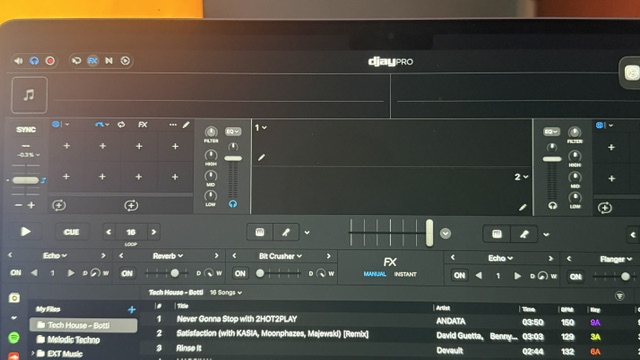
First, it seems like the RIGHT Deck Beat FX in the GUI defaults to Deck1. The left should be Deck1, but the right should be Deck2 as default.
I tend to leave my BeatFX Enabled button activated, but use the Beat FX Destination switch (which decks to apply FX to) and Beat FX Depth to “activate” my FX. I notice that sometimes I would have the destination to apply to ALL decks, but DJay Pro would only have Deck1 showing BeatFX ON, while Deck2 shows OFF in the GUI.
EDIT: I realized the mapping for Beat FX Destination Main was set to the wrong Midi key by default.. Should be CC80 (incorrect default: NoteG#0). Now, the only issue is when I turn it o Beat FX Sampler (SP).. it shows CC80 which then select Beat FX Main. So both knob seletions are the same midi keys…
Hi @phntsm, can you please share a video of this that I can pass onto our engineering team for further review? Preferably with the original (built-in) MIDI Mapping. Thanks.
The photo shows how the FX CH is both 1 for the left and right deck.
The video shows how a) the midi for FX Destination Master (Main) is not correct b) The Midi for Destination Master and Destination Sampler is the same.
Thanks for the video and screenshot @phntsm. Can you please switch back to the (built-in) MIDI mapping for the FLX10 and capture a video of the behaviour you initially described?
It’s the same thing… I had reset it to the buiilt-in one.
Found another thing.. when I load a new track, the Beat FX Depth resets to MAX (shows in GUI) for that deck even though my physical Depth knob is at 0. If I move the knob slightly, then it’ll sync up again. It shouldn’t change on track load and be consistent with the physical button location.
Please share a video of the functionality/issues not the MIDI mapping screen. I want to clearly communicate your issue to our engineers to see if they can reproduce it on their hardware. Thanks!
Hello! It’s been a week since my last reply. I’m going to consider this topic completed for now so I can focus on others. However, please feel free to respond and we can definitely revisit this. Thanks!