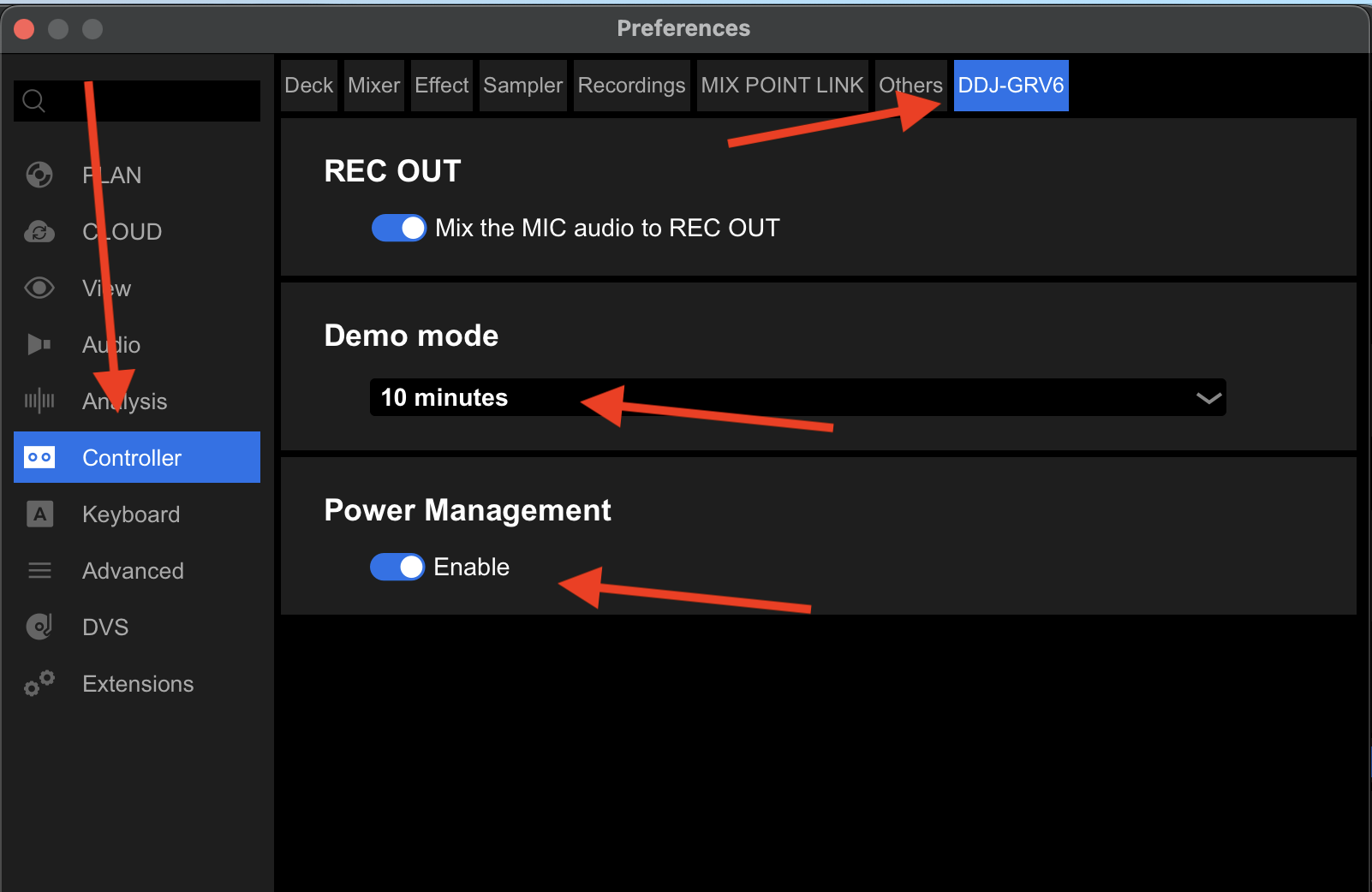
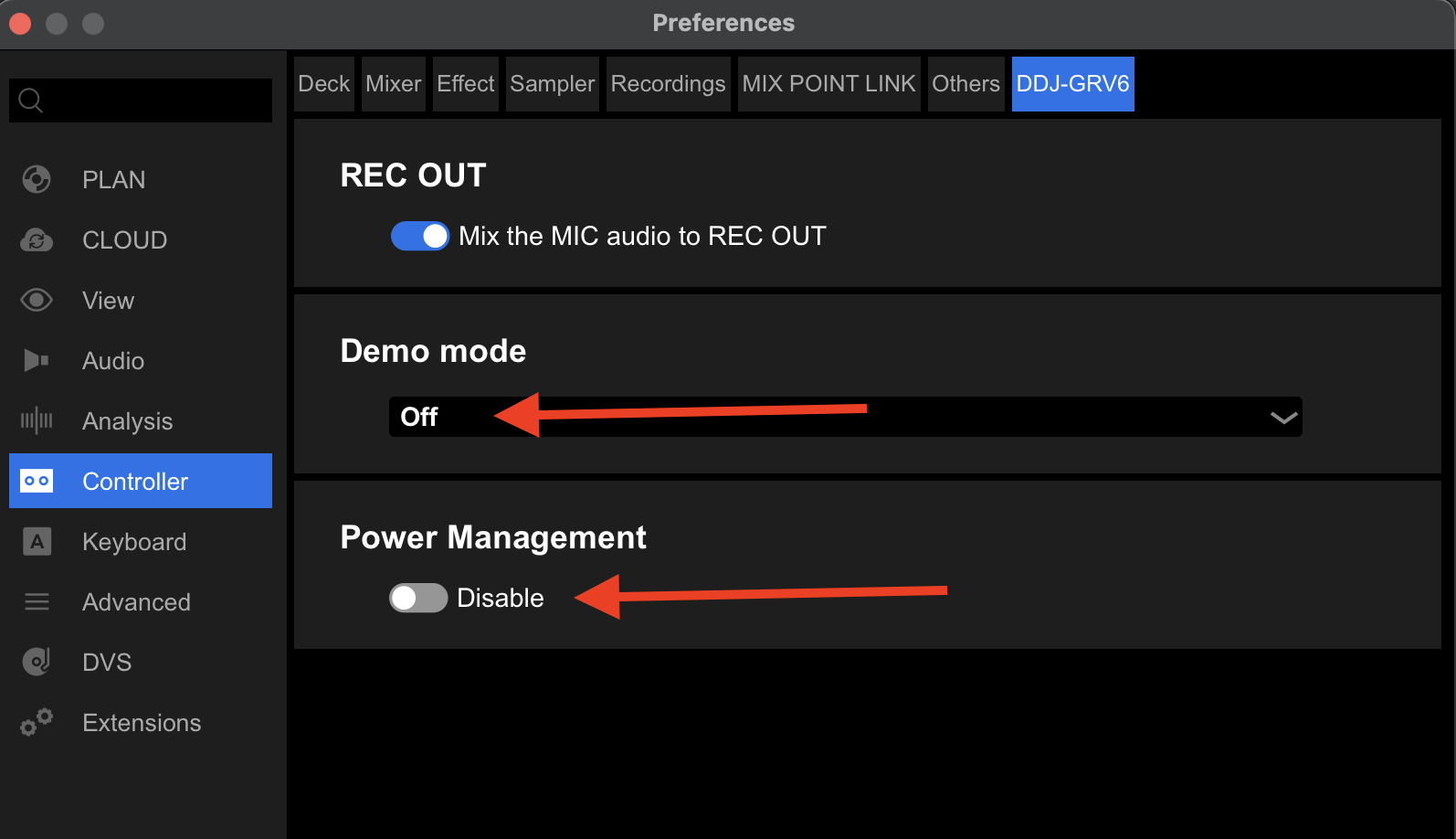
When performing on GRV6/DJAY and leaving it idle for more then 20 minutes, GRV6 will go into power management mode, effectively shutting the controller down. This means that all performance settings must be made over again. It doesn’t remember settings. Please add ability to change this power management setting in DJAY.
YOUR SUGGESTION:
1 Like
Hi @Paul_Van_der_Weyde, welcome to the Community! Thanks for the suggestion! I’ll share this with the dev team for consideration. In the meantime, please use the blue Vote button at the top left of this page so we can gauge user demand for this feature. Thanks!
In the meantime, I did a quick search regarding this and came across the following. I don’t have access to this hardware to check for myself, but maybe this will solve your issue. You may need to connect to Rekordbox.
How to Disable Auto Standby on the DDJ-GRV6:
- Enter Utility Mode: With the controller powered on and connected to your device (though the setting can be changed offline), press and hold the MASTER LEVEL knob (on the right side of the mixer section) while pressing the LOAD button for Deck 1. This switches the controller to Utility mode. The display and LEDs will indicate you’re in the settings menu.
- Navigate to Auto Standby: Use the ROTARY SELECTOR (the large encoder in the mixer section) to scroll through the menu options until you reach the General category.
• Press the SHIFT button + ROTARY SELECTOR to enter submenus if needed.
• Select [Auto Standby] (it may show as “On” by default).
- Toggle It Off: Press the ROTARY SELECTOR to toggle the setting to [Off] or [Disable]. Confirm by pressing the MASTER LEVEL knob or following the on-screen prompt (the jog wheel displays will show status).
- Exit Utility Mode: Press the BACK button or hold MASTER LEVEL + LOAD again to return to normal performance mode. The change saves automatically.
2 Likes
I think fixing this would be better @Paul_Van_der_Weyde
That way we won’t have to keep doing our usual “touch every button and dial” to set it up again each time the GRV6 is turned on 
And then the idle timeout thing wouldn’t matter
1 Like
I think those instructions might be for a different controller @Slak_Jaw as the DDJ-GRV6 doesn’t have a press-able master level knob, or a display.
But 
Thanks for the pointers re connecting to Rekordbox, I found these settings which may help @Paul_Van_der_Weyde
Default settings:
And you probably need to change it to this:
I then immediately deleted the Rekordbox app.


3 Likes
Thanks for sharing @TheSouthernDJ! As mentioned, I don’t have this hardware so couldn’t confirm - just what I found searching online. Glad that at least helped to point you in the right direction. Thanks again - especially for the screenshots - this is very helpful!
2 Likes
Thanks a lot for this SouternDJ/Slak_Jaw! I installed Rekordbox and made the changes like you suggested. I think it worked actually! Had the GRV6 idle for over an hour and it still hasn’t shut down. Let’s hope it stays like this. Last wedding gig was a bit of a nightmare as I accidentally touched the left platter and the music instantly stopped.  The controller had gone back to initial settings after waking up. Didn’t know that… now I do.
Anyway, it would still be nice to be able to change these settings in DJAY.
1 Like
You’re welcome @Paul_Van_der_Weyde. Glad to hear this seems to have worked.
1 Like
@Slak_Jaw if we were to compile a list of things that are not checked / not remembered when first powering on and connecting the DDJ-GRV6, might this be something Algoriddim could look in to?
If so, rather than take this thread off topic I’ll fire up a new suggestions thread (not sure it’s a bug?) and we’ll put a list together?
2 Likes
Yes, I can definitely pass that onto the dev team for consideration. Making a new topic for this would be great. Thanks @TheSouthernDJ
2 Likes
Same here, I set mine playing a loop to itself, came back 90 minutes later and the GRV6 was still wide awake and tuned in 
You are the best, this was making me crazy, thank you for the solution
1 Like