NOTE: Please use the search function above before posting to avoid creating duplicate topics.
Device model (Mac mini 2012):
Version of operating system (macOS 10.13.6): High Sierra
Version of djay (4.2.3):
Algoriddim don’t/won’t sell legacy djay app and I have been using Djay 4.2.3 and love it. I prefer version 4.2.3 but my version (previously purchased) not working for some reason. I want to reinstall but can’t find a download anywhere - Algoriddim site just offers later versions which are no good to me (format not what I want). Can anyone suggest where I can legally get/download version 4.2.3. ?
Thanks - tried that - it brings it up - tried installing again but opens in “Demo” mode with time limit and though it has “Buy” button, that doesn’t work or flips you to Algoriddim site with newer versions that are not 4.2.3. Really irritating - I paid for it - it should be there, as it was back in 2014 surely? (Wish it had been released on discs - then it would be simple).
(A) There was NO djay v4.2.3, boss.
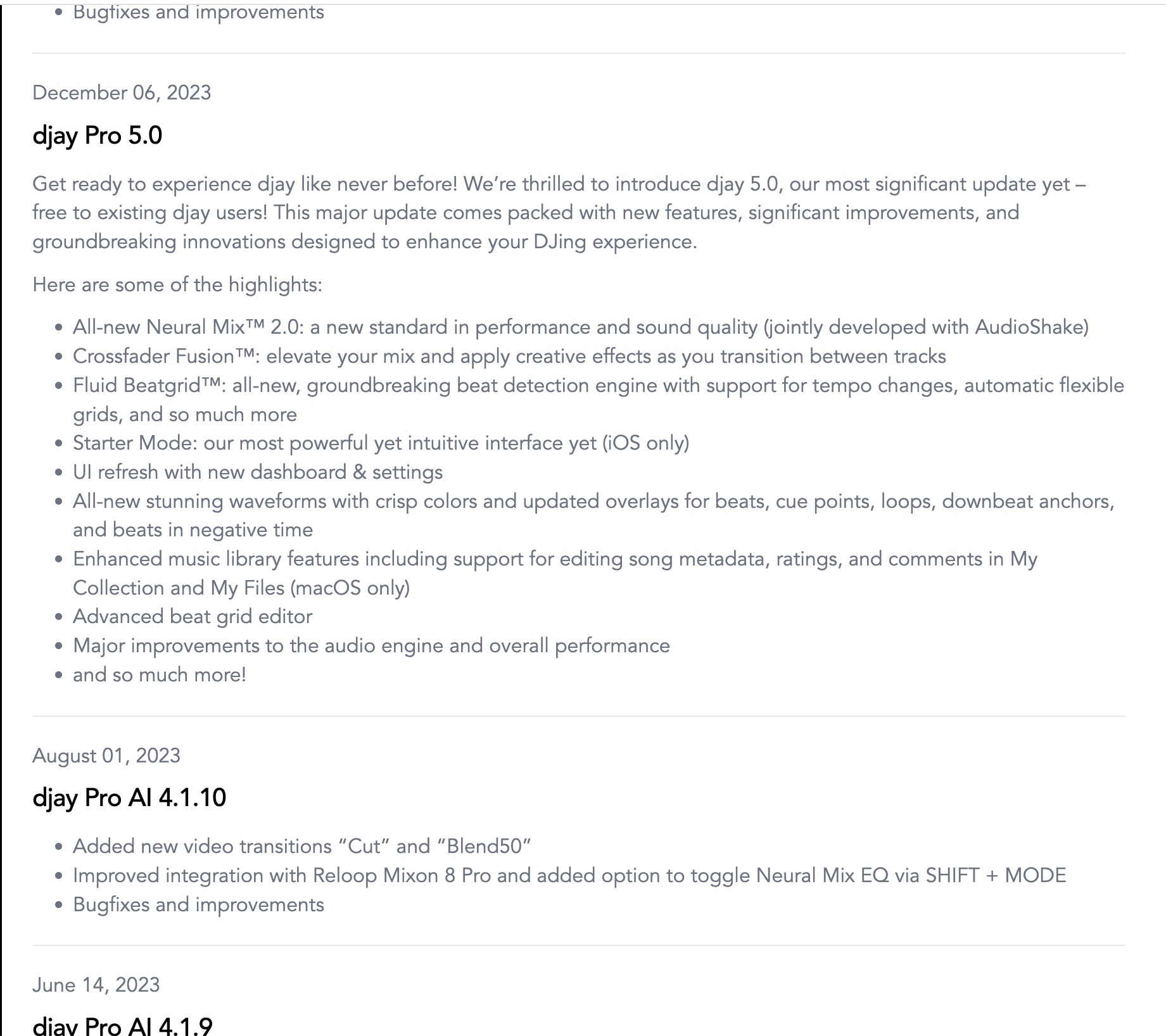
After djay Pro AI 4.1.10, on August 1st, 2023, the “AI” moniker, as well as the entire v4 series, was dropped and we jumped straight into v5 in December same year.
Check release notes.
(B) djay Pro AI v4 was not a buy once option. I think you meant djay 2 perhaps? Most people have said b4, it should be in your purchased apps lists - and if that is giving you a demo mode, then you have to launch a complaint with apple with proof of your purchase (i think)
Cheers
Thanks, but I have just clicked the “About djay” top right and clear as day is says it’s version 4.2.3, so I’m not sure what to think about your answer. BUT, I’m not talking about Pro version here, am talking about basic version before Pro came along, the one from early 2010s.
Hi @Caryzzl159, welcome to the Community! Your memory is correct — djay 4 for Mac was a real product, sold on the Mac App Store and 4.2 shipped in February 2013. I believe @Armigo was thinking of djay Pro AI 4.x, which is a completely separate version line, so you’re both right depending on which app you mean.
The catch is that we don’t distribute legacy djay 4 builds, and there’s no legitimate source for it outside your own Mac App Store purchase history. Please steer clear of third-party “old version” sites — those aren’t licensed copies.
The Demo mode you’re seeing points at a receipt or Apple ID mismatch rather than the app itself:
Open App Store > your name (bottom left) > Purchased and confirm you’re signed in with the Apple ID you used back in 2014.
If djay isn’t listed, check App Store > Account Settings > Hidden Items and unhide it.
Download from that list rather than launching a copy already on the drive.
If a fresh download from Purchased still opens in Demo, that’s an Apple receipt issue and Report a Problem on the original purchase is the route in.
One thing I’d like to confirm: you listed a Mac mini 2012 on macOS 13.6. Apple only supports that model up to macOS 10.15, so if you’re on a patched install, App Store receipt validation can misbehave — and that on its own would explain the Demo mode. Can you tell me how that machine got to Ventura? Thanks!
You’re welcome @Caryzzl159. Thanks for confirming you are on High Sierra not Ventura. For clarity, I have corrected your original post accordingly from macOS 13.6 to 10.13.6 High Sierra.
That actually explains one piece of this. Current djay Pro needs macOS 10.15 or later, so the App Store can’t offer it to you at all — it’s falling back to the last version compatible with 10.13, which is your djay 4.2.3. The download you’re getting is the right one. The problem is purely that it isn’t recognising your purchase.
On High Sierra the purchase list lives in a different spot than on newer macOS:
Open the App Store and click the Purchases tab along the top.
Confirm you’re signed in with the Apple ID you bought djay under in 2014 — check via Store > View My Account.
Download djay from that list, then launch it from Applications rather than any copy already sitting on the drive.
One thing to be aware of: the Mac App Store has had well-documented trouble on 10.14 and earlier, where the top tabs vanish entirely and sign-in fails. If Purchases isn’t showing for you, users have reported that pasting macappstores://showPurchasesPage into Safari opens the purchases list directly. That’s a community workaround, not an official one, but it’s worth trying before you conclude the purchase is gone. I hope that helps!
Thanks, I fear my resistance to upgrade to new os and app versions over time because I really don’t like or need their new features or format has killed my ability to solve my djay app issue. I’ll keep trying but am resigning myself to failure here.
When I download fresh (after deleting old version completely) it seems to know it’s existed on my set up before and defaults to the demo thing. Are there other old djay files like caches and metadata etc I need to delete to address this?
Apols everyone, I’m an old guy just wanting to use an app that kinda works like when I dj with my turntables. Don’t need the hundreds of buttons and tiny deck thing, just big graphics, mixer and a few effects. Had it down pat with djay 4.2.3, so I miss it a whole lot right now.
Hold off on deleting anything for a moment — there’s a non-destructive test that will answer this in about two minutes.
Create a fresh macOS user account (System Preferences > Users & Groups > +), log into it, and launch djay from Applications. A new account has none of your old preferences, caches or metadata. If djay still opens in Demo there, leftover files aren’t the cause and deleting them won’t help. If it runs normally, we’ve confirmed it’s something in your user Library and we can hunt it down properly.
While you’re at it, check what you actually have: right-click djay in Applications, Show Package Contents, then open Contents and look for a folder called _MASReceipt. Every app downloaded from the Mac App Store gets one — it’s the signed proof of purchase the app checks on launch. If it isn’t there, the copy you’re running didn’t come from the App Store, which would explain the Demo mode and the Buy button pointing at our website. No amount of cache clearing fixes that one.
One important warning before you start deleting: your playlists, cue points and library metadata live in ~/Library/Application Support/Algoriddim. Wiping that takes your whole setup with it. Copy it somewhere safe first regardless of what you do next.
Yep, got _MASReceipt so looking good. Strangely the app reappeared on my App Store purchases after I contacted you, it wasn’t evident previously. Am sure not you that made that happen, but I like to think it was. djay 4.2.3 now re-installed and no “Demo” etc message coming up. Superb! Not sure how, don’t care, love this version of the app and can get back to business. Hopefully that’s the end of a weird chapter. Thanks my friend.