**
• MacBook Pro, M4 (late 2024)
• MacOS Sequoia 15.5
• djay Pro 5.4.4 (Legacy)
**
I’m trying to make sense of an issue I consistently run into, when managing BPMs.
The bulk of DJing I do requires me to play songs fully, without crossfading or beat-matching. Although I sort my music in a variety of ways when choosing a song, I most commonly choose based on BPM, since I’m regularly playing for dancers and tempos matter a lot.
I used to evaluate BPM manually in Apple Music/iTunes, but djay Pro would routinely override it, so now I analyze songs in-app and make adjustments when necessary (which is quite often, because jazz is notoriously difficult for BPM-evaluating apps and BPMs are routinely halved).
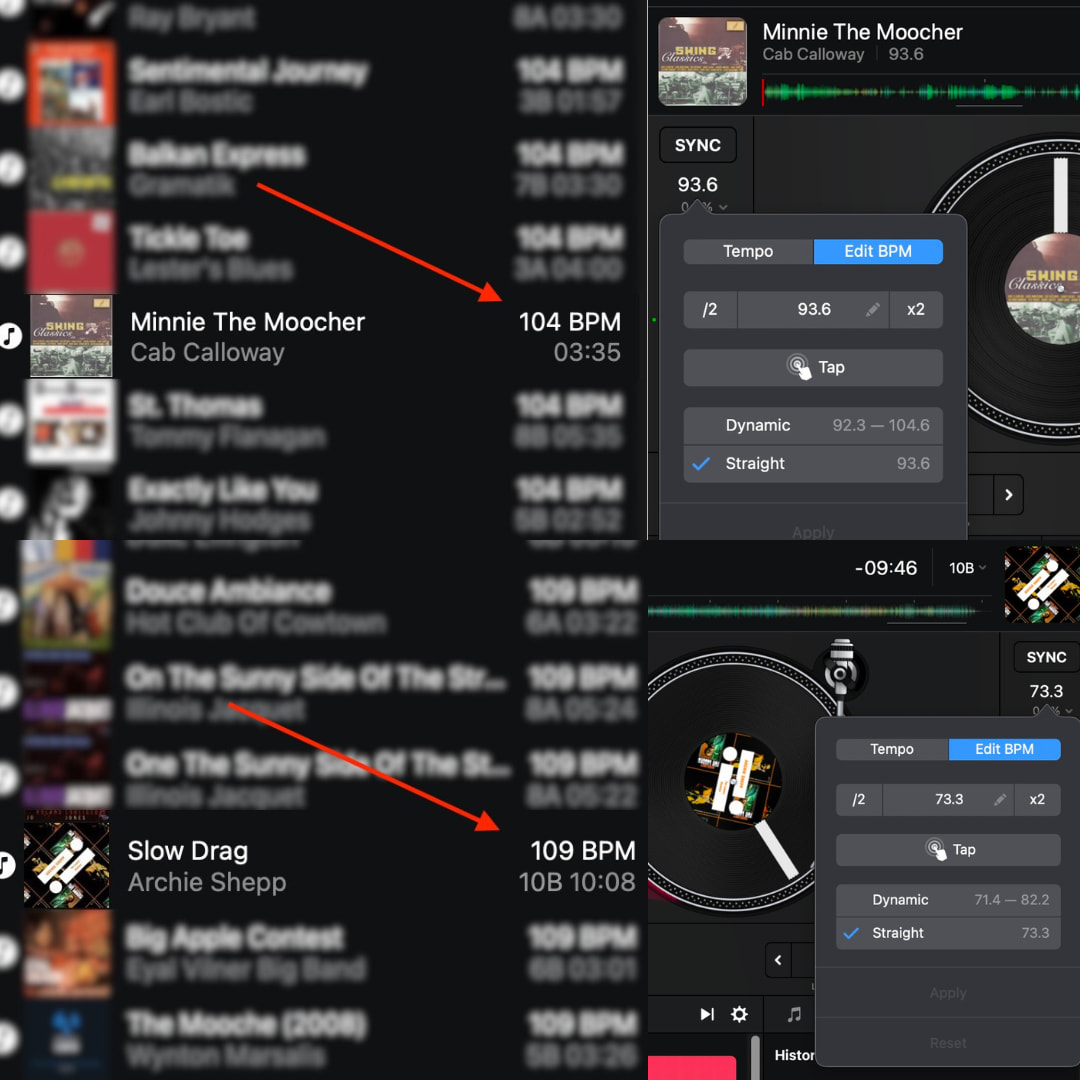
The issue I have is that let’s say I’ve noted a song as having a BPM of 100. It will be listed throughout djayPro with that tempo until it gets loaded into one of my decks. Then the app will automatically re-evaluate the tempo and change the listed BPM. This change will be retained and that song will now be sorted by the new BPM instead of the one I originally marked.
Now, often songs have slight or drastic tempo changes and the re-analyzed BPM that djayPro assigns is not entirely wrong, in that it might be accurate for a certain moment in the song. But that’s besides the point, because I don’t want the BPM reset after I’ve manually assigned it. That defeats the purpose of being able to manually set those values. I should be able to set whatever BPM I want – even if it entirely wrong – without djayPro tweaking it of its own accord.
(Also, I have “Tempo Change Detection” turned off in the settings and all my BPMs are marked as “straight”, not “dynamic”, so that’s not the issue.)
So what’s going on here – is this a bug or a “feature” that can’t be disabled?
1 Like
Hi @Andrius, welcome to the Community! Please try adjusting the analysis range in the djay Settings>BPM Analysis>Range. Something like 58-115 or 68-135 might help.
Okay, thanks for the suggestion. Before I do that, can you briefly explain what that does and how it relates to this particular issue?
You’re welcome @Andrius. It does basically what it says. When djay automatically analyzes the BPM of a song when loading it for the first time, it will limit the BPM that it assigns to the selected range. A typical example of this is with “Drum and Bass” music which can be played at around 175 BPM or 87.5 BPM. If in this example you set the analysis range to 58-115, djay would assign the BPM of 87.5 instead of potentially 175.
Okay, so this sounds useful in the frequent cases where it halves the tempo, when being analyzed. I’ll look into that.
But what about, as I illustrate in my question, the track has already been analyzed? Why does it re-analyze upon being loaded to the deck? Why does it override the BPM that it set (or I modified), earlier?
(In case my above examples weren’t clear, they both feature tracks that were already analyzed and set to “straight” on an earlier date. Yet upon loading to the deck, one was re-analyzed from 104 to 93, the other from 109 to 73.)
This sounds like unexpected behavior then. Could you please try to capture this on a screen recording so I can share with our engineering team? Ideally in a way where you show the song has already been analyzed, then the BPM manually adjusted and loading that same song again and it re-analyzes the BPM. Thanks!
Hello! It’s been a week since my last reply. I’m going to consider this topic completed for now so I can focus on others. However, please feel free to respond and we can definitely revisit this. Thanks!