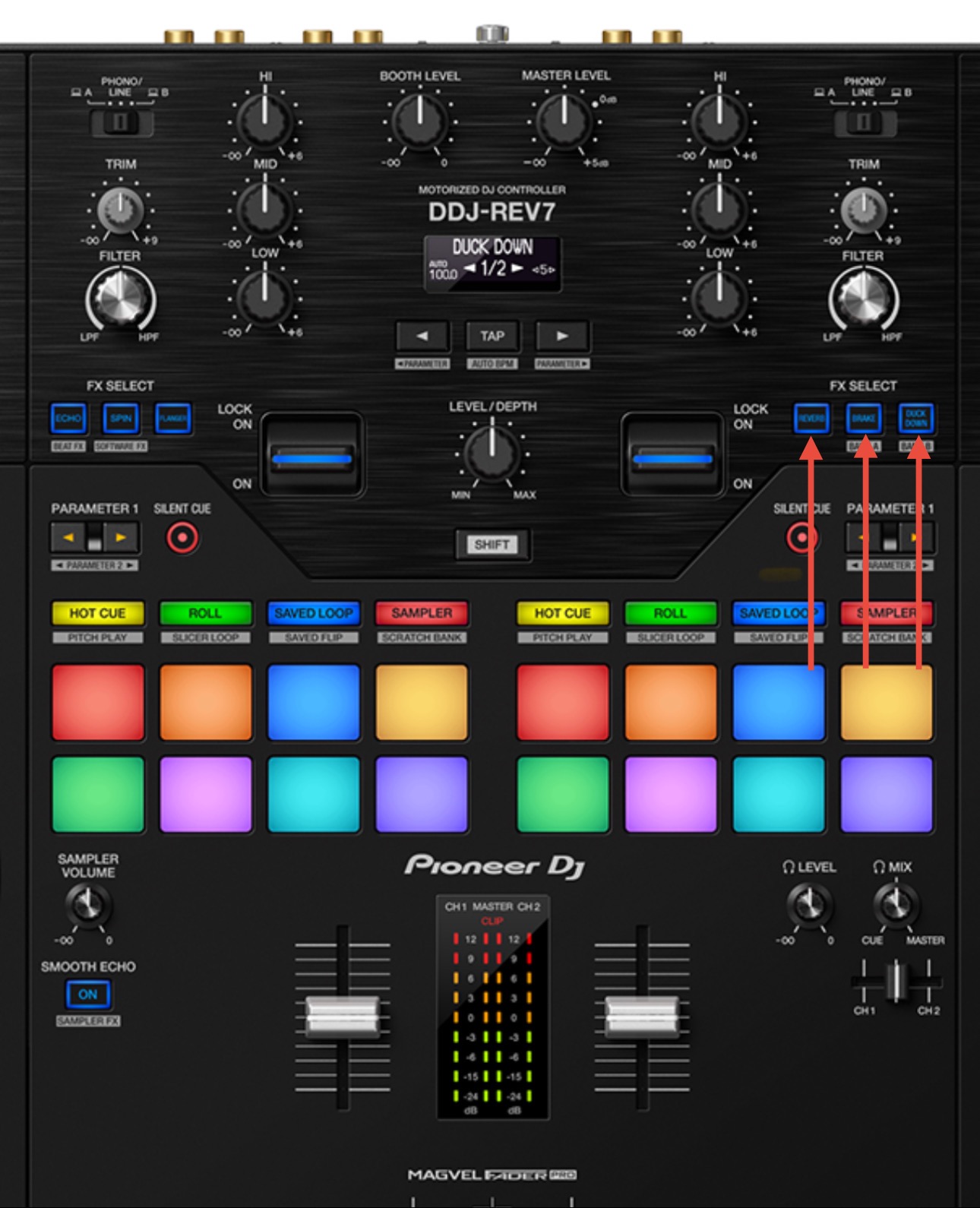
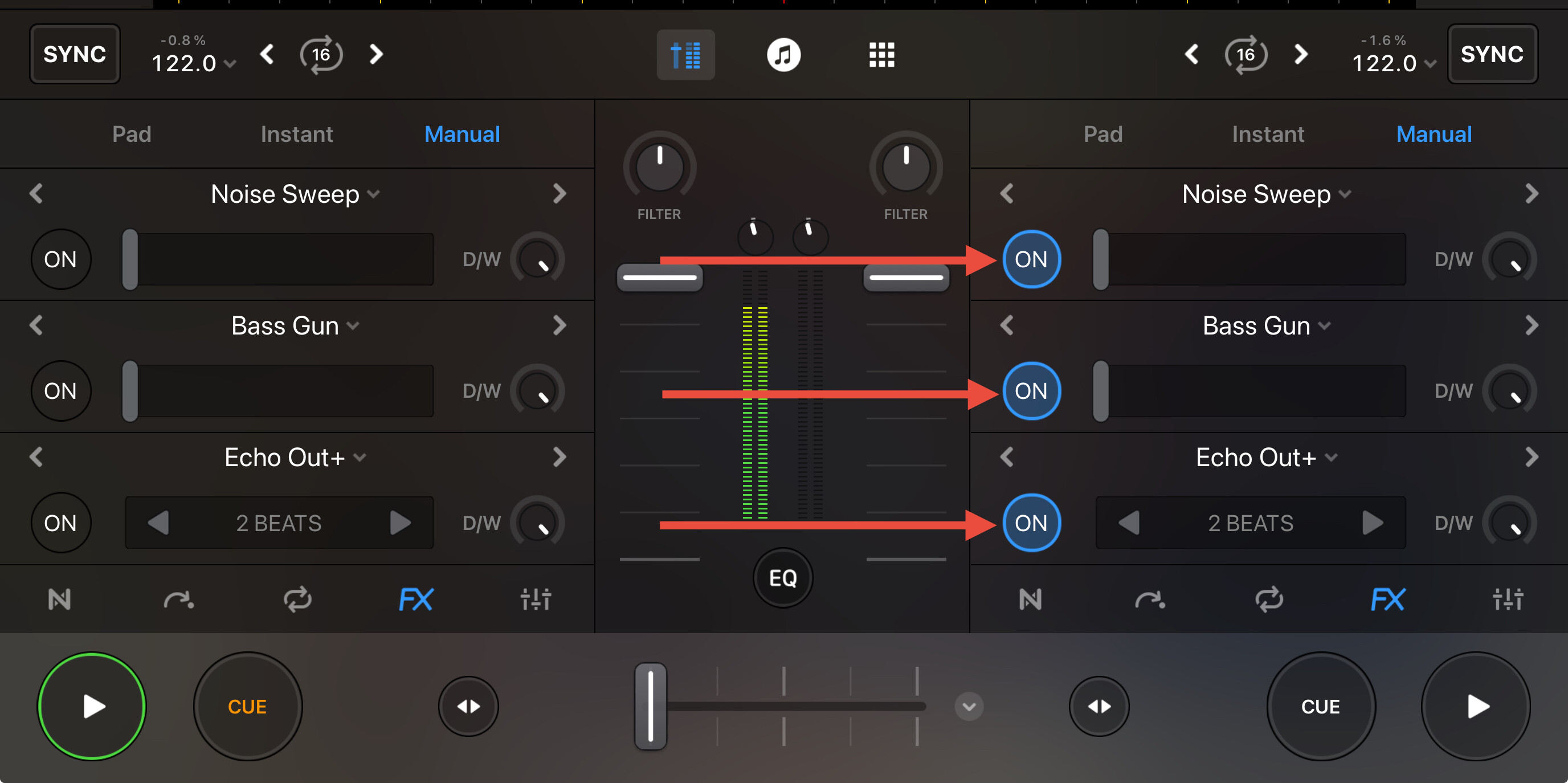
Have been a long time Serato user, but have been hearing lots of great things recently about djay and have have been playing over the last couple of week on both MacOS and iPad.
One thing that’s driving me mad is the effects toggles don’t activate just deck 1 (left paddle) and just deck 2 (right paddle).
At the moment I’m using the DDJ REV7 (does the same on the DJM S11) and if I select an effect on the left side, both paddles toggle the effect on deck 1, likewise if I select an effect on the right side, both paddles toggle the effect on deck 2.
I’ve looked at the MIDI mapping, tried numerous things and cannot see how to fix this so regardless which of the 6 effects I’ve picked, toggling the left paddle applies the effect deck 1 and toggling the right paddle applies the effect to deck 2 (like in Serato).
Hi @robxbl69, I don’t have a REV7 or S11 to check, but I suspect these are MIDI Mapped similar to the Mixon 8 Pro. In addition the the FX Paddles, you probably also need to select the FX1, FX2 or FX3 switches for Deck 1 or Deck 2.
I’ve just been testing with the Rane Seventy (which on the whole is mapped WAY better than the REV7/S11) and the effects on this make total sense. Left 3 buttons and left paddle controls Deck 1 and right 3 buttons and right paddle control Deck 2. This is exactly how it is in Serato. I can have either the same or different effect separately toggled on Deck 1 and/or 2. Limits you to 3 effects per deck, but happy with that.
The problem with the REV7/S11 is if the last effect I chose was on the left side (top row on the S11), both paddles activate Deck 1 and if I choose an effect on the right side (bottom row on the S11), both paddles activate Deck 2. Even if I set the same 3 effects in the same slots on both sides, the only way to turn them on and off separately is to use the iPad screen.
With the REV7/S11 and Serato I can select anyone of the six effects and apply them to either (or both) decks. This would be great in djay, but I’d be happy if it just worked like the Seventy.
Before posting I just tried with the S11 and if I choose FX1-1, FX1-2 or FX1-3 on the top row of the Software FX buttons this sets Deck 1 effects and FX2-1, FX2-2 or FX2-3 from the bottom row sets Deck 2 effects. However it’s the same problem that if I last chose FX1-n then both paddles activate Deck 1 and if FX2-n, then both paddles activate Deck 2. I can simultaneously press for example FX1-2 and FX2-3, but then both paddles activate both effects on Deck 1 and 2 simultaneously. It’s unusable as is (IMHO).
Hello! It’s been more than a week since my last reply. I’m going to consider this topic completed for now so I can focus on others. However, please feel free to respond and we can definitely revisit this. Thanks!
Link to video. As I’ve said before the problem is the same on the DJM-S11.
To be clear, I don’t necessarily want all 6 effects to work on either deck, I just want the 3 on the left to only get triggered by the left paddle and the 3 on the right only get trigger by the right paddle.
Thanks for the video @robxbl69. That definitely clarifies things and this does look like unexpected behaviour to me. I’ve passed this onto our hardware team to see if they can replicate this on their end. I’ll report back when I have news.
Can you please confirm your full setup details?
Device Model (ex. 2020 iPad Air 4th Gen): Version of operating system (ex. iOS 17.3.1): Version of djay (ex. 5.1.3): Hardware/controllers used (ex. Reloop Ready): Hardware Firmware Version (ex. 2.7):
Also, are you using the (built-in) MIDI mapping or a custom edit?
Device Model 2025 iPad 10th Gen with A16 Version of operating system iPadOS 18.5 Version of djay 5.4.1 Hardware/controllers used DDJ-REV7 and DJM-S11 Hardware Firmware Version REV 7 v2.01 and S11 v1.05 (latest for both)
I’m using the built in mapping. I have tried to custom edit, but could not get it to work, so deleted my custom edit.
I will also double check tomorrow evening, but I’m 99% sure the behaviour is the same using the MacOS version of djay.
Any update in this? I’ve recently picked up a Rane One Mk2 and this works exactly as expected. It’s an awesome controller, however I’m always drawn back to the Rev 7 for its battle style layout. Just wish I could use it with Djay.