NOTE: Please use the search function above before posting to avoid creating duplicate topics.
- Device model (e.g. 2020 iPad Air 4th Gen):
- Version of operating system (e.g. macOS 14.4.1):
- Version of djay (e.g. 5.1.2):
- Hardware/controllers used (e.g. Reloop Mixon 8 Pro):
- Hardware firmware version (e.g. 1.0.1):
- Please consider sharing a short video or screenshots to help clarify your question
YOUR QUESTION
Hy guys.
I am having problems with sound on my new flx2 with algorridim dj app.
Sound goes up and down all the time
even if I have only one deck playing.
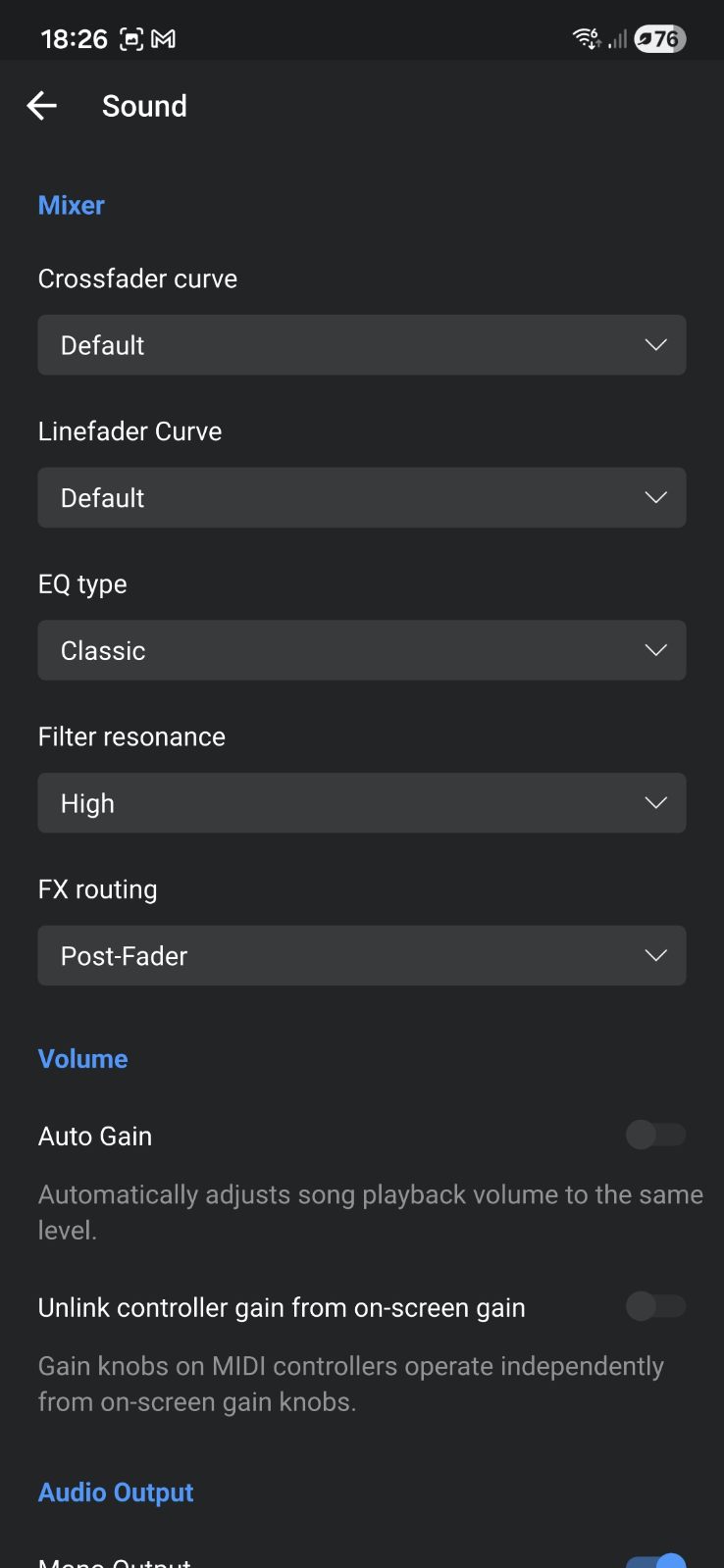
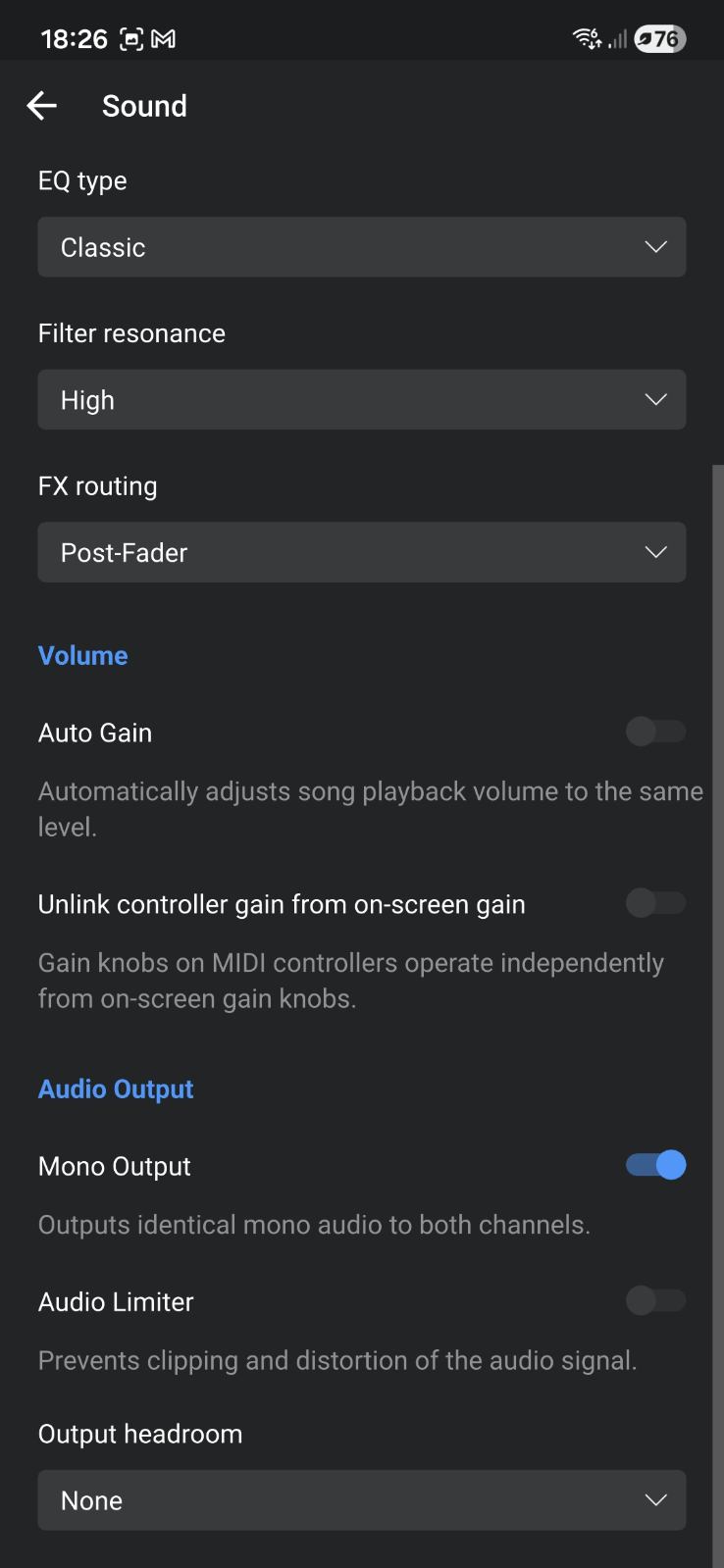
I did everything in settings enabeling auto gain disabeling, also auto limiter.
It worked well from the start, but all of the sudden start experiencing fluctuating volume levels.
I can’t tell you how frustrating it is.
Bought it for my young doughter, but looks like it’s gonna be just a paperweight. Did anybody had the same problem. Almost sure it’s hardware issue.
Thanx for help.
Hi @Quasi_Tales, welcome to the Community! Sorry to hear you’re having audio issues with your FLX2. When creating new topics, please do not forget to answer the questions in our template with specific details about your setup not just “iPad” or “Latest Version”. This helps all of our community moderators to provide the most effective support to users with the utmost efficiency. Thanks!
Device Model (ex. 2020 iPad Air 4th Gen):
Version of operating system (ex. iOS 17.3.1):
Version of djay (ex. 5.1.3):
Hardware/controllers used (ex. Reloop Ready):
Hardware Firmware Version (ex. 2.7):
- Can you please provide more details about the issue you’re experiencing?
- Are you connecting the FLX2 to your Android device via Bluetooth of USB cable?
- If you are using a wired connection, are you also using any USB adapters or a powered USB hub?
- Do you have a djay Pro subscription or are you using the free demo version?
- With your FLX2 connected to your Android device, can you please share a screen of your main djay Settings page?
Hy.
Like I’ve said sound drops and rises again quite freqently even only playing just one deck.
I am connected via usb cable, because via bluetooth is useless because I can’t using headphone monitors.
I’m not useing any usb adaptors and powered hubs just fully charged android phone.
I don’t have pro subscription just free demo version.
Thanks for the additional details @Quasi_Tales,
- So you are powering the FLX2 off of your Android phone? Do you have a powered USB-C hub that you can connect to your Android device so you can power both your phone and the FLX2 with an external charger or power bank?
- Please share a screenshot of your djay Settings>Sound page.
- Please also capture and share a short video of the issue.
Thanks!
1 Like
Thanks @Quasi_Tales, please
- Turn Auto Gain → ON,
- Turn Unlink controller gain from on-screen gain → ON
- Keep Mono Output ON
- Keep Audio Limiter → OFF
- Keep Output headroom → None
1 Like
Tried to send you short video.
Same story.
Does’t work.
I’ve given your account permissions to upload videos. Please try again.
Strange, can you please upload your video to your Google Drive/Dropbox, enable sharing permissions, then share a link to it here?
Please also provide the requested full details for your setup:
Device Model:
Version of operating system:
Version of djay:
There seems to be a problem with your linked video:
Would it worked on Iphone 14 plus if I connect it with lightning to usb-c connector?
Hi @Quasi_Tales, your YouTube video is not playable. Perhaps you have it set to Private access.
Yes, you should be able to do this
Have you tried other 3.5mm audio cables? That’s usually the main pain point with these budget controllers. My buddy had similar problems with his FLX2 and Hercules Starlight. Audio problems got solved when he bought higher quality cables for the 3.5mm out. HOSA brand ain’t a bad place to start.
1 Like
I can try, but from start when I bought it worked well. Got a cable from a proper audio store. It doesn’t look cheap. Volume level was quite hy from the start now it’s really low. Thanks man.