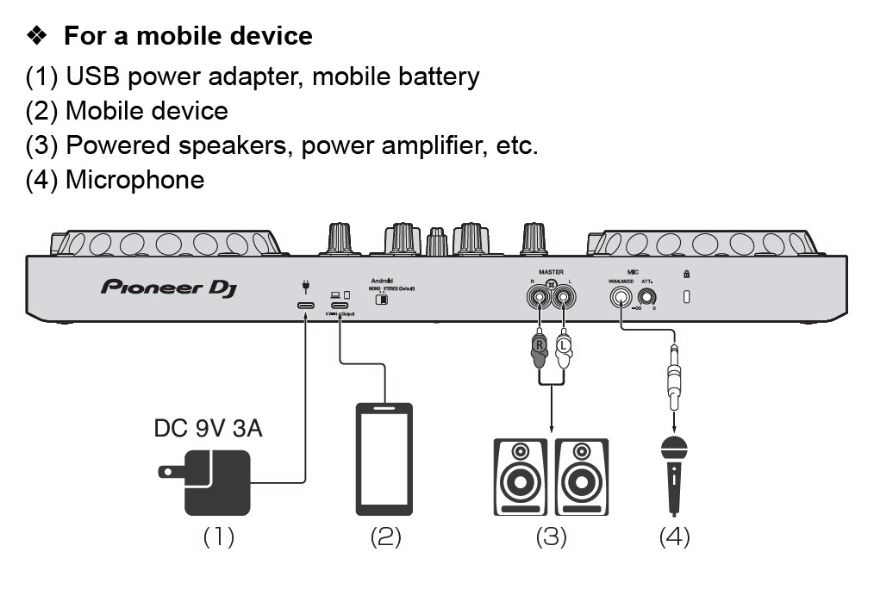
I think I have found the issue and a how to resolve it:
I have been using a cable that is supposed to be low resistance together with a 120W phone charger. The length of the cable (USB-A to USB-C) is 3 meters. When calculating the resistance and voltage drop then it showed that it would never work with that setup: Here goes (Please excuse any errors on my part):
A typical high-current USB cable pair (e.g. 20 AWG power conductors commonly used in 6 A cables) has approximately 0.0328 Ω per meter per conductor (example value based on measurements). Since current flows back and forth, we shoulduse round-trip length = 2 × cable length when calculating resistance.
Round-trip length = 6.00 m
Resistance per meter (example):
AWG20 ≈ 0.0328 Ω/m (common in many 6A cables)
AWG18 ≈ 0.0210 Ω/m (thicker cable)
AWG16 ≈ 0.0133 Ω/m (very thick cable)
AWG stands btw for American Wire Gauge and the number for the wire’s gauge size.
AWG10 - 2.59 mm
AWG14 - 1.63 mm
AWG18 - 1.02 mm
AWG20 - 0.81 mm
If the cable is ~AWG20 (R ≈ 0.0328 Ω/m)
-
Round-trip R = 6.00 m × 0.0328 Ω/m = 0.1968 Ω
-
At I = 3.00 A → voltage drop ΔV = I × R = 3.00 × 0.1968 = 0.5904 V
-
Voltage at the device = 9.00 − 0.5904 = 8.4096 V
Result: the device sees ≈ 8.41 V, i.e. below 9 V.
If the cable is thicker, ~AWG18 (R ≈ 0.0210 Ω/m)
-
Round-trip R = 6.00 × 0.0210 = 0.1260 Ω
-
ΔV = 3.00 × 0.1260 = 0.3780 V
-
Voltage at the device = 9.00 − 0.3780 = 8.6220 V
Result: ≈ 8.62 V, still below 9 V (but closer).
If the cable is very thick, ~AWG16 (R ≈ 0.0133 Ω/m)
-
Round-trip R = 6.00 × 0.0133 = 0.0798 Ω
-
ΔV = 3.00 × 0.0798 = 0.2394 V
-
Voltage at the device = 9.00 − 0.2394 = 8.7606 V
Result: ≈ 8.76 V, still below 9 V.
So I could never have come up to the required 9V 3A.
I tested with a shorter cable and another adapter. And “et voilà”! The iPad started the charge via the FLX “device” port.
I have now bought a special cable that should be able to handle up to 240W (SS USB-C) and an adapter that can push up to 65W (9-24VDC). I hope that will do the trick.
Thanks everyone for helping me