Four Decks, Two Layers: The Hidden Mental Load

TL;DR: I used to think operating four decks meant learning to manage more complexity through practice and muscle memory. After changing my workflow, I discovered something unexpected: how much mental energy I’d been wasting just operating my controller. Removing that burden hasn’t just improved my confidence. It’s given me more freedom to be creative.


I’ve been reflecting on something interesting about four-deck DJing.

Previously, just thinking about moving beyond two decks brought a certain uneasiness.

I could actually feel myself becoming more mentally alert, preparing for the additional workload.

I’d scan my iPad, check the controller, confirm settings, double-check which deck I was controlling, and mentally prepare for the next action.

It wasn’t particularly enjoyable.

The conventional advice is to practise until muscle memory takes over. And muscle memory is certainly valuable.

But I’ve started questioning whether we’re sometimes using muscle memory to compensate for unnecessary complexity.

Why should we have to train ourselves to work around an interface when the interface could be designed to work more naturally with us?

Recently, I changed the way I interact with my controller.

What surprised me wasn’t simply that operating four decks became easier.

It was the psychological change.

That familiar mental preparation has largely disappeared.

The checking, second-guessing and hesitation have been replaced by confidence.

And here’s the part I find most interesting.

I hadn’t fully appreciated how much attention I’d been sacrificing until I no longer needed to sacrifice it.

Instead of thinking about how to operate four decks, I’m thinking about what I can create with them.

More spontaneous ideas. Greater willingness to experiment. Less interruption to my creative thinking.

Before, four decks felt like four responsibilities.

Now, four decks feel like four possibilities.

It’s made me wonder how much of our creative potential is unnecessarily occupied by managing equipment rather than making music.

I’m curious whether other DJs have experienced something similar.

Have you ever held back a creative idea because the mental effort of operating your controller got in the way?

thank you AI agent for your amazing LLM generated AI slop post :wink:

try an 8 deck configuration on DJpro… and you’ll exercise those electrons upstairs LOL

once someone, knows their controller, inside and out… the progression to experimentation comes about, & the fun begins

Nice thoughts.

Yes, it is a challenge and an opportunity. My experience is that the layout of the controller creates or limits the workflow a lot. I used a custom build controller with intech.studio modules to create a good workflow for me, but also left that route because it was diverting too much from ‘normal’ workflows creating uneasiness when I had to use club layout controllers. These modules are fine, but a bit flimsy for daily DJ use. And you need to have decent programming skills to get the relative complicated logic of a DJ controller working in the limited memory space these things have.

For me, the first use of the extra decks was a kind of 3 deck mixing to get an extra layer of beats or vocals to create smooth transitions. You kind of cycle through these decks without thinking. But this works best with a 4 deck controller and now while getting familiar with the Mixtour I have to adapt my workflow because simple 3 deck cycling becomes a severe planning challenge on there … :slight_smile:

As far as the UI of DJay, the 4 deck view is sub optimal. On the Mac that does not have a touch screen anyway, a simple layout just showing the basics as a reference, when you feel lost, would be better. But a reasonable compromise is doable already. Using a strict colour scheme for different usage of hot CUE’s helps already a lot to reduce dependency on the UI.

Thanks for sharing your thoughts on this @Brainbox

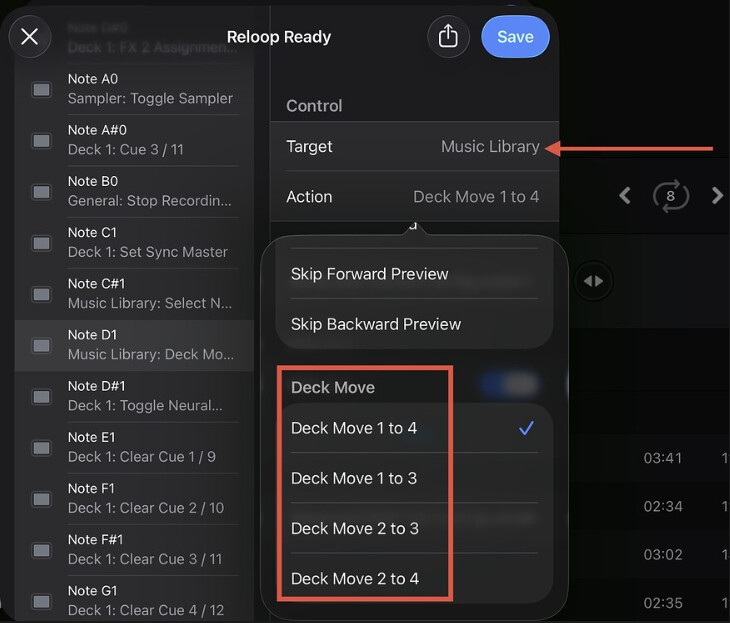
the only way i can see 4 decks as doable at this point (not really a djay limitation, more so my own), is the somewhat new midi mappings that can send a track from deck 1 to deck 3 and deck 2 to deck 4 with no interruptions.
so you can basically set up your current track to loop, press a button to put it down to the lower deck, it keeps looping, then you can load up your next track real quick

Hi again @Party_Cardy. Those deck move actions were added to djay in version 5.6.2. “Added MIDI actions to move a track from deck 1/2 to 3/4”. That release went out on macOS/iOS/Windows/Android, so if you’re on 5.6.2 or newer you can map them yourself in the MIDI Learn tool. DJM-S11 owners don’t need to map anything, since that update also mapped deck move actions out of the box. djay for iOS » Release Notes +2. I hope that helps!

@Party_Cardy I recognise that feeling - wanting the creative possibilities of four decks but finding the operation mentally demanding. @Slak_Jaw those deck move actions are useful and I can see why they help here.

My experience has led me to this: thinking in layers is what needs to cease.

Think of four decks, each with its own volume control, always available. Mirco touch a deck’s volume control (does not affect volume level) and you’ve also selected that deck for Play/Pause. The Play button’s colour—or a simple binary state, on or off—immediately identifies which deck it controls.

Working with Deck 3? Touch its volume control. Returning to Deck 1? Touch its volume control. Selection follows the work you’re already doing.

You’re no longer thinking, “Which layer am I on?” You’re thinking, “What do I want to bring into the mix?”

For me, that removed the mental bookkeeping that made four decks feel cumbersome and brought back the enjoyment of using them.

Interesting perspective