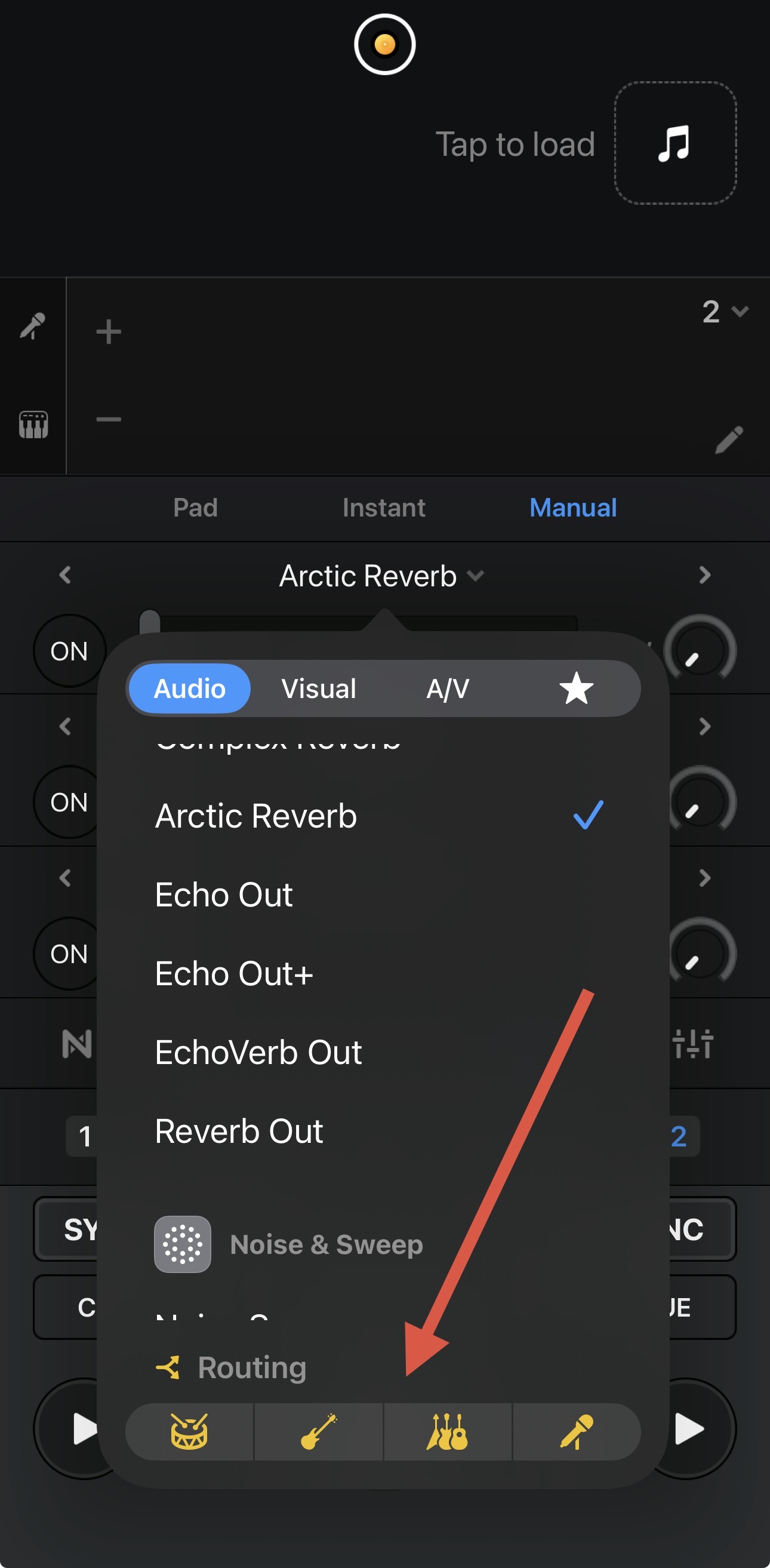
Probably something super simple but when I push on an effect on deck2 the on button is yellow instead of blue - which seems to not affect the deck it’s assigned to. All the others go blue. How I fix this please??
- Razor blade
- Windows11
- 5.6.3
- Ddj-flx4
Probably something super simple but when I push on an effect on deck2 the on button is yellow instead of blue - which seems to not affect the deck it’s assigned to. All the others go blue. How I fix this please??
When creating new topics, please do not forget to answer the questions in our template with specific details about your setup not just “iPad” or “Latest Version”. This helps all of our community moderators to provide the most effective support to users with the utmost efficiency. Thanks!
Device Model (ex. 2020 iPad Air 4th Gen):
Version of operating system (ex. iOS 17.3.1):
Version of djay (ex. 5.1.3):
Hardware/controllers used (ex. Reloop Ready):
Hardware Firmware Version:
The Yellow On button means you have set the FX Routing to one or more STEMS instead of the full track. Please make sure all STEMS are selected in the Routing:
Oh cool I didn’t even know you could do that awesome thanks
You’re welcome @AgentOllie