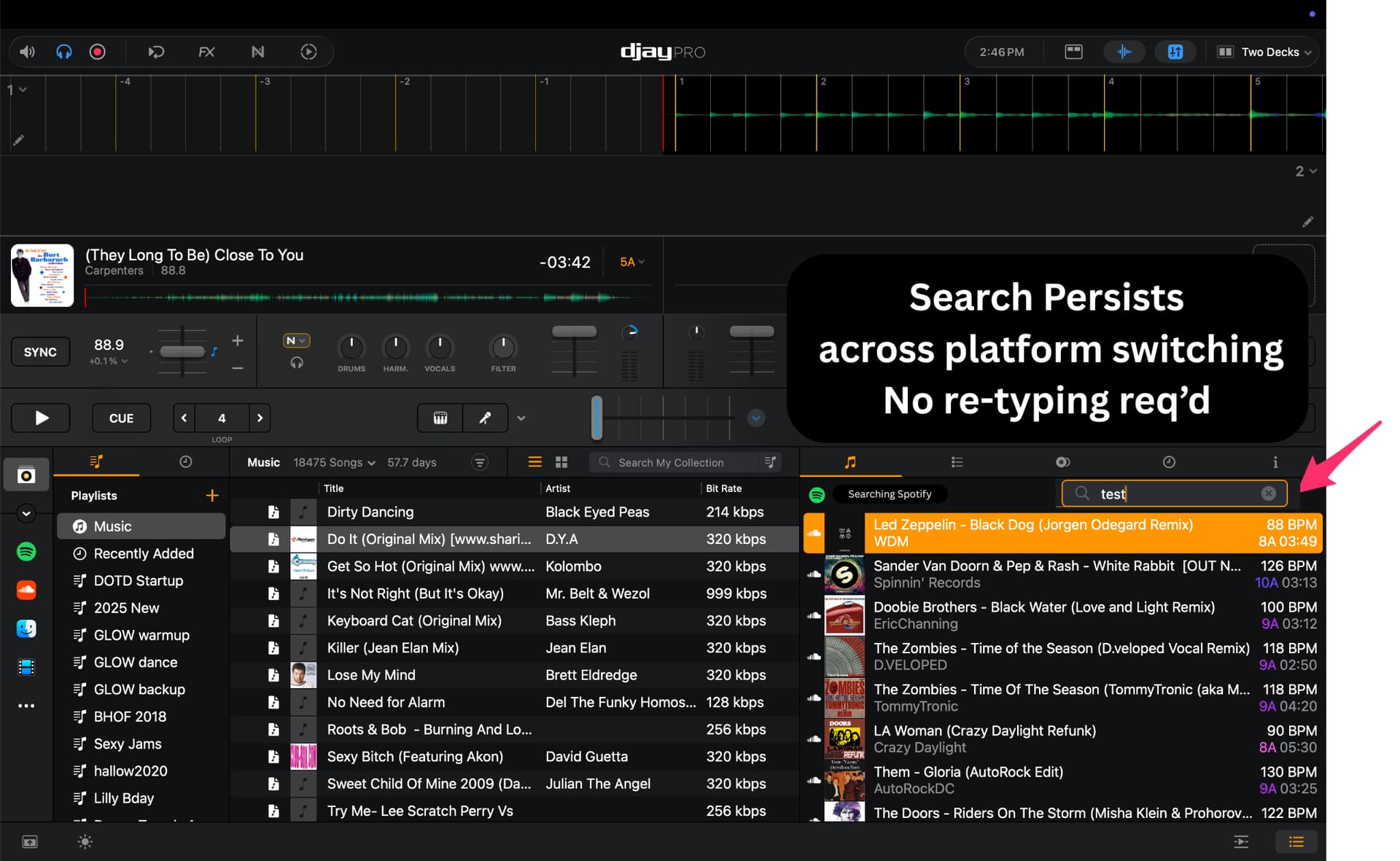
Global Search in Sidebar Library Pane

Hello, I love the software!

Here is a problem I encounter EVERY SINGLE GIG I do, and I hope you can help me (and every other Request DJ) by implementing this… It is something that throws me right out of the mix and causes me to spend way too much time at the keyboard, instead of mixing and hyping the crowd.

As I am ALSO a professional software/app developer and UX/UI consultant, plus Wedding DJ on the side, I hope you will find my detailed explanation of the details and rationale for this request helpful.


Djay Pro currently requires DJs to repeat the same search manually in each music source (Local, Spotify, SoundCloud, etc.), adjust column widths, and juggle playlists while a live set is in progress, in order to find a song and add it to a playlist.

This leads to lost time, repeated typing, unnecessary mouse travel, UI friction, and a chaotic experience during live performances.

The proposed solution is a global search field in the right-hand sidebar’s Music section that:

  • Runs a contextual search on whichever library is active.
  • Keeps the search query persistent when switching libraries.
  • Displays results in the lower pane for the selected library.
  • Clears results and returns to the prior view when the search is cleared.
  • Ideally also fixes the clear button so it actually clears the query instead of just selecting it.

This would allow DJs to search across libraries quickly, with fewer clicks, less typing, and minimal disruption to the performance.


Current Workflow (Old Way)

  • Type the request into Local library search.
  • Discover the track is not in Local.
  • Move the cursor to the Spotify tab and click it.
  • Re‑type the same search query in Spotify.
  • Fix typos and adjust the narrow column widths.
  • Sometimes fight with the column resize handle on macOS.
  • If not found, switch to SoundCloud.
  • Re‑type the same search query again in SoundCloud.
  • Adjust column widths again to see all metadata.
  • Repeat ALL STEPS AGAIN for other libraries
  • When finally found, need to then adjust the view in order to drag the track into a dedicated Requests playlist.
  • Navigate back to the main playlist to keep the party going, often interrupting this process mid‑search if a track is ending.
  • Repeat this entire flow dozens of times per gig, creating a lot of repetitive typing, mouse travel, UI friction, and cognitive load while performing live.

Proposed Workflow (New Way)

  • Type the request once into a global search field in the right‑hand Music sidebar.
  • Djay Pro automatically switches the right-hand pane into “searching library” mode for the currently active source.
  • Quickly drag matching results into the queue or a Requests playlist without changing the main playlist view.
  • Click only twice to switch libraries (Local → Spotify → SoundCloud, etc.) using existing functionality.
  • The same search query persists and automatically runs in the newly selected library.
  • Instantly see the new library’s search results in the same pane, with no re‑typing.
  • When done, simply click clear button (after it has been fixed) to:
    • Clear the search text.
    • Restore the previous library view.
    • Place the cursor back in the search box for the next request

This streamlined flow removes repetitive typing and UI manipulation, reduces chaos during live sets, and lets DJs focus on mixing and crowd interaction instead of fighting the interface.

Here is a video outlining the problem and solution:

Mockups of the proposed solution:


For a transcript, review the video on Descript at:

3 Likes

Hi @TEEE, thanks for the carefully explained an detailed suggestion - especially the video and mockups. This is very helpful. I will share this with the dev team for consideration.

1 Like

Happy to help!

On a related note (…stacking requests, I know…), it would be super helpful to have a midi-mappable macro to auto-focus the Search field (and select anything in it) - I don’t know if there is a keyboard shortcut for this because I have the keyboard shortcuts disabled so they don’t accidentally trigger when I am trying to enter searches or ‘brush’ the keyboard unexpectedly.

Basically, if i could jump to this Global Search (…ie: opens the sidebar pane, then focuses the search) with one midi action, that would be amazeballs! The less I need to use my mouse/keyboard, the better. Being able to ‘switch’ the Library being viewed in that pane with a midi trigger is also on my wishlist.

Essentially - I want to run EVERYTHING from my midi controllers, except entering search text. Big ask, I know, but so far, y’all have been gangbusters at delivering midi triggers. Great coverage so far!

2 Likes

Thanks for the additional feedback @TEEE

Exactly what I need for a fast search! If possible: A setting to priorize sources, for example: My first priority is djay library, second local files, third Spotify. Because I prefer local files rather than Spotify… but would find also directly and much fuster tracks i dont have in my local library. At the moment I search first djay library, then local files, then spotify which can take a lot of time… i would prefer to have with the crowd!

2 Likes

Hi @whiterocka, welcome to the Community! Thanks for the additional input. Please don’t forget to vote at the top left of this page. Thanks!

1 Like

I came here specifically to make a similar suggestion. I have only been using djay pro for about a couple of weeks, and I’m still getting used to the GUI, but I can say I struggle using the library to prepare setlists (play lists). I do really like being able to have folders of playlists, instead of one long list of playlists, so that’s awesome.
I don’t use streaming services for live sets, partly because I am a streaming DJ (via shoutcast) and I worry about bandwidth where I’d be simultaneously streaming in and out. I mention this for context, all of my sets are from music in my own l library. This is what I want:

  1. Global search of all tracks. Essentially though, this is just a list view of all the tracks shown in a single folder view, so the tracks in not just the root folder, but all the subfolders and their subfolders. This lets us search across a broader range of tracks and sort by any of the column headers in the list. This is the biggest thing missing for me.
  2. As an extension, it would make sense to show all the tracks in any subfolder with the tracks in the folder that contains them. Ideally it’s a switch button “show tracks in subfolders.” This really the same thing as item 1, it just applies it to the current folder. So, to show all of your tracks, go to root folder and turn on the switch.
  3. as a nice to have, being able to not just sort the tracks, but filter them as well. Filters for numerical criteria could have a plus or minus range (filter for tracks with 120BPM plus or minus 5).

Summarizing, what I’m proposing isn’t a new workflow (as I think the OP suggested), rather it’s just deepening the view into the library so we can see and work with as much or as little as we need. I think this keeps things simple while still adding the ability to easily find what we’re looking for.

I really hope this gets implemented, right now I’m working outside djay pro to find tracks and then going into djay to find them and move them, but I need to know what folder they are in first and It’s a pain.

Hi @FlatLine, welcome to the Community! Thanks for the additional feedback - this is great. Please don’t forget to vote at the top left of this page. Thanks again!