NOTE: Please use the search function above before posting to avoid creating duplicate topics.
- Device model (e.g. 2020 iPad Air 4th Gen):
- Version of operating system (e.g. macOS 14.4.1):
- Version of djay (e.g. 5.1.2):
- Hardware/controllers used (e.g. Reloop Mixon 8 Pro):
- Hardware firmware version (e.g. 1.0.1):
- Please consider sharing a short video or screenshots to help clarify your question/suggestion/feedback
YOUR QUESTION / SUGGESTION / FEEDBACK:
- I’m having an issue getting one deck to play through headphones and one through my speakers, can anyone help please ?
If got my decks and speakers connected to my iPhone and at the minute I can either hear both decks through my headphones or speakers on my iPhone
Please help
Hi @Rusty52, welcome to the Community! When creating new topics, please do not forget to answer the questions in our template with specific details about your setup not just “iPad” or “Latest Version”. This helps all of our community moderators to provide the most effective support to users with the utmost efficiency. Thanks!
Device Model (ex. 2020 iPad Air 4th Gen):
Version of operating system (ex. iOS 17.3.1):
Version of djay (ex. 5.1.3):
Hardware/controllers used (ex. Reloop Ready):
Hardware Firmware Version:
1 Like
1. Try turning the CUE MIX knob all the way to the left ←. That should separate the headphone cue from the main out.
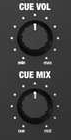
2. Make sure CUE SPLIT is Off.

2 Likes
I’ve one @Michael_Wisniewski. Thanks for the help as usual!


