High EQ knob is correctly midimapped to Action>High EQ, but it activates neural mix stem volume.
I mapped Shift+HighEQ to the same function (neural mix volume) and it works the same. I cannot control High and Lows EQs through my controller as it used to be?
Any ideas of what could be going on?
2019 iPad Pro
Reloop Beatpad2
NOTE: Please use the search function above before posting to avoid creating duplicate topics.
Device model (e.g. 2020 iPad Air 4th Gen):
Version of operating system (e.g. macOS 14.4.1):
Version of djay (e.g. 5.1.2):
Hardware/controllers used (e.g. Reloop Mixon 8 Pro):
Hardware firmware version (e.g. 1.0.1):
Please consider sharing a short video or screenshots to help clarify your issue
Hi @tchesco, sorry to hear you’re experiencing this issue.
What version of djay are you using?
What version of iPadOS are you using?
Do you have an active djay Pro Subscription?
I suspect that your MIDI controller does not send separate MIDI messages for the EQs when you hold SHIFT. However, there is a better method to toggle between normal EQs and Neural Mix EQs without mapping each EQ knob.
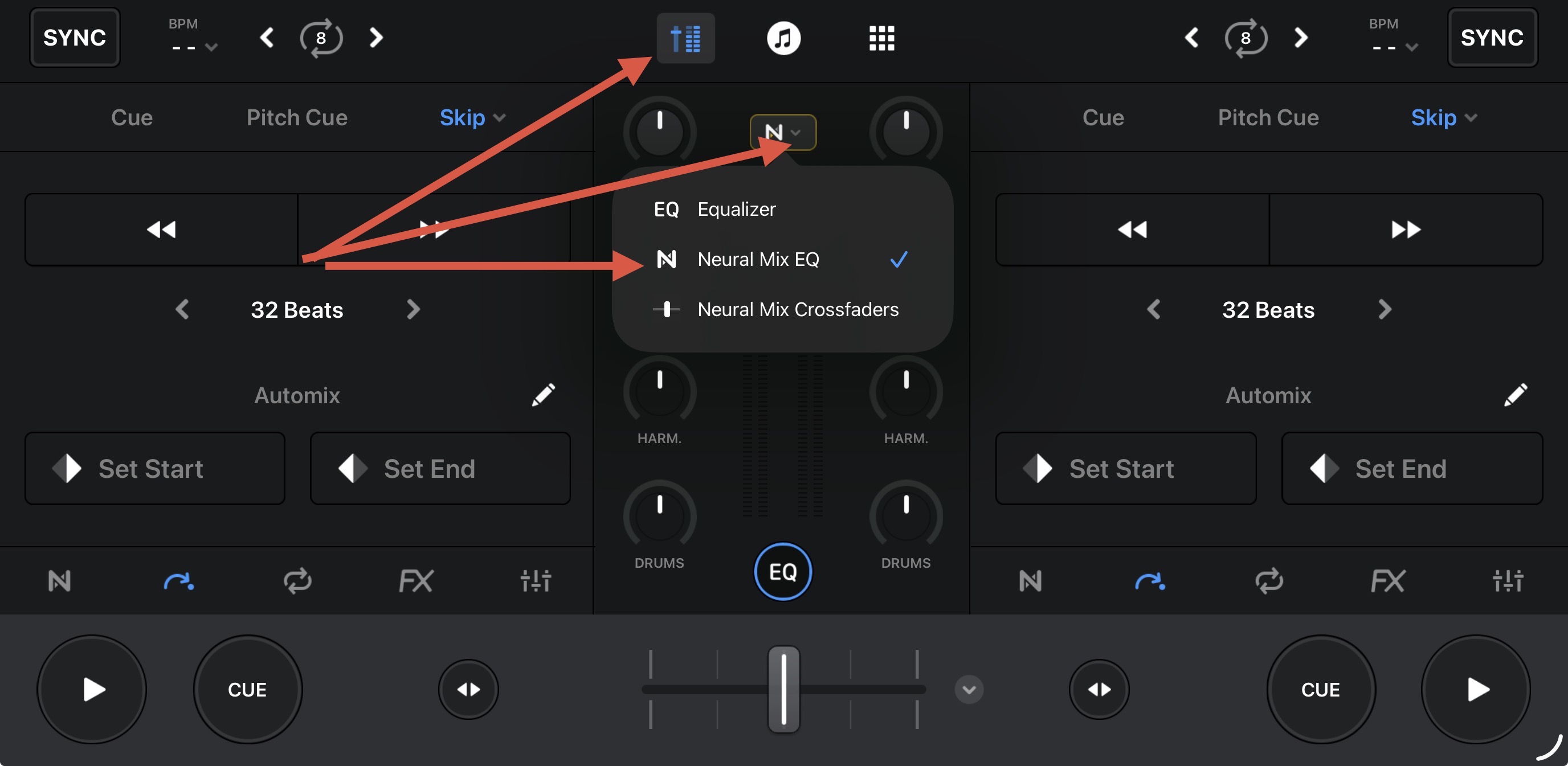
Please try switching back to the (built-in) MIDI mapping for the Beatpad 2 and instead using the onscreen controls in djay to toggle between Equilizer and Neural Mix EQ. Test with this setup and confirm if everything works more like expected. If so, then I can show you how to MIDI map the EQ/NM EQ toggle action to your controller so you don’t need to change this via the iPad screen.
Hello! It’s been a week since my last reply. I’m going to consider this topic completed for now so I can focus on others. However, please feel free to respond and we can definitely revisit this. Thanks!
Hello @Slak_Jaw !
Thank you so much for your quick reply, and also sorry for my late one!
I just discovered that the problem was caused because of the EQ Function setting on the app. There are 3 types of EQ functions, Equalizer, Neural Mix EQ and Neural Mix crossfaders.
Although the controller can midimap and send different midi controller messages for each function, like high eq or neural mix crossfaders, it does not override the setting applied directly on the software (exactly the button function showed on the pic you posted).
This clearly seems to be a software bug, once it limits controller actions on a high layer of software.
As soon as i switched the EQ function setting to Equalizer it returned its behaviour as expected.
Thank you again @Slak_Jaw for you help!
Hope this may help any user who faces the same problem.