


I added a track by accident as a related track, now I can’t un-relate it. Dragging it out does nothing, pressing delete does nothing…how do I do it please?!
Hit delete (on Mac).
As I said in my post…hitting DELETE on my Mac does nothing at all!
Sorry! Missed that. Works great over here. What Mac & Djay versions are you on? What’s the source of the tracks?
macOS tahoe 26.0.1
djay whatever the latest is 5.5?
tracks are on an external drive
Me too. I can simply click on the related track to highlight it and press [delete].
Can you add new related tracks?
Yes I can add new related tracks no problem. I have copied the media library to my desktop and I still cannot delete the related tracks on a different machine.
It doesn’t end there. If I add the track I cannot remove to the related tracks AGAIN…I can delete the OLD one I wanted to delete originally but now cannot delete the NEW one I just added.
If I add more to the list, I can delete SOME of them but not ALL of them. And this is on two machines, both running Tahoe.
Also, I used to be able to re-order them…but I can’t do that now either.
And if I load a track that I cannot delete into a deck, and look at the list of related tracks…the track I cannot un-relate it from is not in the list!
It’s not happy at all!
I’m thinking it might be related to either something like file / folder names with exotic characters, or maybe very long folder & file names. Something OS related that’s not correctly supported within DJAY.
Especially since you’re saying it works sometimes. It could also be a library issue somehow (e.g. maybe you’ve been moving files around and DJAY got confused).
Waiting for support to step in and take over now…
This sounds suspicious. Like DJAY isn’t able to find the original track location or something.
Hi @discoian, I just tested this on my Mac running macOS 26.0.1 and djay 5.5 and pressing the Delete key is working for me to remove the Related Tracks.
- Can you please confirm that djay has full access rights to your connected external drive in macOS?
- Can you please share a short screen recording of the issue?>
Yet it will play fine in djay, and if I right-click and select show in finder, it goes straight to the file…
Hi @Slak_Jaw
1 - Yes
2 - I sent it to the support form on the main website, but here’s a dropbox link to the video…
Thanks for confirming @discoian. Since you’ve already submitted an official support ticket, I will let them handle it from here and consider this community topic closed. Thanks!
That’s strange indeed.
And it get’s stranger because I deleted the deleted the track from the hard drive, removed it from the library, and now it looks like this in the related tracks list:
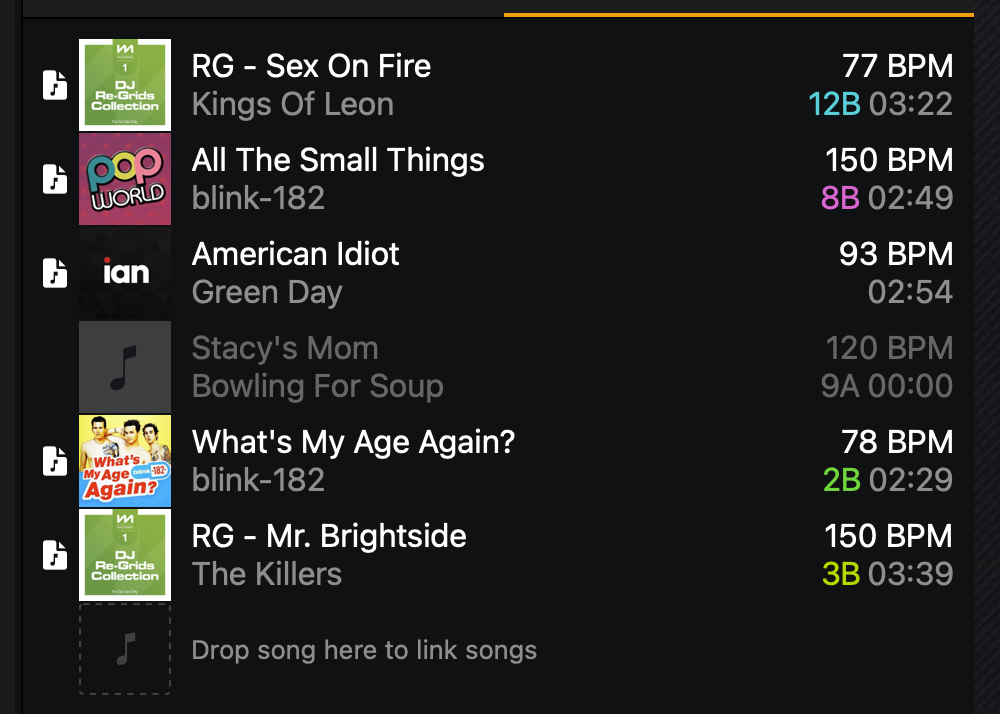
Greyed out, and I still cannot delete it! Or any of the others in that list.
Thanks for the additional info @discoian
it’s called family bro ! you can’t get rid of relatives you just have to tolerate them  !!
!!
I was having the same greyed out related track issue. Support recommended a completely fresh user environment: (New Login, turning off all file-management, sync, antivirus, security, cleanup, or other background utilities. And that worked. (Google Drive seemed like at least one of the issues)
This means a new library so looks like I loose all smart playlists. Tracks with Cue Points saved by exporting to OneLibrary USB from old library and importing into new one. (messy though)


