


How to put Neural mix on my controler Pioneer DDJ SX3. Possibly on a sample button?
Hi @Ckinsel, the easiest way to use Neural Mix on any MIDI controller is via the EQ/NM EQ onscreen Toggle.
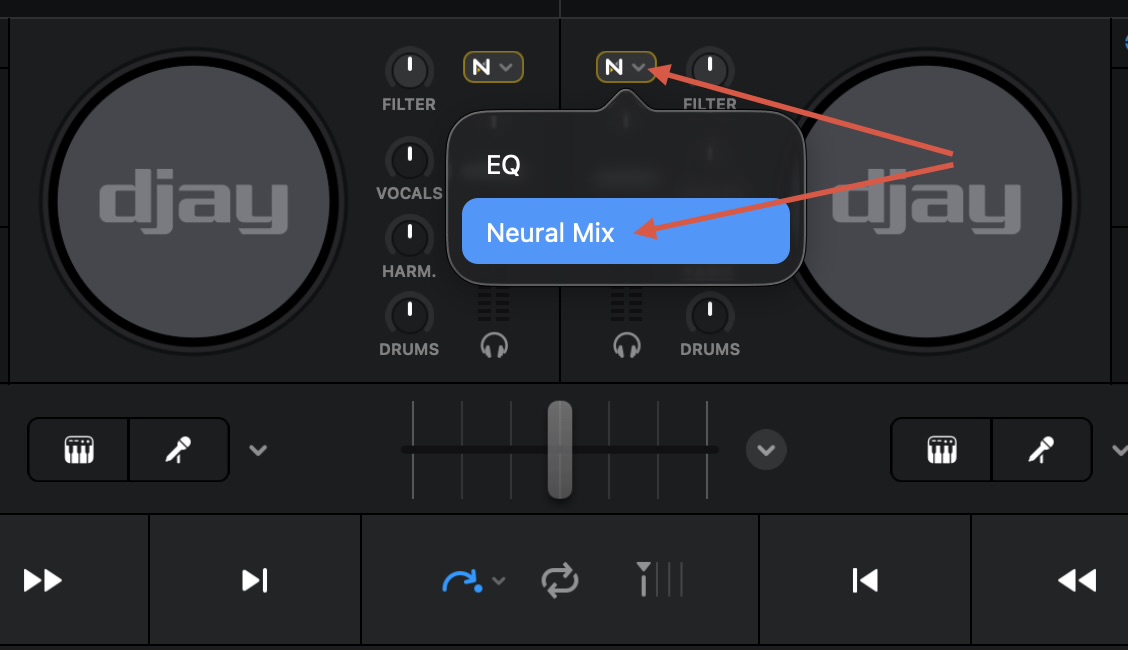
You could also MIDI Map this toggle command to a free button on your controller.
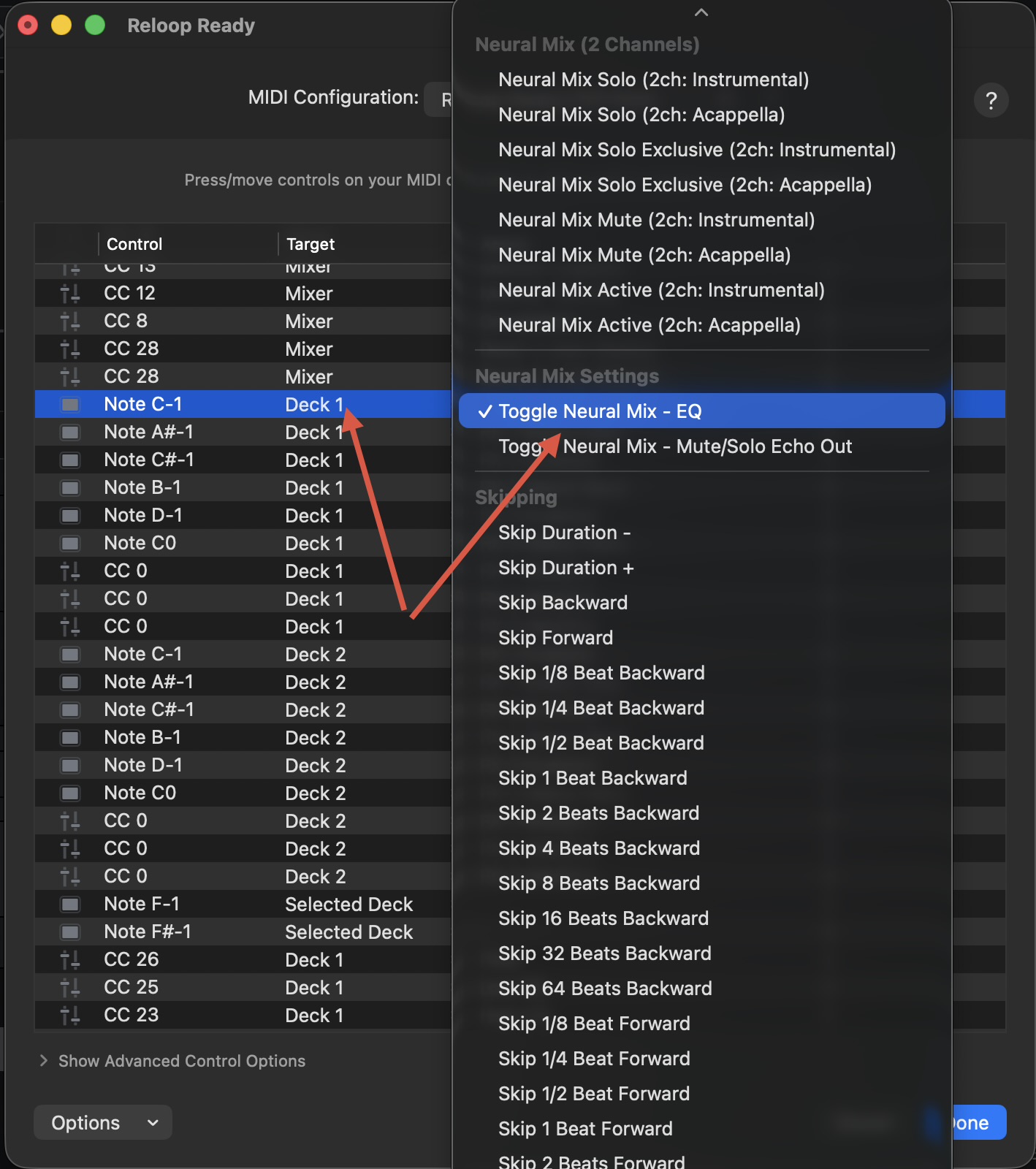
Thank you. What does Note C-1 refer too? Is that one of my sample buttons?
You’re welcome @Ckinsel. This is related to MIDI mapping. Please refer to the linked FAQ below on how custom MIDI Mapping on macOS works.
I still don’t understand. My mac has been connected to DJ Prom for many years. A pop up doesn’t come up. Mapping a MIDI device | Algoriddim Support Also where is the EQ/NM EQ onscreen Toggle.
Hi again @Ckinsel, please read the linked topic on how to use the MIDI Learn tool for djay on macOS. With your DJ controller connected to your Mac, and while in the MIDI Learn tool, press an unused button on your controller that you want to map to Toggle Neural Mix - EQ. Then map it according to my screenshot above.
If you prefer, you can simply use the onscreen toggle.
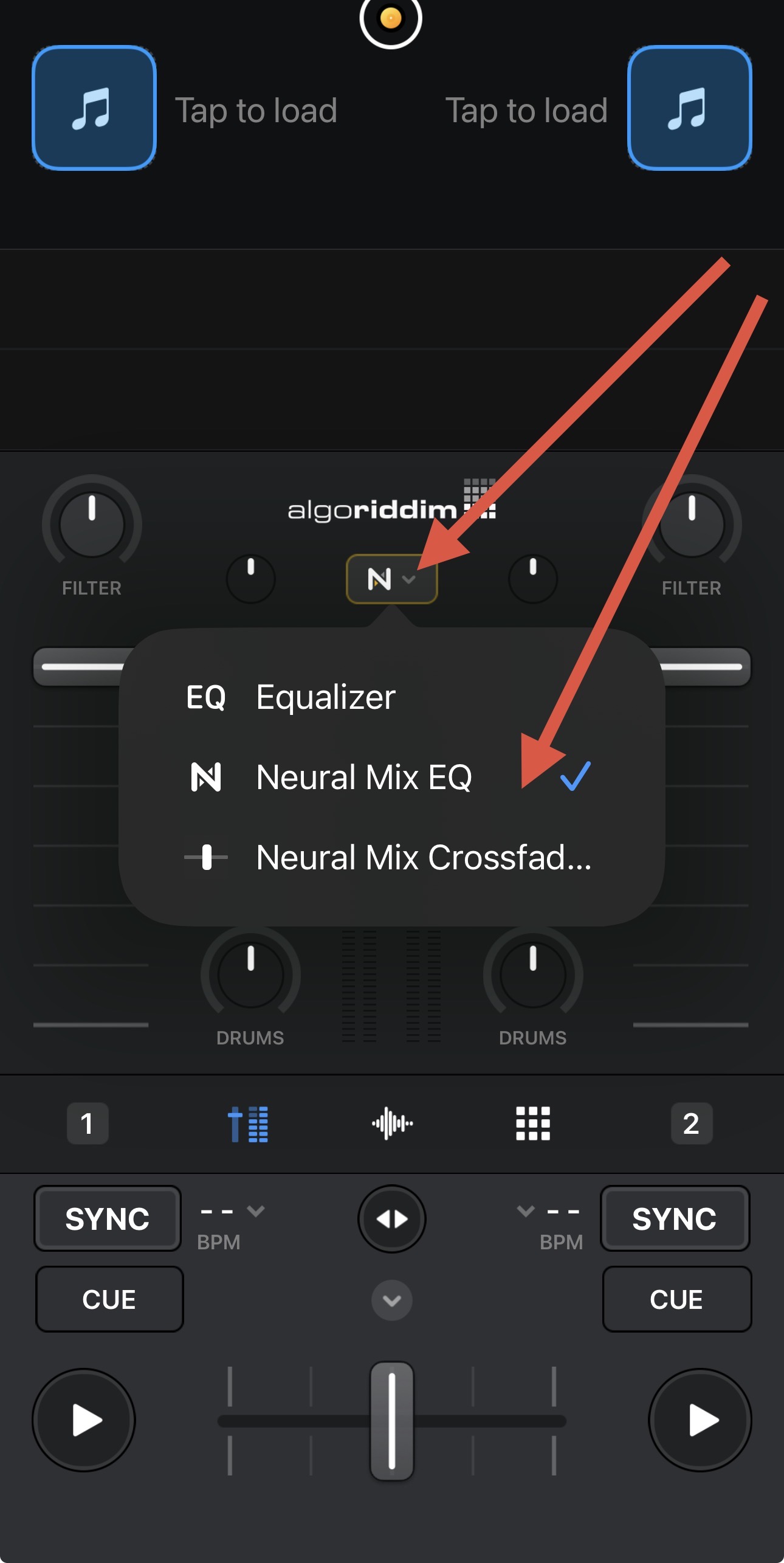
How do I open the MIDI Learn tool?
Thanks!
Chris Kinsel
DJ | Emcee | Owner – 3 Voice Productions
 804-334-1991

 @3_voice_productions https://www.instagram.com/3_voice_productions/
I am using a Pioneer DDJ SX3. Is it not allowing me to Map Midi Controls?
If not, Which controller would you recommend that works the best with DJ
Pro?
I’ve seen some on your site, but I know some new controllers have come out
since then.
Chris Kinsel
DJ | Emcee | Owner – 3 Voice Productions
804-334-1991
@3_voice_productions https://www.instagram.com/3_voice_productions/
Are you on iOS or macOS?
Mac
Chris Kinsel
DJ | Emcee | Owner – 3 Voice Productions
804-334-1991
@3_voice_productions https://www.instagram.com/3_voice_productions/
The SX3 is supported and MIDI mappable on macOS. Since I’m currently on vacation, I recommend that you submit an official support request through the djay app.
- Open the djay Pro app on your Mac.
- In the top left corner of your screen, click on the portion of the menu bar that says “djay Pro”.
- In the drop-down menu, click on the button that says “Provide djay Pro Feedback”.
- Fill out the submission form that will pop up in your default browser and title your email “ATTN: MARIE – “The Title of your Community Topic” in the provided subject line.
- Please also include a link to the Community Topic so support can reference everything we’ve discusses here. Thanks!
I am using a Pioneer DDJ SX3. Is it not allowing me to Map Midi Controls?
If not, Which controller would you recommend that works the best with DJ
Pro?
I’ve seen some on your site, but I know some new controllers have come out
since then.
Chris Kinsel
DJ | Emcee | Owner – 3 Voice Productions
804-334-1991
@3_voice_productions https://www.instagram.com/3_voice_productions/
How do I open the MIDI Learn tool?
Thanks!
Chris Kinsel
DJ | Emcee | Owner – 3 Voice Productions
804-334-1991
@3_voice_productions https://www.instagram.com/3_voice_productions/
Hi @Ckinsel, I’m on vacation and have shared all the information I can think of to assist you. Please contact our Official Support team for additional help while I’m away. Thanks!
- Open the djay Pro app on your Mac.
- In the top left corner of your screen, click on the portion of the menu bar that says “djay Pro”.
- In the drop-down menu, click on the button that says “Provide djay Pro Feedback”.
- Fill out the submission form that will pop up in your default browser and title your email “ATTN: MARIE – “The Title of your Community Topic” in the provided subject line.
- Please also include a link to the Community Topic so support can reference everything we’ve discusses here.
Ok But what link do I send?
Chris Kinsel
DJ | Emcee | Owner – 3 Voice Productions
804-334-1991
@3_voice_productions https://www.instagram.com/3_voice_productions/
This one: How to use Neural Mix on Pioneer DDJ SX3
Ok But what link do I send?
Chris Kinsel
DJ | Emcee | Owner – 3 Voice Productions
804-334-1991
@3_voice_productions https://www.instagram.com/3_voice_productions/


