Version of operating system Windows 11 Pro - 24H2 - 26100.4946
Version of djay: 5.4.2
Hardware/controllers used: Piioneer DDJ FLX4
Summary of the issue:
The application inconsistently handles duplicates from the RB Collection. When adding a track to a playlist that already exists,
if the track has RB cue points and loops, it correctly identifies the duplicate and preserves its Djay Pro cue points, loops, etc.
but if there are no RB cue points and loops, it imports as a new separate instance of the same track. This new instance lacks all previously saved Djay Pro cue points,
How to reproduce the issue:
Locate a few tracks in your RB Collection with and without RB cue points, that you have already set Djay Pro cue points for in a specific playlist
Attempt to add the track to the playlist from the RB Collection browser
Observe the result:
Inconsistent Behaviour A: for the track with RB cue points, a pop-up states “This track is already in the playlist” and does not add a duplicate, and when force adding, it preserves the Dejay Pro Cue Points
Inconsistent Behaviour B: for tracks without RB cue points. a new instance of the track is added to the playlist. This new track will have none of the cue points or attributes you set for the original track in that playlist.
Edited: I just did a few more tests, and the inconsistency may be random and not directly related to the tracks with non-existing RB cue points!
Expected Behaviour:
The app should consistently detect all duplicate tracks with the same source file and offer an option to either keep the existing attributes or replace them with External APP (i.e RB)
Hi @Max_K, thanks for the careful and detailed explanation of your issue. I have shared this with our engineering team for further analysis and to see if they can replicate this on their systems. I’ll report back when I have more news. Thanks again!
Hi @Max_K, sorry for the delayed response. The engineer that I needed to discuss this with was away on summer vacation. Our duplicate track detection system does not look at things like saved cue points.
Inconsistent Behaviour A: this is currently expected behaviour in djay.
Inconsistent Behaviour B: this might happen if you had set cue points for the track in djay before but then deleted them. In that case the track was already “touched” by djay and is essentially the same as a track with the cue points.
Do the cue points load correctly in djay when you load the tracks directly from the External Apps source?
Hello! It’s been a week since my last reply. I’m going to consider this topic completed for now so I can focus on others. However, please feel free to respond and we can definitely revisit this. Thanks!
I definitely haven’t added and then removed cue points in Djay Pro. I always drag and drop my tracks directly from the external source (RecordBox) and it always detects existing files and duplicates without adding them again.
Here’s another test I did:
1- Created a new RB playlist and added 8 new files.
2- Created cue points for two of them in RecordBox.
3- Added 4 of the tracks directly from the external source (RecordBox).
4- Refreshed RB library in Djay Pro.
5- Tried to add all 8 tracks again from External Apps (RecordBox Library) in Djay Pro.
6- Skipped the duplicates pop-up,
7- But it still added 3 files again as duplicates. For the record, one of the files with existing RB Cue points is duplicated too.
I think the logic here needs to be clear and consistent; otherwise, this feature becomes unreliable and people like myself will stop using it.
I suggest a feature that Djay Pro detects all duplicate files (based on file source and other identifiers) and then pop up an option to either preserve or replace the existing cue points and attributes.
This would help keep everything consistent and give users better control over their library.
Hi again @Max_K, I spoke with engineering. Duplicate detection in djay is based on title + artist + duration of the track, i.e. if two tracks have the same values for all 3 of these they are considered duplicates. I hope that helps!
It’s definitely not picking up duplicates properly, as you can see from my test with those new tracks.
I’m sure this isn’t consistent behaviour. I’ve done everything I can on my end, so I’ll leave the rest with you. Just give me a shout if you need any more info on how to replicate
I’ve run a few more tests and found that even when the files have the exact same Title, Artist, Duration, and other details, some of them are still not being detected as duplicates, which is not consistent. And I can’t figure out the logic behind it. My test is dragging the files directly from the RB library.
Djay Pro 5.6.1
Rekordbox: 7.2.8.03271
Windows Windows 11 Pro - 25H2 - 26200.7462
Hi,
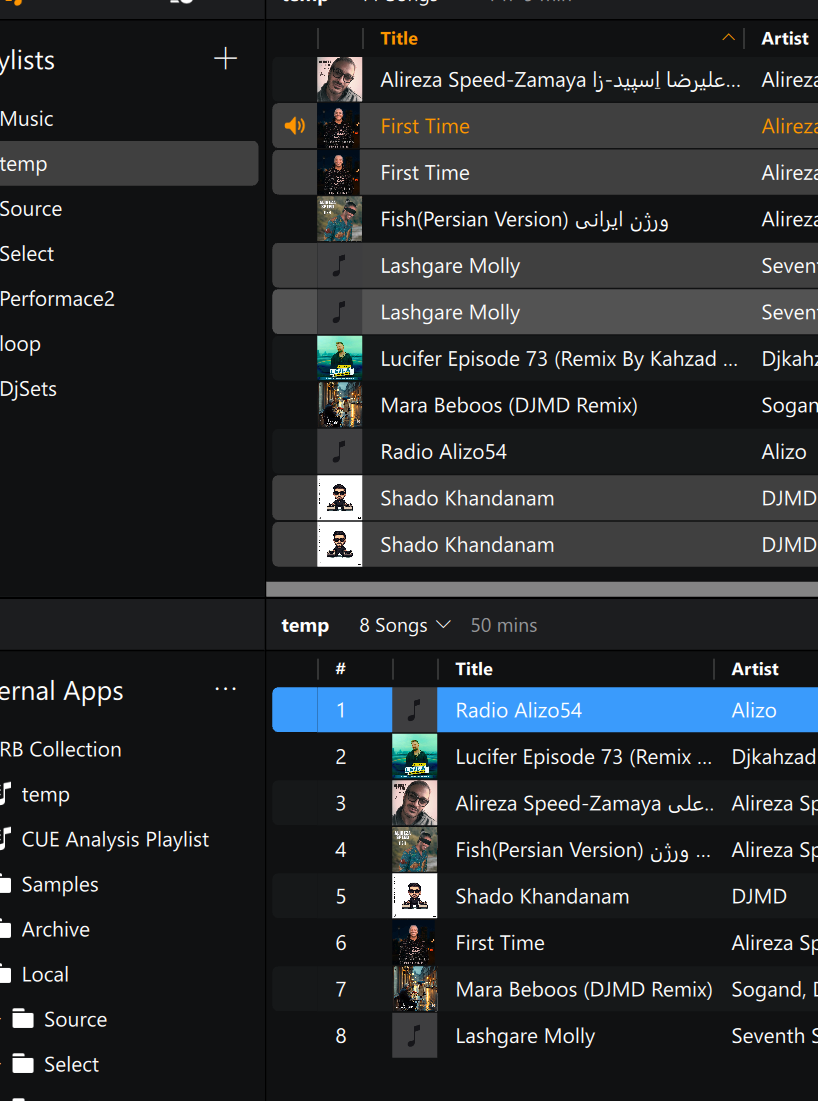
I’m still experiencing this issue. I’ve done a test from “another angle” that highlights the problem more clearly:
The exact same audio files are being treated as different tracks in Djay Pro, depending on how they are imported:
How to Reproduce for me:
1- Drag 4 files directly from Rekordbox (or from your file browser) into a new playlist (Playlist-1)- which I have already have cue points in Djay Pro.
2- Drag the same 4 files into a different playlist (Playlist-2), but this time add them via the ‘External Apps’ section that connects to Rekordbox.
You’ll see that the files in Playlist-2 are treated as completely separate entities – they don’t share cue points, play counts.
This suggests the ‘External Apps’ integration is not correctly identifying and matching the files, (at least in some situations!)
Note: Some random files are getting picked as the same files, but I couldn’t dissect the logic!
Thanks for the video and additional troubleshooting @Max_K. I have passed this onto our engineering team for further review. However, please note that several members of the team are on holidays this week, so it make take some time to get feedback. Thanks!
Hi @Max_K, sorry for the delayed reply. Just a quick update on this. Our engineering team was able to reproduce this issue and they are investigating further. I’ll share more news here when I have it. Thanks!