NOTE: Please use the search function above before posting to avoid creating duplicate topics.
- Device model ( 2024 iPad Air 13 inch (M2)
- Version of operating system (IPadOS 26.2.1)
- Version of djay (5.6.1)
- Hardware/controllers used (Pioneer DJM A9)
- Please consider sharing a short video or screenshots to help clarify your question
YOUR QUESTION
Hi everyone,
I’m preparing for a club gig soon and I’ll be using djay on an iPad (USB‑C) together with the Pioneer DJM‑A9. I’ve read different posts about the Crossfader FX and I’m still unsure about what actually works with this mixer in External Mixer Mode.
Some users mentioned that Crossfader FX does work when the iPad is connected to the DJM‑A9, even though the mixer doesn’t send MIDI for the crossfader. I’d really appreciate some clarity from people who have tested this setup.
A few details about my situation:
- I’m not planning to use the CDJs connected to the mixer
- I will be mixing only through the DJM‑A9
- At home I use a GRV‑6, so the layout feels familiar to me, but I want to be sure about the differences in functionality
My questions:
- Does Crossfader FX work when using djay on iPad with the DJM‑A9 in External Mixer Mode?
- If it works, how exactly does it behave with the A9 crossfader?
- Are there any limitations when using STEMS with the DJM‑A9 crossfader?
- What is the correct way to connect the iPad to the DJM‑A9?
- Is USB‑C → USB‑B the right cable?
- Does the USB‑C port on the DJM‑A9 serve any purpose for djay?
- What audio routing settings should I use in djay for the best performance with this mixer?
- Any recommended mixer settings on the DJM‑A9 (channel input mode, USB routing, etc.)?
I’ll be connecting the iPad using a USB‑C → USB‑B cable into one of the DJM‑A9’s USB ports, unless there’s a better method I’m not aware of.
Any advice or real‑world experience would be super helpful. Thanks in advance!
Hi @illya_kroon, I want to provide you some quick answers first then doublecheck with our hardware engineering team for confirmation.
- Does Crossfader FX work when using djay on iPad with the DJM‑A9 in External Mixer Mode
a. Yes, CFX now works with External Mixer Mode Devices like the A9. Note the A9 MUST be used in External Mixer Mode → this is not an optional setting.
b. Note, you may need to have djay in Pro Mode or Classic Mode instead of Hardware Mode to access the CFX controls.
- If it works, how exactly does it behave with the A9 crossfader?
a. The A9 crossfader also sends MIDI so CFX should simply work as normal - I confirmed this with our hardware team.
- Are there any limitations when using STEMS with the DJM‑A9 crossfader?
a. There are no dedicated Neural Mix controls on the A9. For example, you will not be able to toggle between Normal EQ and NM EQs.
- What is the correct way to connect the iPad to the DJM‑A9? Is USB‑C → USB‑B the right cable?
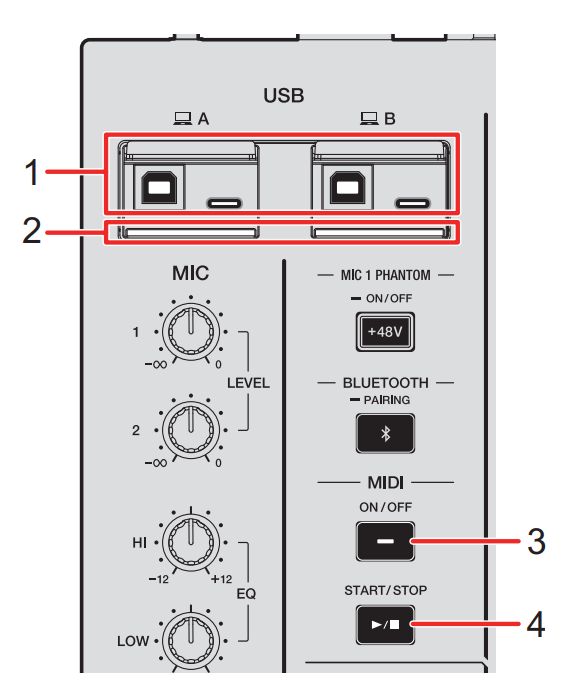
a. Yes, you can connect your iPad directly with a USB-C to USB-B cable to either the A or B sockets on the top left of the mixer.
b. Note, however, that these sockets will not charge your iPad. If you have a long set, you may want to consider using a powered USB-C hub connected to your iPad first so you can connect your iPad charger to it then a USB cable to the mixer. Again, you will want to test this first, to confirm that your iPad and the A9 will function as expected when connected to your powered hub. If in doubt, connect directly via a cable and make sure your iPad is fully charged.
- Does the USB‑C port on the DJM‑A9 serve any purpose for djay?
a. The USB-C sockets on the top left side of the mixer can also be used to connect your iPad. So you can use either the Type B or Type C sockets with your iPad.
b. Note, that the USB-C sockets on the A9 also will not charge your iPad.
c. However, do not connect your iPad to the MULTI I/O socket on the top right side of the mixer. This will not work.
- What audio routing settings should I use in djay for the best performance with this mixer?
a. djay is plug-and-play with the A9 and will automatically configure your audio settings in External Mixer Mode. I do not recommend changing these settings. If you accidentally make any changes or the audio is not working, simply press the Reset to Defaults button at the bottom of the Audio Devices Settings page.
- Any recommended mixer settings on the DJM‑A9 (channel input mode, USB routing, etc.)?
a. Please refer to the A9 user manual for full USB/MIDI setup starting on page 57. Basically, you need to enable MIDI and set the input selectors for each channel to “Computer A” or “Computer B” depended on which USB socket you connected to.
b. Pioneer DJ DJM-A9 Manual
I hope that helps! As mentioned, I will doublecheck with our hardware team to confirm some of the above. In the meantime, I highly recommend that you read through the DJM-A9 user manual. Thanks!
Hi again @illya_kroon, I have confirmed everything above with our hardware team and edited my answers accordingly. I hope that helps!