NOTE: Please use the search function above before posting to avoid creating duplicate topics.
- Device model (e.g. 2020 iPad Air 4th Gen): iPad mini (A17 Pro)
- Version of operating system (e.g. macOS 14.4.1): iPadOS 26.2.1
- Version of djay (e.g. 5.1.2): 5.6.2
- Hardware/controllers used (e.g. Reloop Mixon 8 Pro): None, only iPad itself
- Hardware firmware version (e.g. 1.0.1): N/A
- Please consider sharing a short video or screenshots to help clarify your issue: See https://youtu.be/G7zyYC5IxZU
A) SUMMARY OF ISSUE:
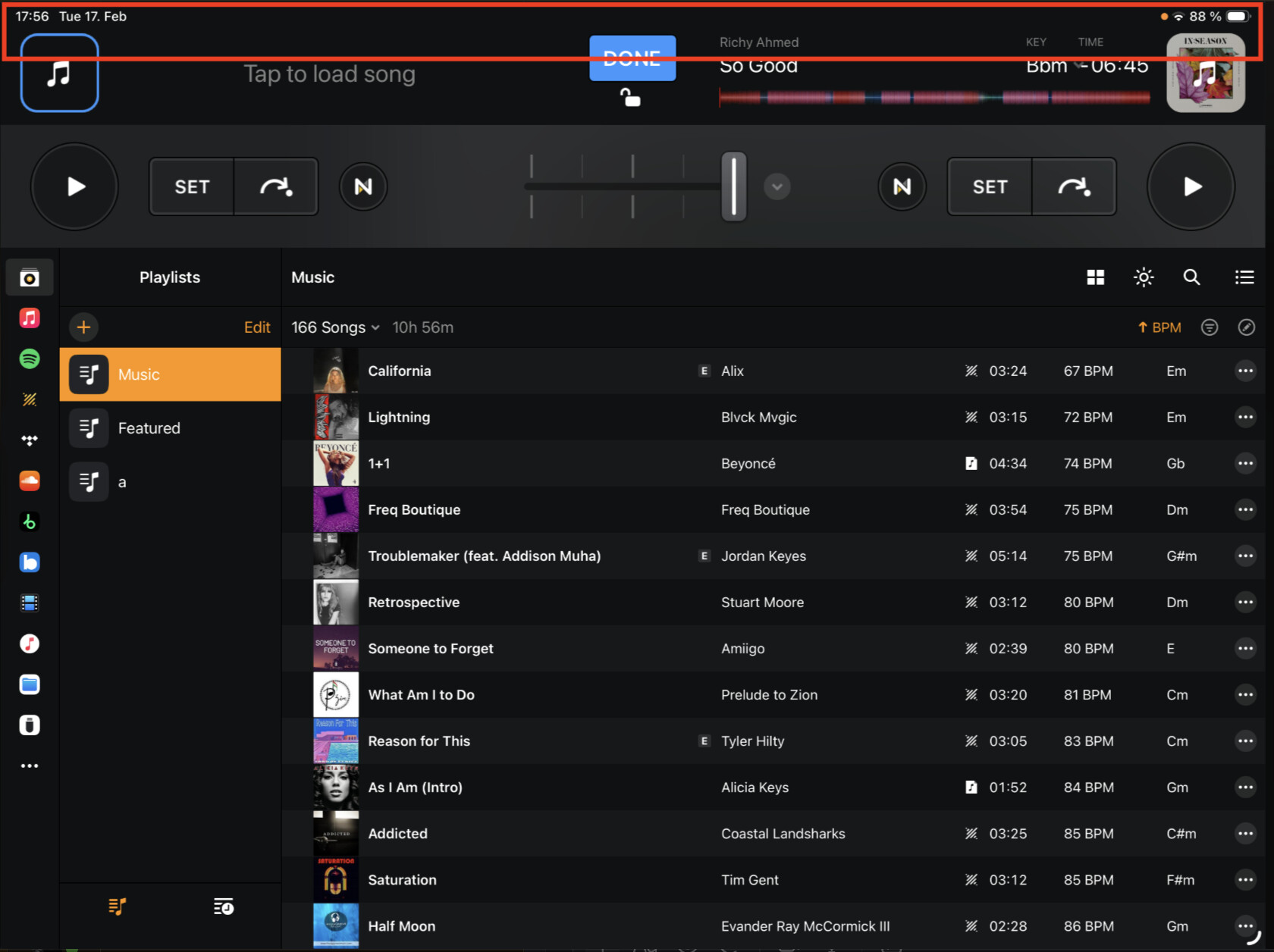
When tapping the album art to load a track, in the “Pro” layout view, with the “Mixer” tab activated (though only tested with this layout view), the library list scrolls to the top at times. The bug happens, in my findings, regardless if sorting (by BPM, for example) is enabled, or the music source (only tested with My Collection and Apple Music).
Oddly, this bug occurs less when the right sidebar is kept open (where the queue, history, match, and automix tabs are). Keeping the sidebar open prevents the scroll reset most of the time (though I got it to scroll to the top during my video demo), and I’ve been using this workaround for a few of my DJ sets, and it seems like its a stable workaround (until I recorded this demo video…  )
)
Note: I did copy over my “djay Media Library.djayMediaLibrary” file from Mac to my iPad. Though, I don’t think this contributes to the bug, as I tested using the official method of transferring a library via OneLibrary, and the bug still happens. I also thought coloring by key may have been the issue, but the bug still happens with or without the coloring by key option.
See video of me demonstrating the bug: https://youtu.be/G7zyYC5IxZU
B) DETAILED STEPS TO REPRODUCE:
-
Open the djay Pro app.
-
Go to the “Pro” layout.
-
Switch to the “Mixer” tab in the “Pro” layout (basically where the inline library is not showing). This is the icon where it looks like a fader and a VU meter next to it – adjacent to the Music/iTunes icon and sampler icon.
-
Open the full-screen library by tapping the album art (flashing blue rounded square) in the top left corner. Make sure to scroll down in the library list to see the bug happening. Load a track into the left deck.
-
Repeatedly tap the album art on the right deck to open the full-screen library (do not load a track though, just keep tapping it to bring up the full-screen library page).
-
After a few tries, the list should scroll up to the top unexpectedly.
C) EXPECTED RESULTS:
- The list should not scroll up, and should remember the previous scroll state.
D) ACTUAL RESULTS:
- The list sometimes scrolls up instead of keeping the previous scroll state.