Hi again @StormeNet, in addition to the setup details above, can you please check the following?
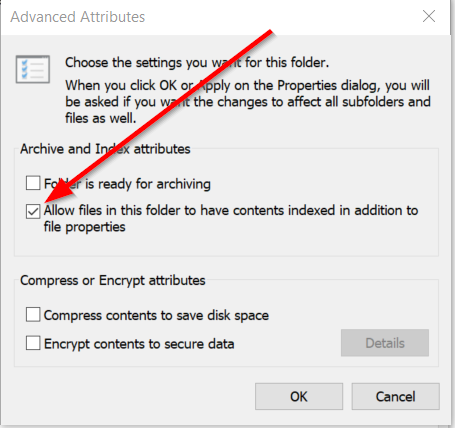
Make sure the folders containing the your local music tracks are set to be indexed by Windows search:
- Right-click the folder in Explorer.
- Select Properties.
- Click Advanced….
- Look for “Allow files in this folder to have contents indexed in addition to file properties”.
- Checked = the folder is allowed to be indexed.
- Unchecked = Windows Search won’t index file contents in that folder.
Hey, I checked the folder(s) and indexed was already ON.
My device: Legion Pro 7 16IRX9H
Processor Intel(R) Core™ i9-14900HX (2.20 GHz)
Installed RAM 32,0 GB (31,7 GB usable)
System type 64-bit operating system, x64-based processor
Windows version:
Edition Windows 11 Home
Version 25H2
OS build 26200.8655
Experience Windows Feature Experience Pack 1000.26100.315.0
1 Like
Okay, thanks for confirming @StormeNet. In order to continue investigating the issue, our engineering team kindly requests that you follow the steps listed below:
- Install and run “DebugView” app from Microsoft to access logs from djay Pro: DebugView - Sysinternals | Microsoft Learn
- Run djay Pro and reproduce the issue
- Upload the logs from DebugView to your Google Drive/Dropbox, enable sharing permissions, then share a link to the files in a DM to me.
Thanks!