Device model (e.g. 2020 iPad Air 4th Gen): Mac (Standalone / Tested without hardware)
Version of operating system (e.g. macOS 14.4.1): macOS
Version of djay (e.g. 5.1.2): 5.6.8
Hardware/controllers used (e.g. Reloop Mixon 8 Pro): Pioneer DDJ-FLX4 (Tested both with and without hardware)
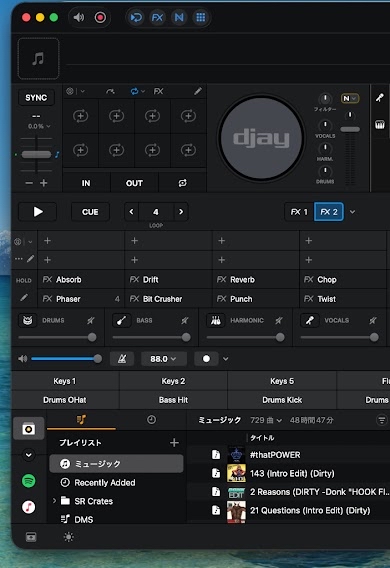
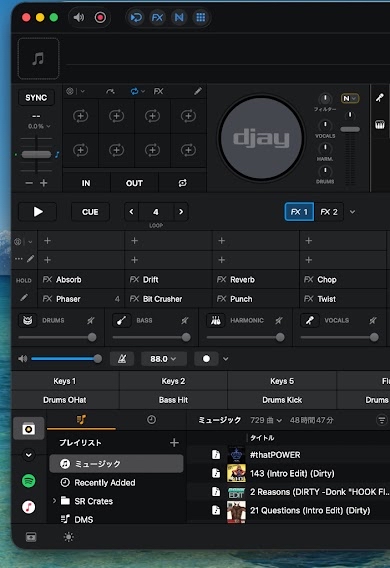
A) SUMMARY OF ISSUE: The “FX 1” and “FX 2” tabs in the software FX panel sync and overwrite each other instead of acting as independent effect banks, making it impossible to hold and switch between two separate effect sets.
B) DETAILED STEPS TO REPRODUCE:
Open djay Pro (version 5.6.8) (tested in standalone software mode without a controller connected).
Open the FX panel and select the “FX 1” tab.
Apply a specific effect pack or assign a set of effects (e.g., Effect set A).
Switch to the “FX 2” tab to set up a completely different effect pack or set (e.g., Effect set B).
Observe that the contents of FX 2 automatically sync, mirror, or overwrite FX 1, preventing independent configurations.
C) EXPECTED RESULTS: The “FX 1” and “FX 2” tabs should function as independent effect banks, allowing users to store and switch between two completely separate sets of effects.
D) ACTUAL RESULTS: The tabs link and synchronize their contents, rendering hardware and software switching between FX 1 and FX 2 practically useless since individual presets cannot be maintained.
Hi @shimisho, welcome to the Community! Thanks for the detailed report - this is very helpful. Can you please capture and share a short screen recording of this to help clarify what’s happening on your end? Thanks!
It reads to me like they are expecting a ‘Serato’ style FX where you have 2 banks and you can assign them to a channel independently, whereas Djay has a specific FX bank per channel.
This makes using Serato specific controllers quite difficult as there is a mismatch in workflow. Take the DDJ-SP1 as an example, you can’t control deck 3/4 effects banks in Djay because of the channel specific.
thanks but no, that’s completely missing the point. I’m talking about within the exact same single deck. Even in standalone software mode without any hardware, switching between the ‘FX 1’ and ‘FX 2’ tabs inside the same deck syncs and overwrites their contents instead of acting as independent banks. It has nothing to do with multi-channel routing or Serato controller mismatches—it’s a broken UI design for a single deck.
Thanks for the screenshot @shimisho. This clarifies things. Those are not the main Manual FX though. The ones you are using in your screenshots are a special version of the Instant FX and are there as another easy way to access Instant FX. They can only be applied one at a time like with the Instant FX.
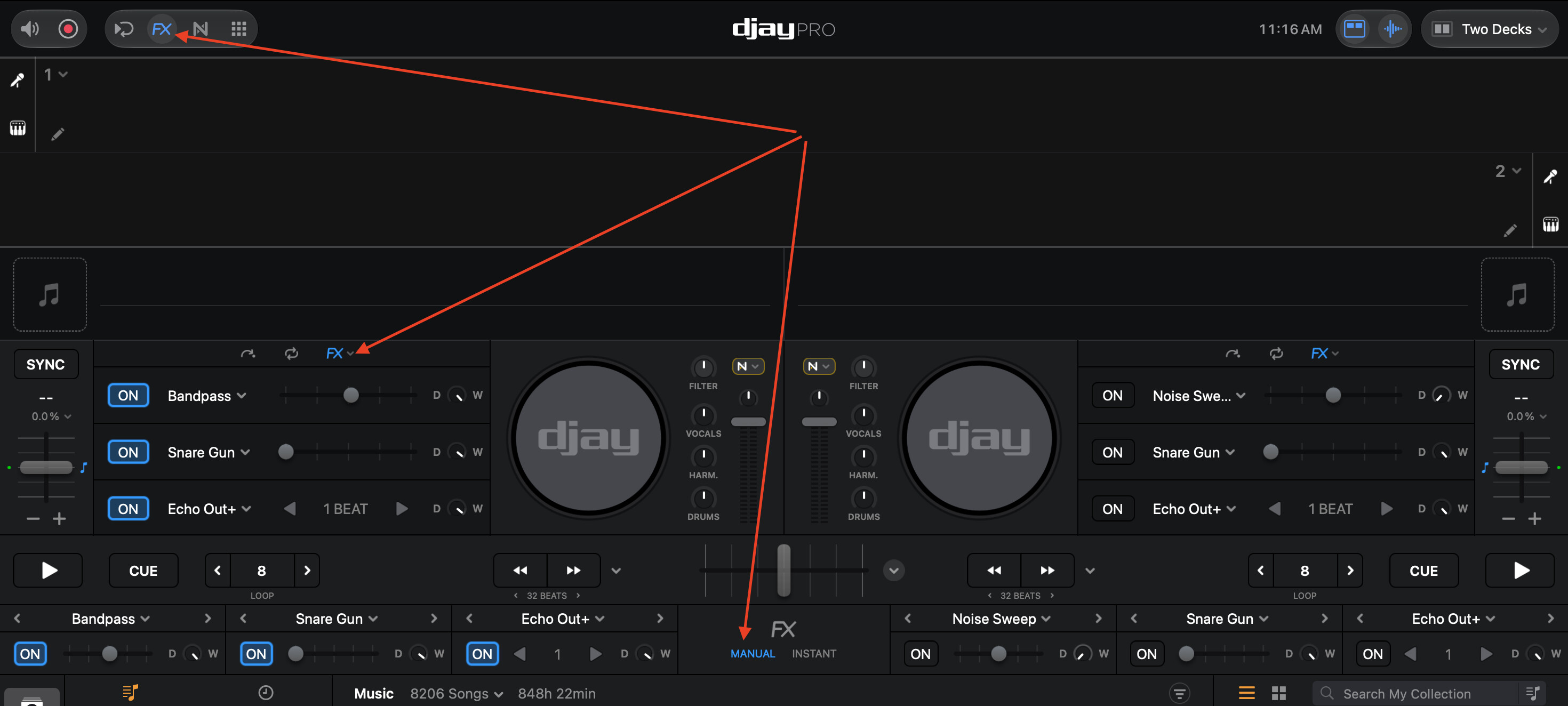
Please switch to the Manual FX instead if you want to layer up to 3 at a time:
Thanks for clarifying, but that’s not what I’m trying to do.
I WANT to use the Instant FX mode (not Manual FX), and I want to be able to control and apply the specific effects from an Effect Pack directly via the hardware pads.
Right now, within the same deck, I cannot set up or assign separate, independent effects from the Effect Packs to FX1 and FX2 the way I need. How can I achieve this exact setup using Instant FX and the pads?
Thanks for the additional clarification @shimisho. As requested earlier, please demonstrate this with a video to help clarify what you are trying to achieve and what isn’t working as expected. Thanks!
I think what you are trying to achieve is to have different Instant FX1 and Instant FX2 types for Deck 1 and for Deck 2. If so, please note, this is currently not supported with the Instant FX and is expected behavior - not a bug. They are mirrored across both decks. If you want different FX selections across Deck 1 and Deck 2, you must use the Manual FX.
If you like, I can change this topic from a Bug Report to a Suggestion and pass this onto our dev team for consideration. I hope that helps!
@Slak_Jaw
Thanks for the reply, but there is still a misunderstanding.
I am NOT talking about having different FX across Deck 1 and Deck 2.
As shown in the video I attached, my issue is within the SAME deck, where I want to set up and control independent, separate Instant FX (or FX packs) on FX1 and FX2, but the app doesn’t allow me to do this properly.
Please take a look at the video to see what I am trying to do within a single deck. I would appreciate it if you could pass this to the dev team as a feature suggestion.
Thanks for the video @shimisho. That definitely clarifies things! The FX1 and FX2 type selections are independent of the Instant FX selections. Think of FX1 and FX2 and 2 more Instant FX and completely separate from the other 8 Instant FX.
Please note: they are not two different banks of 8 Instant FX. So, instead of 8 Instant FX you essentially have 10 Instant FX. Not 2 banks of 8 for a total of 16. These were added so you always have access to 2 Instant FX even if your UI is set to a different view like Hot Cues or Loops. This section can also be changed to Neural Mix or Beat Jump if preferred.
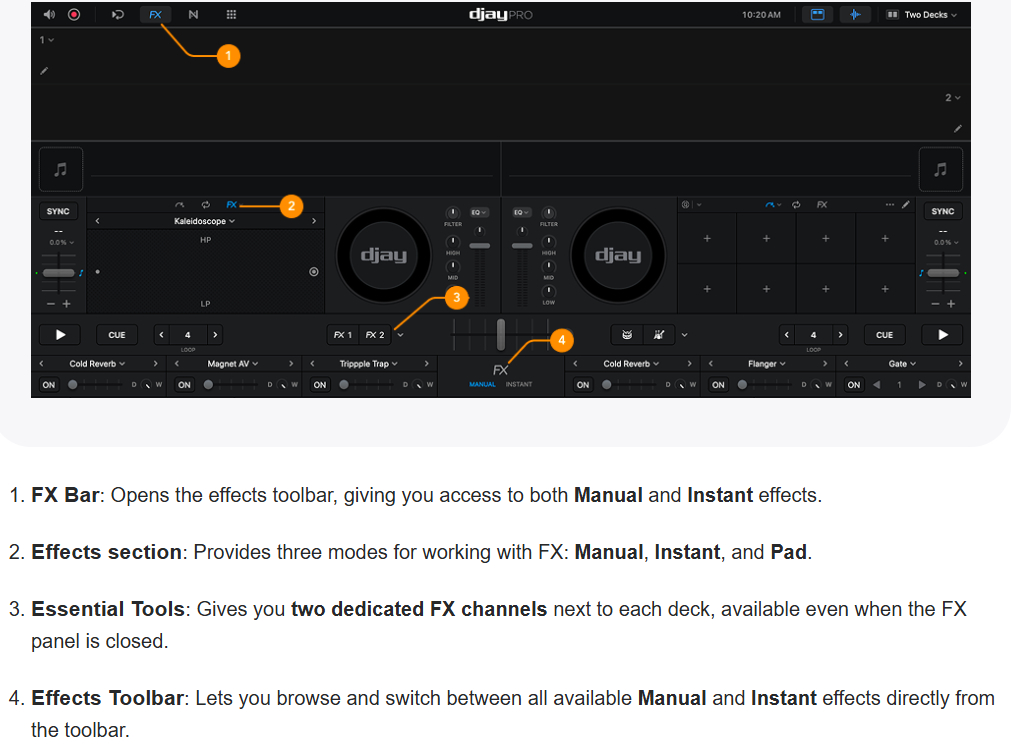
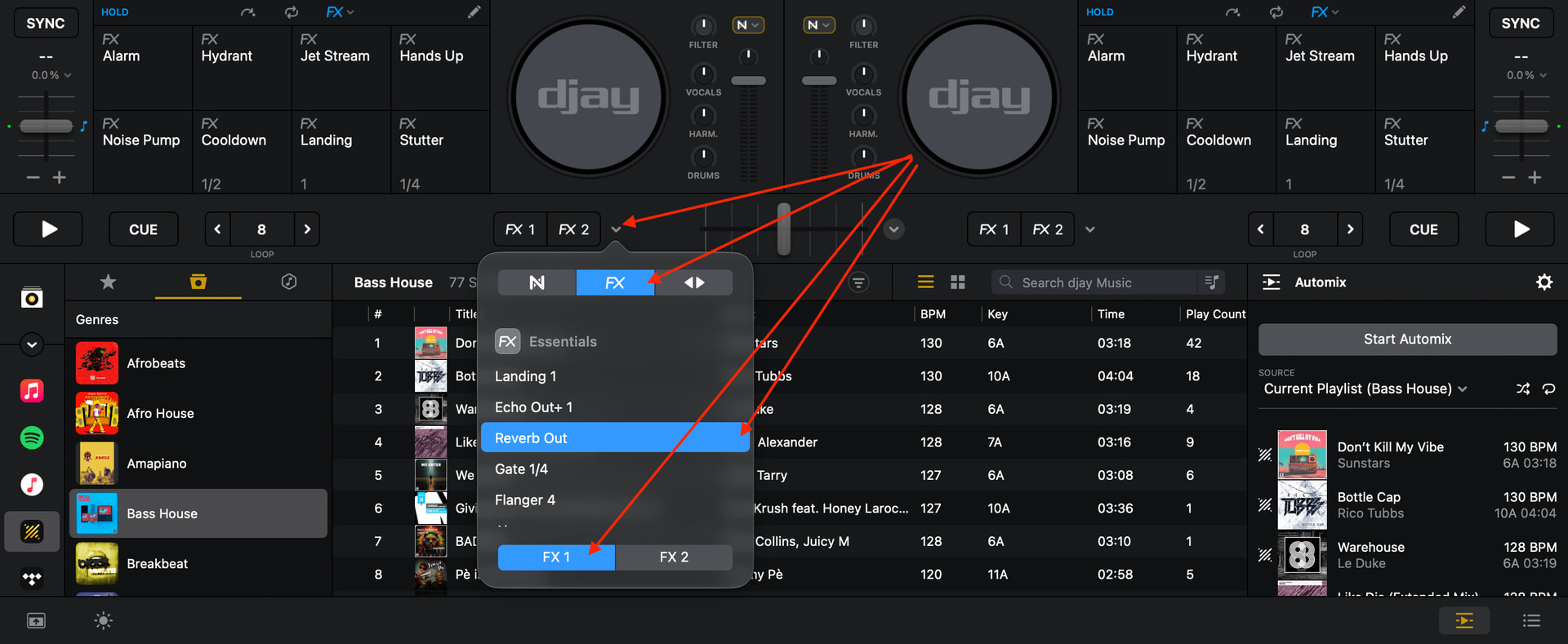
To change the FX selection for these, you need to select the down arrow next to FX1 / FX2.
Then choose either FX1 or FX2 at the bottom and finally choose the FX type that you want for each of the two FX (see screenshot below).
@Slak_Jaw
Ohh.. make sense!
So just to clarify my understanding, FX1 and FX2 are completely dedicated to only 1 effect (not to effect pack), right?
So we cannot manage or switch effect packs by FX1/FX2 button.
Correct?
My expected usecase was to assign different effect packs to each FX1 and FX2 button so that I can switch whole effects when I am needing.
However djay pro was not intended for that purpose.
that’ my understanding.
BTW, i am using ddj-flx4 and so far changing pad mode doesn’t reflect to UI in djay pro application.
Is this design?
This is not currently supported on the FLX4. Only some Reloop devices support this feature. However, there is an existing suggestion topic for this if you’d like to upvote it: MIDI Commands to Change UI Pad Modes