


Thanks for the feedback @Biser_Borisov. I’ll share this with our dev team. This is in active development. In the meantime, please read above for more details…
4 Likes
Hi! I’m using a FLX4 with djay PRO on a MacBook Air M4 - latest version, latest firmware. Is there a way the section of the UI between the decks and the playlist / music browser change as I move through the pad modes on my FLX4. For example, the default view could be cues and loops (or nothing since they’re next to the decks), but that should change when I press the beat jump button, then again if I select FX on the decks., etc. Having to manually switch it twice (once on the decks then again on the screen) or either have everything displayed at all times (or I guess use things blind) isn’t ideal.
Thanks!
1 Like
Hi @texasadam, this is not currently possible. Please see above for more details and cast your vote at the top. Thanks.
Thanks @Slak_Jaw, just voted. Not to pile on to what others have already said but this is basically the one feature holding me back from ditching Rekordbox completely and moving to djay full-time. Thanks for your response and hopefully the dev team can get this in the queue.
1 Like
You’re welcome @texasadam. Thanks for the additional input. I’ll share it with the devs…
Hello everyone,
I’m not sure if this is a suggestion, a question, or a bug, so @Slak_Jaw, please feel free to move this thread to the correct category. Sorry for the inconvenience.
Here’s the situation: In Djay Pro 5.5.2, I’ve noticed that some buttons/functions on the Pioneer DDJ-RR controller do not work as expected.
Specifically, the PAD MODE buttons (HOT CUE, PAD FX, and SAMPLER—highlighted in the image) do not trigger any response in the app or via MIDI. They are not included in the native mapping, and I cannot find an option to map them manually
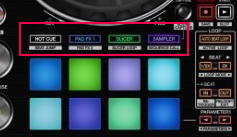
In Rekordbox, pressing these buttons on the controller automatically switches the software interface to that specific view. For example, pressing HOT CUE opens the saved hotcues panel.
However, in Djay Pro, the PAD FX button is not mapped to open the FX panel in the UI.

This forces me to use the mouse to manually navigate the interface and click the FX tab. The same issue applies to the SAMPLER button.
Interestingly, the SLICER button works correctly: when pressed, the pads activate, and the waveform changes to Slicer mode, even though there isn’t a visible button assignment in the native mapping settings.
I’ve also noticed other missing functions (I’m not sure if these are bugs or specific to this controller):
- Grid /2 button (halve BPM)
- Grid x2 button (double BPM)
Note: I would like to be able to access these functions using the controller’s Shift button (secondary layer), as these buttons have dual configurations.
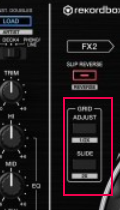
There are other buttons not configured in the original mapping that I cannot add due to the lack of options. While these don’t personally affect my sets, since I already have an open ticket regarding this controller, I think it might be worth reviewing the DDJ-RR native mapping more thoroughly.
That’s all for now. Please let me know if there’s anything I can do or if this is indeed a bug. It’s preventing me from getting 100% out of Djay Pro during my sets.
Thanks!
1 Like
Hi @Albert_Maro, I’ve merged your new topic with this existing one. This is not currently supported in djay, but you can vote above for this suggestion. Thanks!
1 Like
Has others suggested, at least, give us the midi mapping functions to select the panel. Thanks
Thanks for the input @PatriceCros
- Device model : Mac Mini M1
- Version of operating system : Tahoe 26.2
- Version of djay : 5.6.2
- Hardware/controllers used : Hercules Inpulse 500
- Hardware firmware version (e.g. 1.0.1): unsure (stock)
- Please consider sharing a short video or screenshots to help clarify your question/suggestion/feedback
YOUR QUESTION / SUGGESTION / FEEDBACK:
-
When switching from Hot Cue to Saved Loop on the hardware, the pad view in djay’s interface does not update to reflect the selected mode.
-
It seems not possible to map such UI change to Midi, since this would easy solve the problem.
Regards
Giuseppe
1 Like
Hi @GiusC, this is not yet supported in djay. I’ve merged your new topic with this existing one. Thanks!
@GiusC please hit the Vote button on the first post of this thread.
Sooooo many people want and need this feature 
2 Likes
Voted! This plus having multiple/split windows features on PCs/Mac would
make it an absolute killer …
1 Like
Voted! This plus having multiple/split windows features on PCs/Mac would
make it an absolute killer …
1 Like
Thanks for the vote @GiusC
1 Like


