


Hi everyone, I’m working on MIDI mapping Pioneer mixers. When I map in Serato, I set the mapping to “rel” so any button press triggers the desired action. However, in DJ Pro, I have to double-tap for it to work. Does anyone know a fix or why this happens?
Hi @Owe_Marley, when creating new topics, please do not forget to answer the questions in our template with specific details about your setup not just “iPad” or “Latest Version”. This helps all of our community moderators to provide the most effective support to users with the utmost efficiency. Thanks!
Device Model (ex. 2020 iPad Air 4th Gen):
Version of operating system (ex. iOS 17.3.1):
Version of djay (ex. 5.1.3):
Hardware/controllers used (ex. Reloop Ready):
Hardware Firmware Version (ex. 2.7):
This sounds like unexpected behavior. Can you please also share some screenshots of how you’ve MIDI mapped one of the buttons? Ensure that the Advanced Control Configuration section is expanded in your screenshot as well. It sounds to me like you may have mapped the same button twice by accident.
Hello! It’s been a week since my last reply. I’m going to consider this topic completed for now so I can focus on others. However, please feel free to respond and we can definitely revisit this. Thanks!
Hi team,
Just wanted to check if something is possible within MIDI mapping in djay Pro AI, or if I might be missing something.
I’m currently using a control that sends REL (relative) MIDI data, and I’m finding that it requires multiple presses to complete a full on/off cycle, rather than behaving like a simple toggle.
In Serato DJ Pro, this type of behaviour can be handled more cleanly, allowing a control to act as a true toggle even when using relative input.
Is there a way to achieve this within djay Pro AI’s current MIDI mapping system, where a REL-mapped control can alternate cleanly between on and off with each press?
If this is already possible, I’d really appreciate any guidance on what I might be overlooking. If not, I’d love to suggest this as a feature, as it would make performance much smoother and more intuitive.
Thanks for your time
Hi @Owe_Marley, it sounds like you may have double mapped a function or are using the wrong button type. Can you please share screenshots of your mapping for this function with the Advanced Control Configuration section expanded?
1 Like
no problem I’ll need to hook up to the clubs setup to send a proper example.
In Serato DJ Pro, you can switch MIDI mapping from binary to relative, which completely changes how triggers behave.
Right now, with the default mapping (like what you guys have), if I map something like an acapella to a headphone cue on a Pioneer DJM-900, I have to press once to turn it on, press again, then press again to turn it off. It ends up being a double-tap cycle.
With relative mapping, it becomes a simple on/off toggle—one press on, one press off—exactly how you’d expect it to work.
I’ve looked through the MIDI settings in djay Pro AI but can’t find any option to switch this behavior.
Hi @Owe_Marley, when you have access to the hardware again, please capture a screenshot like the one below for the button you have MIDI mapped. Perhaps you have accidentally mapped the same button twice or you have set the wrong control type. Also, if you could please capture a video of the exact behaviour when you press this button that would be great. Thanks!
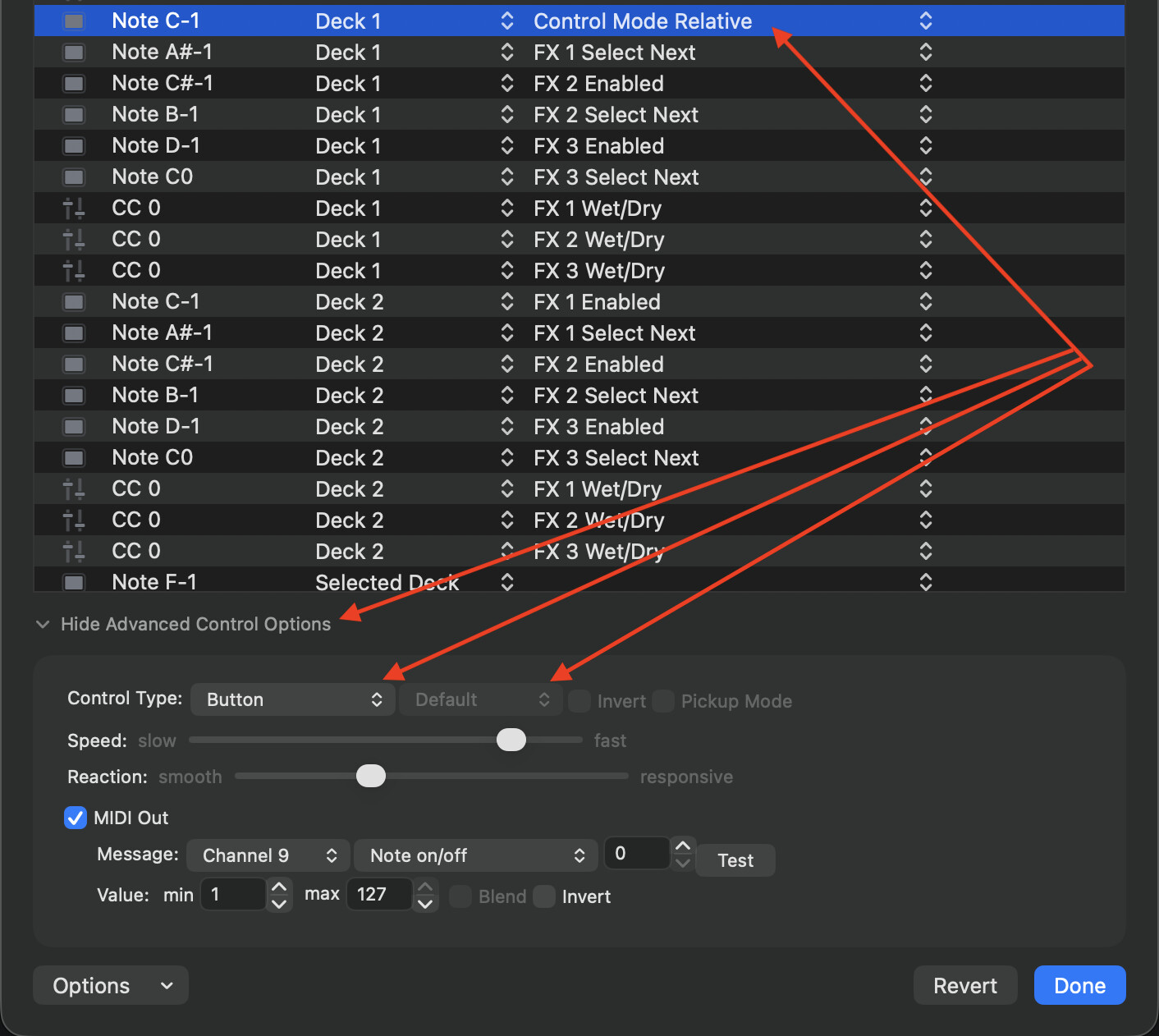
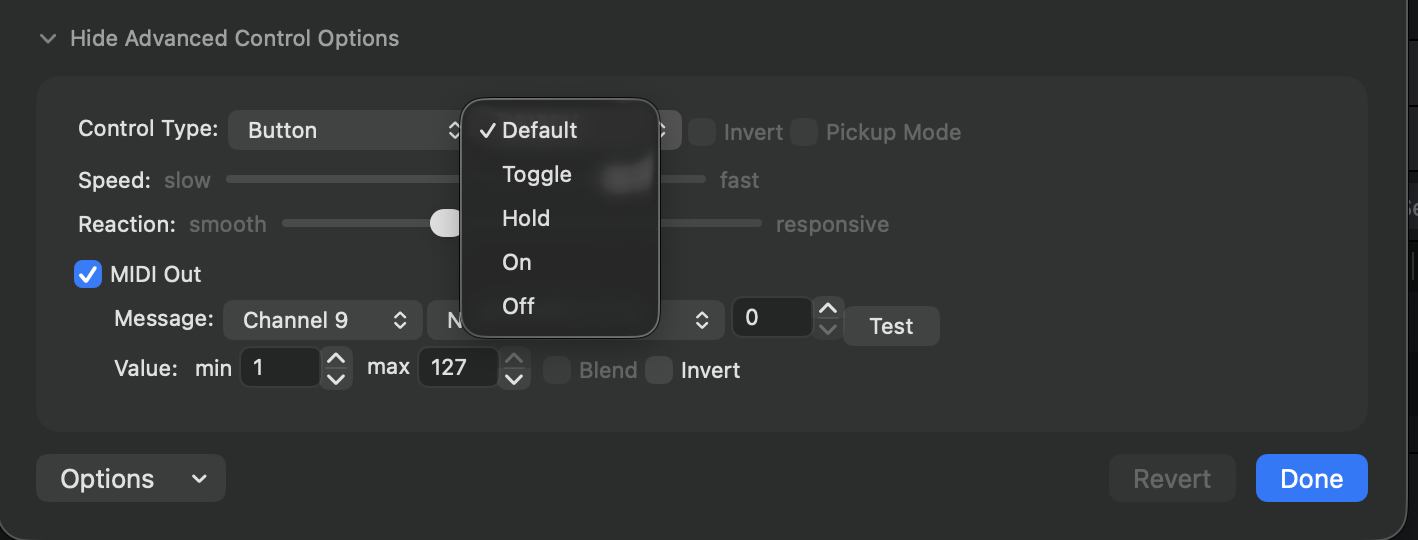
Some buttons can be changed from Default to Toggle, Hold, On, Off.
1 Like
Im at the club now i cant seem to get relative how you have on the image
Hi @Owe_Marley,
- Try pressing a different button on the hardware.
- Make sure the Target is set to Deck 1 or Deck 2.
- For the Action, scroll way down near the bottom of the menu to the DVS section to find Control Mode Relative.
1 Like
Buttons with fixed toggle settings on the hardware side will require two presses to function, even after changing the mapping.
Examples I’ve encountered include mixers and controllers from Pioneer and NI.
(However, in the case of NI, this can be changed using a dedicated tool.)
1 Like
yeah ive figured that out hence me suggesting the rel behaviour like serato has. i learned the other night that the REL in the picture above was DVS control something with smae name but totaly differnt to what i was looking for. please share this tool hehe
Just checking in to clarify whether we currently have this option or if my understanding of the feature is correct.
I’ve attached a YouTube video showing a DJ using a Pioneer mixer to trigger an acapella via MIDI in Serato. His mapping matches mine, utilizing a REL mode midi TRIGGER for button mapping (distinct from the Relative mode used for DVS).
When we attempt the same workflow in DJ PRO, the headphone cue is designed differently, so it requires a double-tap. In practice, this means toggling a stem on or off takes a total of four presses: two to turn it on and two to turn it off.
Please see 1:07 to 1:14 for stem feature using the HEADPHONE CUE to map Stems but no double tap toggle required because its midi is set to REL **(NOT RELATIVE MODE FOR DVS) **
please help
Hi @Owe_Marley, thanks for pulling the timestamp for me. The camera never gets the laptop screen in frame, so I can’t see what mode was set on his end. What I can tell you about our side: djay has no Serato-style REL button mode. Your options are MIDI Configuration > Advanced Options > Button mode > Default / Toggle / Hold.
Please try using the Hold option. Your DJM’s cue button latches on the hardware side, so one press sends the on message and the next sends off. djay should read that as the button being held, which would give you one press on, one press off. If this doesn’t work, I recommend you try mapping the function to a different button instead of the Cue buttom. I hope that helps!
Hi, yeah I ended up giving up altogether and just use the SP2 now. I spent hours after my close sets trying to configure it, but I came to the conclusion that no matter what button I press in DJ Pro, it requires a double-tap every time. It’s fine, since I still have the SP2 on deck anyway.
I just wanted to raise awareness about it, since my original plan was to leave the SP2 at home and only bring my laptop when this is available and hopefully we can have this feature pls.
1 Like
Okay, sounds good @Owe_Marley
1 Like


