Hello,
I am contacting you regarding my Mixon 8 Pro controller, which I received yesterday.
I tested it with my iPad Pro (purchased in February 2026) using the djay Pro application. The controller is correctly recognized in the app settings. However, only the faders (volume and tempo) are working. All other controls (pads, play buttons, effects, etc.) are not responding.
To troubleshoot the issue, I have performed several tests:
-
used different USB-C cables,
-
tested with djay Pro on my MacBook Pro (Apple M1 Pro),
-
uninstalled and reinstalled the djay Pro app on my iPad.
The result remains the same in all cases.
I would like to know whether this is a configuration issue between the Mixon 8 Pro and djay Pro, or if the controller might be defective.
At this point, I have already contacted other parties (including djay/Algoriddim and Apple), but unfortunately I have not been able to get a solution so far. I am therefore relying on your support to help resolve this issue.
Thank you in advance for your assistance. Please let me know if you need any additional information.
Best regards,
Olivier
Hi @Olivierreloop45, welcome to the Community! When creating new topics, please do not forget to answer the questions in our template with specific details about your setup not just “iPad” or “Latest Version”. This helps all of our community moderators to provide the most effective support to users with the utmost efficiency.
Device Model (ex. 2020 iPad Air 4th Gen):
Version of operating system (ex. iOS 17.3.1):
Version of djay (ex. 5.1.3):
Hardware/controllers used (ex. Reloop Ready):
Hardware Firmware Version:
- With your controller connected to your iPad, please share a screenshot of your djay Settings>Audio Devices.
- Please also share a screenshot of your djay Settings>MIDI Devices.
- Make sure you are using the (built-in) MIDI Mapping and not a custom edit.
- Make sure you have downloaded and installed the latest Mixon 8 Pro firmware from the Reloop website. Reloop Mixon 8 Pro - Reloop
I had the same issue for a few minutes too. Mine came in the mail yesterday. Fixed it with using a usb from the A Or B slots with a regular usb, not usb C. Seems very specific and to do what stuff is labeled as. Like the mic inputs don’t take line lvl signal well etc. my current issue is the fx toggles. Would love to know if yours work with djay when you get it connected. Hope this helps. I only tried to test the usbc connection with my phone and that took some doing as well. Had to connect to the phone with the cable, then the unit, then open djay, then cut on the controller, or it wouldn’t work
Hi again @Olivierreloop45, in addition to what I shared above, please also check the following:
- Check the USB switch on the back of the Mixon 8 to ensure that its position matches which USB socket you are plugged into.
- Now confirm that the switches on the top of the Mixon 8 near the Gain Knobs are set to the same USB source you are plugged into on the back of the unit.
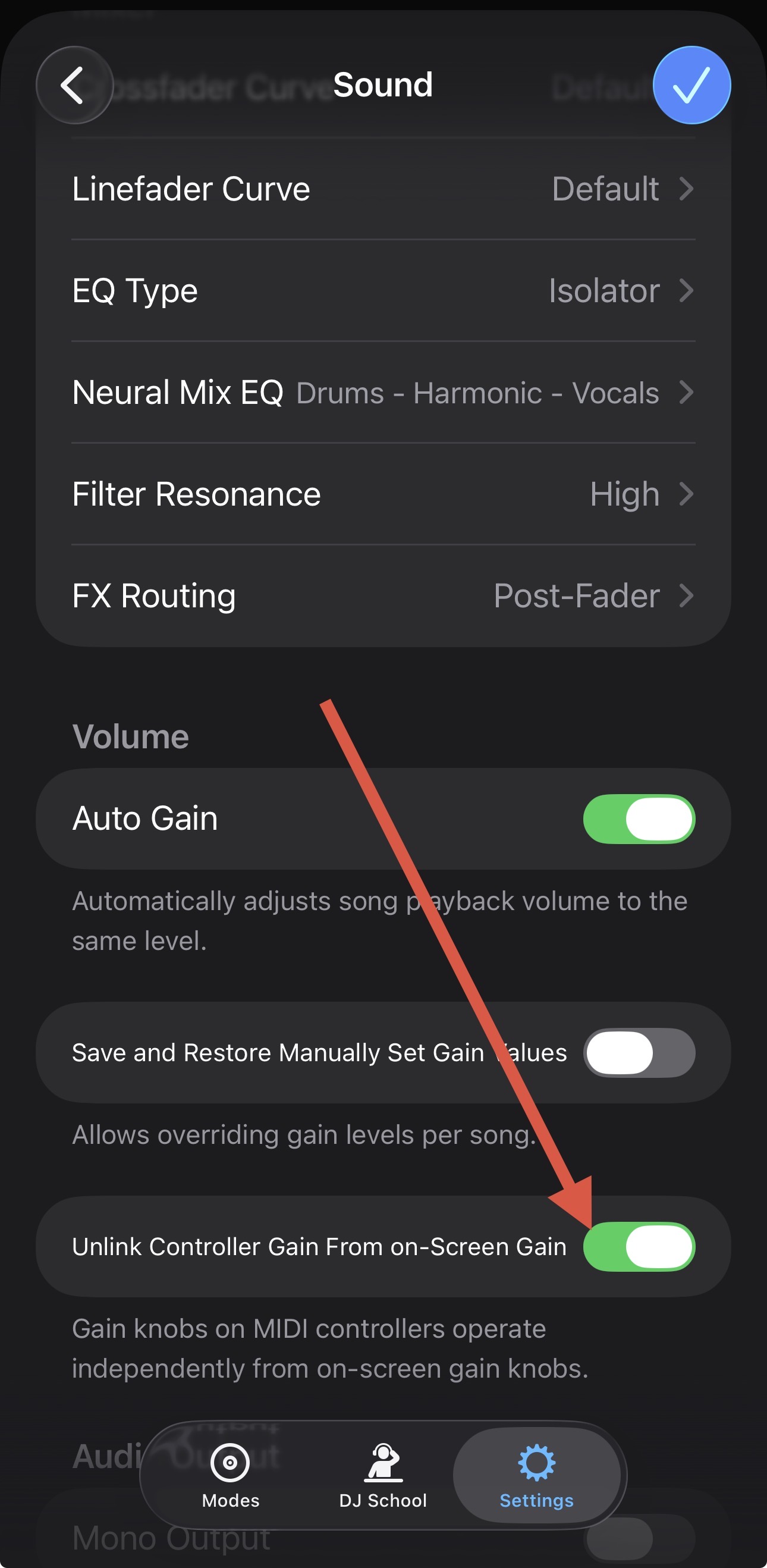
Hi - long time DJAY user and got mixon 8 pro when it was released. The latest version of DJAY has caused an issue with the auto gain feature - I play a weekly 2 hour radio show and last week plus this week, almost half of the songs are too low/quiet in the mix - the moment you adjust the channel trim/gain it jumps up to to the right level. If I tried to sort it by adjusting the master gain, then the next song (or the one after) would be red lining and I had to reduce it down again.
I’m using an m4 iPad Pro
Hi @DJGetNaked, try enabling the setting below:
Hello! It’s been a week since my last reply. I’m going to consider this topic completed for now so I can focus on others. However, please feel free to respond and we can definitely revisit this. Thanks!