NOTE: Please use the search function above before posting to avoid creating duplicate topics.
- Device model (e.g. 2020 iPad Air 4th Gen): Any
- Version of operating system (e.g. macOS 14.4.1): Any, but primarily Desktop Mac and Windows
- Version of djay (e.g. 5.1.2): Any
- Hardware/controllers used (e.g. Reloop Mixon 8 Pro): Native Instruments Traktor D2
- Hardware firmware version (e.g. 1.0.1): MIDI Mapping
- Please consider sharing a short video or screenshots to help clarify your question/suggestion/feedback
YOUR QUESTION / SUGGESTION / FEEDBACK:
I wanted to start a specific topic for MIDI mapping the Native Instruments Traktor D2 controller. This is a great controller for DJay as it has a MIDI mode and also was originally designed as a stems controller. It has faders, control knobs and buttons intended for 4 channel stem manipulation and is basically a standalone multi-deck controller that is almost identical to the deck control parts of a Traktor S8.
2 Likes
Thanks for sharing @Mandrake. I will pass this onto the dev team for consideration.
4 Likes
any update on this?
this got no vu meters, no sound card, no jog wheel, only thing is the screen if you can make it work would be amazing, even without screen still incredible controller with so much versatility.
it shouldn’t be hard to support right?
Hi @hardbea7, we don’t have any updates to share for this device.
How to map pad pages? when i try to map pads only does hot cues, I want to be able to change pad pages like beat jump, sampler, stem pads, pad FX
Hi @hardbea7, I’m sure exactly how it works on the D2 hardware, but normally you first change the pad mode via the hardware then press a pad to map it to the desired function. Most hardware with pad modes send different MIDI messages for each pad once you e changes the pad mode on the hardware. So you have to map each of the 8 pads for each of the pad modes.
pad mode doesn’t change, only that i need help with otherwise is very straightforward to make this device work, could you ask your team and come back with solution please?
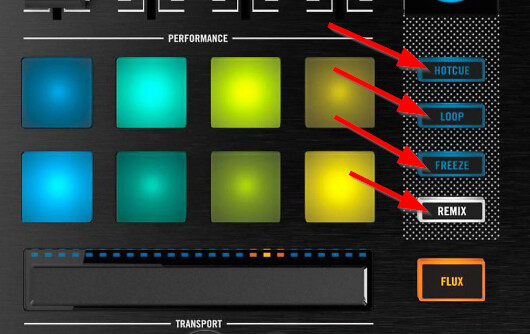
Looking at the D2 hardware image, the Pad Mode buttons are one the side. First, please refer to our guide for MIDI Mapping in djay: How to custom map a controller in djay using MIDI learn | Algoriddim Support
- With the controller connected to your device running djay, open the MIDI Learn Tool.
- Press one of the Pad Mode buttons on the D2, like “LOOP”.
- Then press PAD #1 and set the Target>Deck 1 and Action>Auto Loop 8
- Now press PAD #2 and set the Target>Deck 1 and Action>Auto Loop 4
- Repeat this process for all 8 PADS
- When finished with the LOOP PAD MODE, try pressing the FREEZE PAD MODE and mapping each individual pad to something like INSTANT FX 1-8.
I hope that helps!
I understand you very clear and i kinda know how to do basic mapping, but the problem here you don’t understand what i am trying to say…. pad mode doesn’t change like in the video
Then this is likely a limitation of the hardware. It seems it doesn’t send separate MIDI messages for the pads when changing pad modes. I don’t have access to this hardware to confirm myself, but you could try testing it with a MIDI Monitor app to confirm.
Traktor S2,S3 works the same way, but you guys made it to work, from what i understand we cannot map this in midi configuration, just help me with this, all i want is to change pad modes and assign pads to do accordingly
I don’t know what else to suggest unless you want to try to figure this out in the XML code. I don’t recommend this if you don’t know what you’re doing and I cannot offer any guidance for your specific needs.
Unfortunately, since Djay doesn’t support software-based MIDI layering or custom mapping combinations, the specific workflow you’re looking for isn’t possible. That said, with a bit of creative setup, you can actually make it more useful than the X1.
However, because it’s bulky and requires an external power supply, I haven’t used it at all lately.
1 Like
Thanks for sharing @megamema