- Apple Mac Studio 2022 M1 Max
- macOS Sequoia 15.7.1
- djay 5.5
- USB drive
When exporting audio files from macOS Djay Pro 5.5 to a usb drive (ExFAT or Mac OS extended format), the file name created in the usb drive has a maximum length of 45 characters.
It is not enough.
I have some files (different versions of the same track) that would have the same name because of this limitation.
In that case, only one file is imported to the usb drive.
So my playlists are not imported entirely and import function is not accurate.
Could you please tell me if this limitation is due to something I’m doing or if it is by design?
Is it possible to correct this issue?
See video file to reproduce the issue.
Thanks a lot,
Nicolas
Hi @InherentVibes, welcome to the Community! Thanks for the details about your setup and the video. I’ve shared this with our engineering team for further comment. I’ll report back when I have news.
1 Like
Hi again @InherentVibes, our team has identified the issue and is working on a fix which should be included in an upcoming update (likely 5.5.1). Thanks!
1 Like
Hi @Slak_Jaw
Thanks a lot
Nicolas
You’re welcome @InherentVibes
Hi @InherentVibes, 5.5.1 was just released and should address this issue. Thanks!
Hello @Slak_Jaw
Thanks for the good news with the 5.5.1 update.
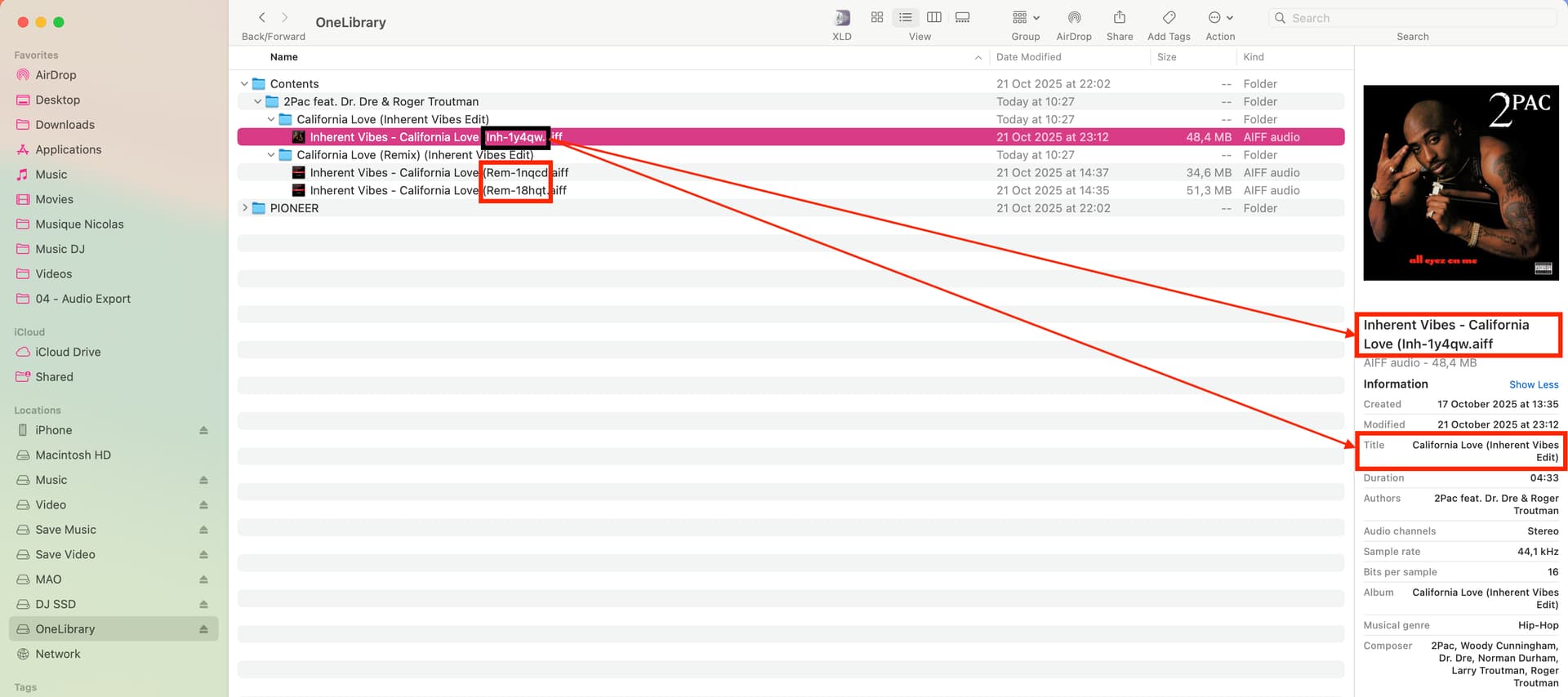
I updated Djay Pro to 5.5.1 on my Mac Studio and test the correction on the file names issue.
It doesn’t work properly and I found another issue on the cover:
- the file name is still not correct, and
- the cover picture in Djay Pro from the source USB drive (OneLibrary) is not the right one but it is ok if I look in the Mac finder on the USB drive.
1) File name is not correct
Exemple:
File name on the USB drive is “Inherent Vibes - California Love (Inh-1y4qw”. It should be “Inherent Vibes - California Love (Inherent Vibes Edit)”
2) cover picture is not the right one in Djay Pro from the source usb drive
See video file to get more explanation on the issue.
Nicolas
Thanks for the additional info and video @InherentVibes - this is very helpful. I’ve passed this onto engineering for further review.
1 Like