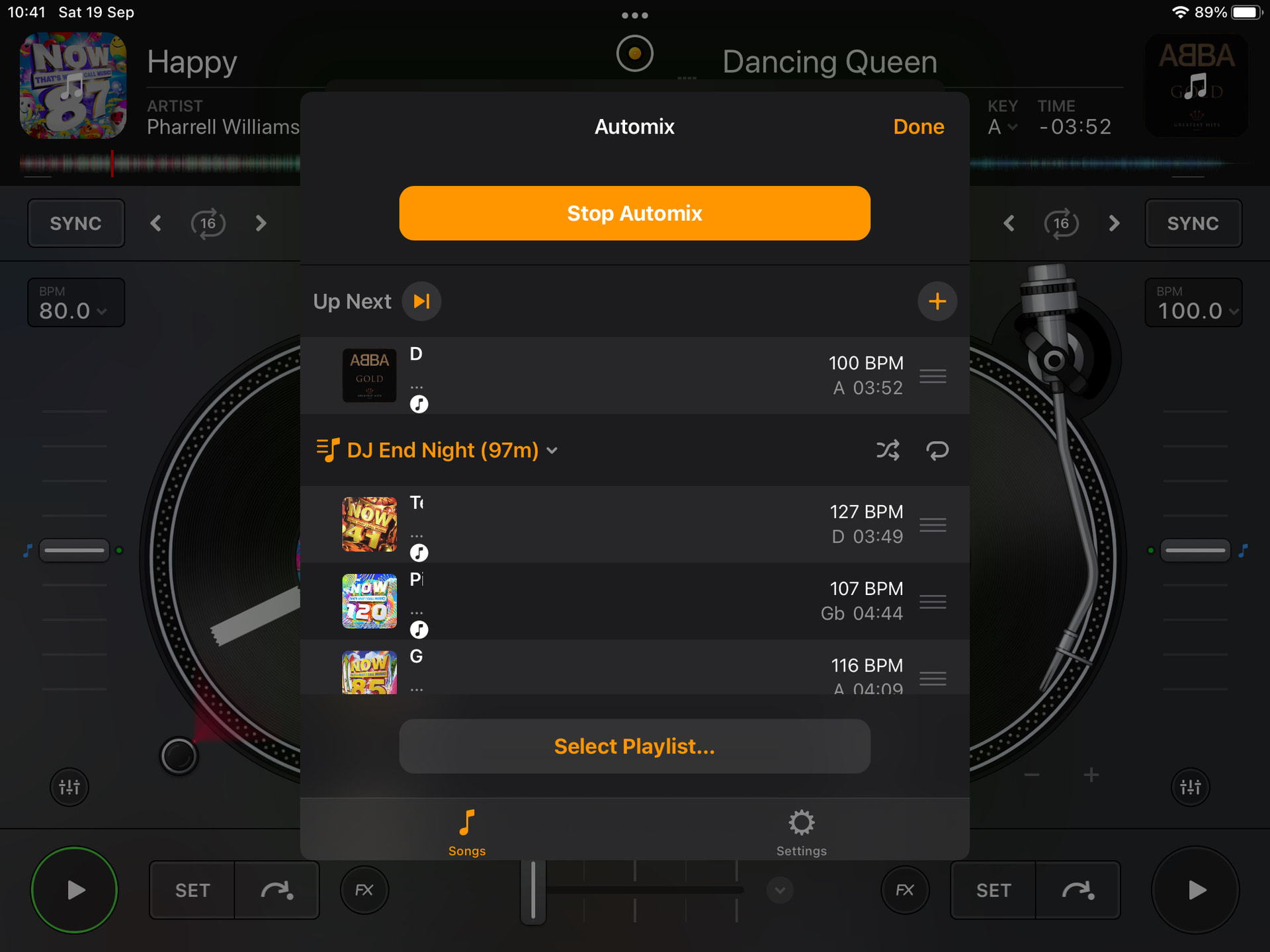
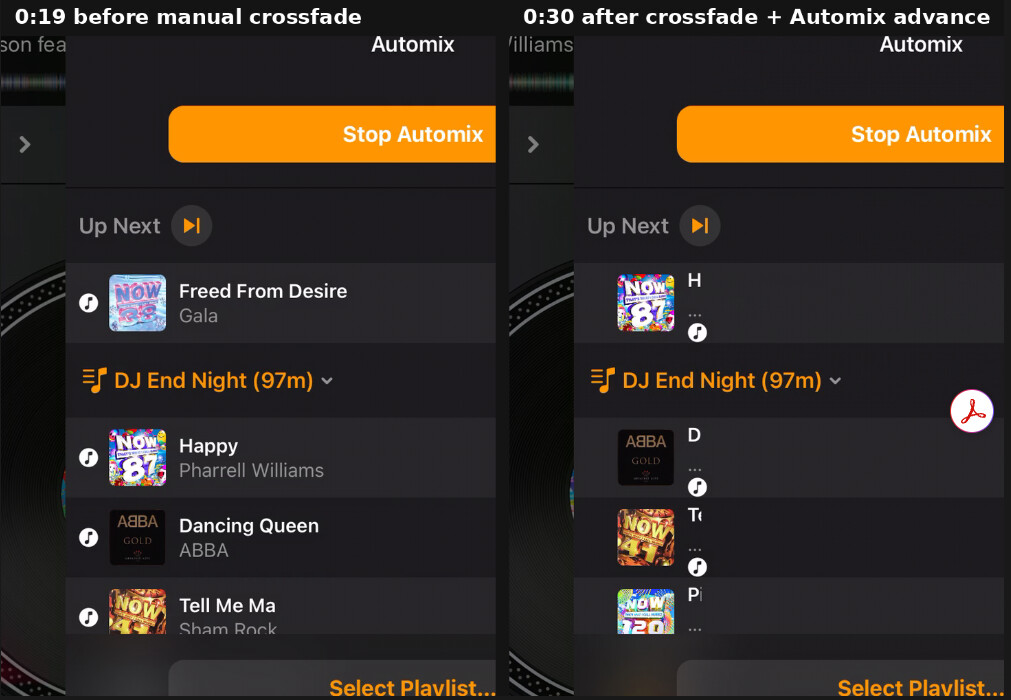
As you will see from my screenshot when I go back into a playlist on my iPad to see whats left to play it just shows the first letter ish of the song title and artist.
When you first select the playlist it displays OK, but if you try to go back in later its all garbled like this.
restart/reboot hasn’t fixed this
Please advise.
Hi @coffee_king, when creating new topics, please do not forget to answer the questions in our template with specific details about your setup not just “iPad” or “Latest Version”.
Device Model (ex. 2020 iPad Air 4th Gen):
Version of operating system (ex. iOS 17.3.1):
Version of djay (ex. 5.1.3):
Hardware/controllers used (ex. Reloop Ready):
Hardware Firmware Version (ex. 2.7):
I tried to reproduce this on my iPad and everything works as expected.
Hello! It’s been a week since my last reply. I’m going to consider this topic completed for now so I can focus on others. However, please feel free to respond and we can definitely revisit this. Thanks!
Hi
Sorry busy few weeks
Device Model iPad Air 2
Version of operating system 15.8.3 (I do not want to update my iOS)
Version of djay 5.6.9 (I just updated it to this too to try to stop it from doing this)
It does it after a few songs have been cross faded back and forth as you will see from the attached video
Hi @coffee_king, thanks for the details and the video. That’s exactly what I needed.
The video makes the problem clear. When you first start Automix, the list shows full titles. After a couple of transitions, the titles and artists in the Automix panel shrink to a letter or two, but the BPM, key and time columns stay correct. Your track info isn’t damaged. The panel just stops drawing the title column at full width.
About updating: the iPad Air 2 was dropped from iPadOS 16, so 15.8.3 is as far as it can go anyway. That’s also djay’s floor, since the current App Store build requires iPadOS 15.0 or later. You’re on a supported setup, just right at the edge of it.
The next time it happens, could you try these with the Automix panel still open?
- Rotate your iPad to portrait, then back to landscape.
- If that doesn’t help, tap Done, then reopen it with djay button (top centre) > Automix.
Let me know if either one brings the full names back. That’ll help narrow it down.
- Where are the tracks from: the Music app library, Apple Music, or files?
- Have you changed Text Size, Bold Text, or Display Zoom in iPad Settings?
Note: Its actually from the fist cross fade that this issue occurs.
Rotating iPad - Showing list / automix panel still open or closed it doesnt put the text back to what it should be
Tapping:
Done
Automix - I cant see the list of songs anymore at all from thsi view anyway
Going back into Classic mode after this still doesn’t fix the text issue
I am using my own MP3s from the Apple Music App (Prev iTunes)
Nothing is streamed or from the cloud.
I have not changed Text Size, Bold Text, or Display Zoom in iPad Settings
Hi @coffee_king, thanks for testing those and for the extra details. That rules out a lot. It starts on the very first crossfade, it happens with your own MP3s, and your text settings are at their defaults. The second tip clearly took you to a different screen than I meant, so sorry about that.
One question so I can give our QA team accurate repro steps: does it also happen if you crossfade manually with Automix off, or only when Automix is running?
In the meantime, you can still see the full track names by opening your library and going to Playlists > DJ End Night (97m). Please let me know whether the names show properly there after the bug kicks in.
Hi
Sorry, I’ve been away.
One question so I can give our QA team accurate repro steps: does it also happen if you crossfade manually with Automix off, or only when Automix is running?
If I manually crossfade the next time I go into Automix playlist the songs are not displayed correctly again.
I don’t know what you mean about when Automix is off? How can I see a playlist if I’m just adding each song manually by pressing in the top left or top right corner of the classic mixer screen?
I never use the app for anything other than automix so please explain the process you want me to do.
In the meantime, you can still see the full track names by opening your library and going to Playlists > DJ End Night (97m). Please let me know whether the names show properly there after the bug kicks in.
Again I don’t understand, where is my Library in this instance? Do you mean by clicking the top left or top right music note? Songs are displayed properly in there.
This is just an issue with playlist songs once any type of cross fade has been actioned.
Hi @coffee_king, welcome back! Sorry, I made that more complicated than it needed to be. Your answer gives me what I needed: any crossfade, whether Automix does it or you move the fader yourself, makes the song names in the Automix playlist shrink. Meanwhile the music note browser shows them fine.
- Could you please send a screen recording that starts from a fresh launch, with one manual crossfade and then the Automix playlist opened?
- Was Automix running or stopped when you crossfaded by hand?
Until it’s fixed, the music note is your best way to read the playlist. Tap the music note at the top left or top right of the decks and open your DJ End Night (97m) playlist to see the full names. Just avoid tapping a song in there while Automix is playing, because that loads it onto the deck. I hope that helps!
Fresh launch. Automix running. Manual crossfade. There you can see the issue still.
Thanks @coffee_king, that video is exactly what I needed.
You can see it clearly. The Automix list is fine after launch. Then you crossfade, Automix loads the next song, and the next time you open the panel the names are cut down to a letter or two. I’m passing this to our QA team with your video and steps, so you don’t need to test anything else.
Until it’s fixed, tap the music note at the top of either deck and open Playlists > DJ End Night (97m) to see the full names. Thanks again for your patience. I’ll update this thread when I hear back.
Hi again @coffee_king, in the meantime, can you please update to djay 5.6.10 and confirm if the issue persists or not? Thanks!