Playlist Browsing Per-Deck on USB HID Players

wow, amazing, HUGE thanks again dear James. i owe you big time!! makes much more sense now that i’ve seen your helpful video. it’s late here now, but i’ll experiment with all of this tomorrow. can’t wait! :slight_smile:

btw, what screen are you using, it looks so nice and seamlessly integrated. solid work!

Hi Jason, glad to help.

The screen is an Asus Zen Screen 1080P from 5 years ago.

Here’s the Amazon listing for the details:

Cheers

James

1 Like

Ah, i see, that’s a great idea to hook up a larger external monitor, as luck would have it i’ve got one collecting dust in the garage!

Ok, i’ve got the new Midi Map, thanks again, I think I need to replicate your setup and have it be 4 decks instead of 2 otherwise the EQs are one full channel to the right of the one playing.

And do either you or Slak_Jaw know if it’s possible to override my Mixtour/Reloop controller so that it is connected and acts as only a way to scroll and load track but allows me to continue using the Rane as my primary mixer? When I plug in the Mixtour controller it immediately silences the Rane.

If it can’t I guess I’ll have to get a separate controller like the X1s you have, James.

Thanks again to both of you, I’ll keep tweaking the settings, wish this luddite luck. :slight_smile:

Sorry, never mind, I think I figured out if I set the main outputs (on internal mode) to Rane that both the controller and the mixer work in tandem! Phew! :slight_smile:

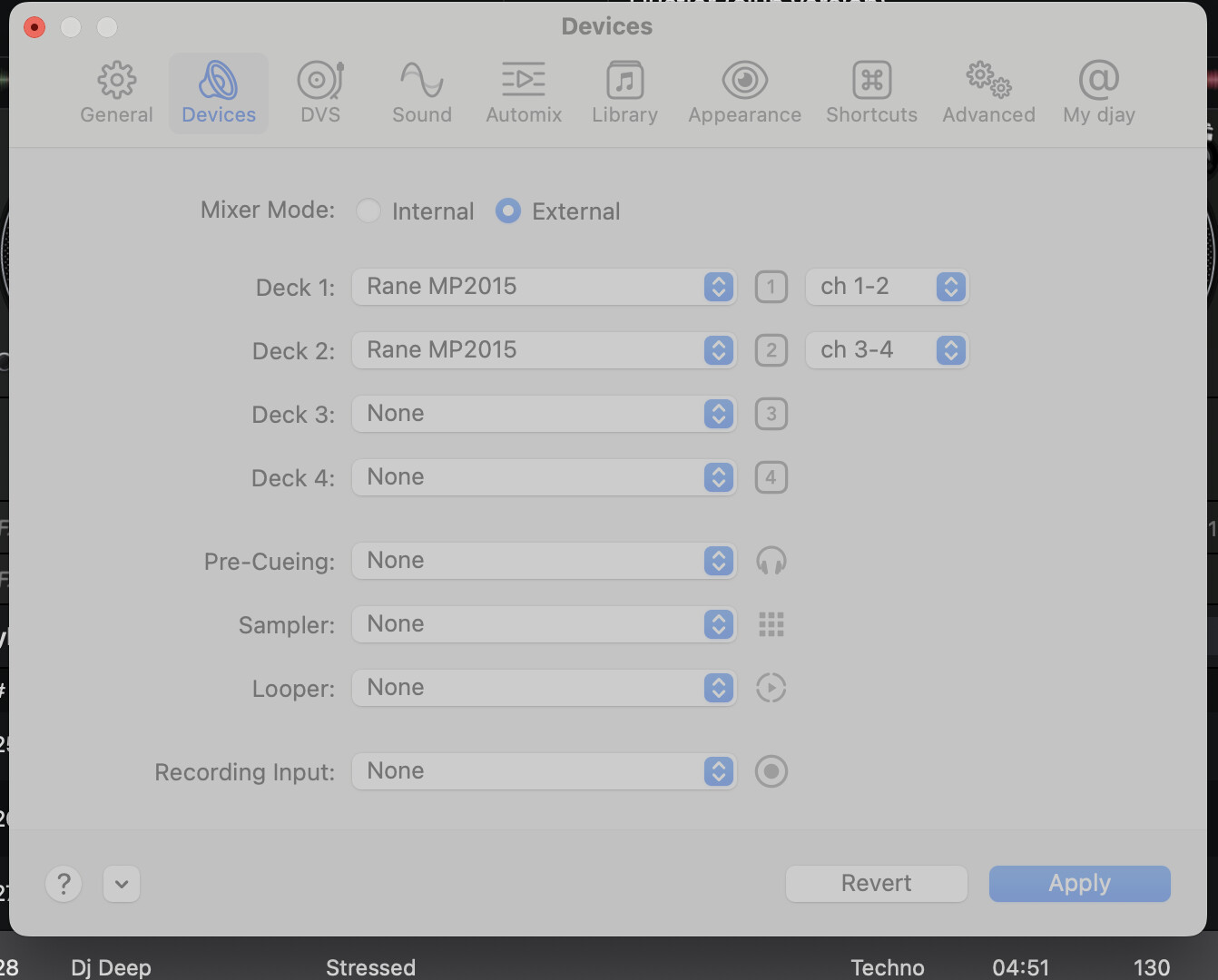
Sorry, me again: Slak_Jaw, any idea why the settings go gray and only allow for 2 channels (i.e. 1-2, 3-4) to be chosen instead of assigning just one channel? See photo. It’s messing with the EQs and levels controlling both tracks. Thanks!

Edit: so I’ve made some tweaks to the map and it’s starting to work better, but still quite a few kinks to iron out.

i mapped the track scroll feature to the Rane’s headphone “pan” button as i don’t use it much anyway, but you’re right, James, it’d be much better as an endless knob.

i used channels 3 and 4’s Sub buttons as “load track” to each deck. so far so good.

but need to find ways of scrolling around folders, engaging the play/cue buttons and ideally the loop functions, and of course some FX, so i think i have to find a way to incorporate this Mixtour controller into the setup or another controller perhaps.

thanks for listening and any thoughts!

Hi Jason,

I see where the problem is now. I had a not-too dissimilar issue. Essentially you are trying to use both the Mixtour Pro and the Rane at the same time, but one as a mixer and one as a MIDI controller.

The Rane in my testing was extremely limited in what you could do with it when not using External Mixer Mode.

I also own a Mixtour Pro which I use for pop-up gigs in location around the island I live on. Due to its deep integration with Djay Pro it works in Internal Mode, but as-if it were an external mixer, very clever.

For you to get the most out of the Rane you would need to use External Mixer mode and deal with it’s limitations like I’ve mentioned previously.

It sounds to me like what you really need/want the Mixtour Pro for is mainly play controls and library management etc. What you need is…. a MIDI controller!

As it happens I am due to receive an Allen & Heath Xone K3 through the post today/tomorrow which I have a specific use case for in Djay Pro - but essentially it’s acting as a mixer across four decks with some play controls. The key thing is that is doesn’t contain a sound card, it’s purely a MIDI controller.

This is what I did with my NI Kontrol X1s (I have two of them, one for each of my four channels/XDJs) - I put them into MIDI mode (quite easy) and then mapped the buttons/controls to them in Djay Pro.

So….. in summary, for your use case it sounds like you need to:

1.) Ditch using the Mixtour Pro in combination with the Rane as there is so much overlap.

2.) Keep the Rane in External Mixer Mode so that you can focus you attention here to do your transitions properly across the four available decks in Djay Pro

3.) Buy one or more MIDI controllers you can map your Play and Library management controls to in Djay Pro.

This is no bad thing! There’s a TON of MIDI controllers available, all sorts of shapes and sizes - and because they are all mappable the possibilities are endless!

I will be using my Xone K3 to accompany a DJM-S11 to give me the Neural Mix controls and some limited play and library controls across four decks to extend what the S11 can do, WITHOUT interrupting the workflow of the S11 directly.

I hope this helps.

Cheers

James

2 Likes

Thanks much for this, James. This confirms my hunch. I’ll research some controllers now or perhaps see about using an ipad as one. Also, while I’d love to have the flexibility of mixing on 4 decks, the main challenge with for me is my laptop screen minimizes the library so much that I can only view one track at a time as the decks take up the majority of real estate.

I take it now that you keep your sweet Rane baby protected at home while playing gigs. I think i should consider the same as tempting as it is to show it off. When you’re playing out do you have your main laptop screen show the 4 decks and then one of the controllers acts as the library? The Xone K3 doesn’t do this, right? It looks like more of a fader and button controller only, but maybe I’m wrong….

btw, please drop me an email so I can send you some musical gifts, you’ve been very kind (and patient!) with me and i deeply appreciate it and it’s the least i can do! jasoncooks@gmail.com

No worries mate, a pleasure.

Been having a bit of a mix-up this evening, and I’ve made a few more subtle tweaks to the MIDI mapping for the Rane:

1.) Enabled “Pickup” mode for the three Neural Mix knobs - this allows for smooth changes between decks where the knob is physically in the “wrong” place, pickup mode lets you “pick up” the position relative to the software so you can effect a seamless change.

2.) Changed the mapping from Neural Mix “EQ” to “Volume” - this works much better because you can then enable a panel in the UI that lets you see at-a-glance what settings per-deck are in-play.

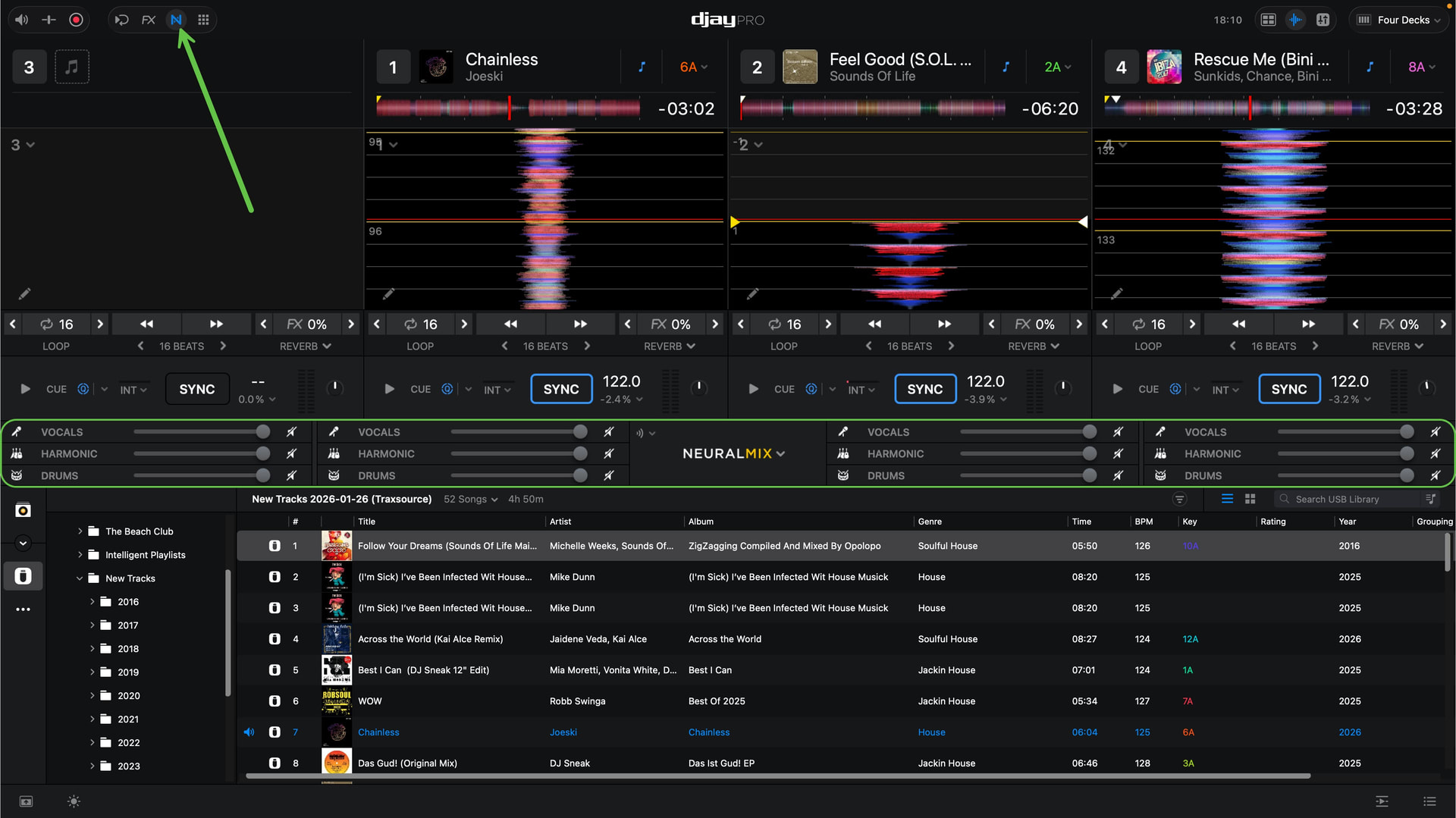
Here’s a 1:1 screenshot of my set-up, and to your question earlier my monitor panel is only 1080P and I’ve got screen estate for 8 tracks in the library list view, certainly enough to scroll through if I’m in a known playlist.

I’ve highlighted the panel in question in green, enabled with the “N” icon:

Where it says “NEURAL MIX” in the centre of the screen there’s small drop-down, select that to change the Neural Mix mode to 3 Channels, mine was defaulting to 4 Channels.

If you want the latest MIDI mapping, as-per the above tweaks let me know and I’ll post it.

This is absolutely going to be my workflow going forward!

Cheers

James

Fantastic, and yes please I’ll take the new midi mappings as it sounds even better. Amazing, thanks james!

I think/hope I can tweak my monitor settings so I can get more tracks in view like yours. Back to searching for a good supplemental midi controller, leaning toward the X1 which I’m hoping to map everything else that the Rane can’t so I can minimize touching the laptop. Thanks again :slight_smile:

ps are you on Jersey? my niece is there frequently as her boyfriend’s from there. i need to go visit!

EDIT: just pulled the trigger on an X1 (mk2) off ebay for $80 – cheap! if this does the trick i’ll be sooo happy.

Hi Jason,

Here’s the latest “v3” Rane MP2015 MIDI mapping. Hope you have some fun with it!

As discussed this has the following enhancements:

1.) Enabled “Pickup” mode for the three Neural Mix knobs - this allows for smooth changes between decks where the knob is physically in the “wrong” place, pickup mode lets you “pick up” the position relative to the software so you can effect a seamless change.

2.) Changed the mapping from Neural Mix “EQ” to “Volume” - this works much better because you can then enable a panel in the UI that lets you see at-a-glance what settings per-deck are in-play.

Yes, I’m on Jersey! :slight_smile:

Congratulations on being able to source an X1 MK2 - as it happens I’ve made a breakthrough this week on some MIDI mapping efforts there, discussed in another thread on this forum.

Cheers

James

Rane MP2015 Master 3.djayMidiMapping (7.0 KB)