Hi there,
Using Djay Pro 5.6.1 (which is amazing, thank you!) on macOS with my Rane MP 2015 and 4 x Pioneer XDJ-1000 MK2s in USB HID Mode.
Bringing several new features together into a holy trinity for me:
1.) Rane MP2015 with Neural Mix Midi mapping added
2.) Native XDJ-1000MK2 support
3.) OneLibrary support (for USB drives from RB etc)
I’ve got some really great results so far, but I notice when I “Link” my XDJs 1-4 and then connect to a OneLibrary USB stick, all four players in the Browse menu will be looking at the same location and will update on each player as one.
So if I am doing B2B with my friend and he has a 2nd USB stick as a OneLibrary source, whilst this will work, the navigation will the same across all four players. It would be great for a QoL update that each Linked player will retain it’s own place in the Djay Pro browser navigation. This is how it works in Traktor for example.
For a B2B scenario, as it stands we will be constantly getting in each other’s way as we can’t both look through our playlists at the same time, and we will have to be constantly navigating back to our own USB stick etc.
I hope this make sense, thanks very much!
Cheers, James
1 Like
Hi @James_Gillies, thanks for the positive feedback and detailed suggestion. I have forwarded this to the devs for consideration.
Hi James, I have an MP2015 too and I’d love to midi map the Stems and other features too, but so far I’ve only figured out how to route the channels of the djay decks. If you have any tips I’d greatly appreciate it!! Been searching around online for help but mostly coming up empty. Thanks so much! Jason 
Welcome to the community @supadisco!
1 Like
Hi Jason,
Thanks for your note.
I have been experimenting with my Rane and MIDI mappings, on “version 2” now which seems to work well.
Because I also own 2 x NI Kontrol X1s I was able to create some Neural Mix functions there too but I do have a couple of tips if you’re interested?
1.) Use External Mixer mode rather than Internal Mixer mode. This lets you route all the USB channels to the four Rane channels.
2.) Map the various mixer knobs to match Djay Pro (happy to share my mapping if it helps)
3.) Use the Sub (blue) button above each channel to make that channel the “Selected Deck” in Djay Pro. Map EQ Hi to Acapella/Instruments 2 Ch Filter. Map EQ Mid to Neural EQ 2 Ch Vocals. Map EQ Low to Neural EQ 2 Ch Instruments. Using this combination, you can quickly apply decent NM changes to the selected deck directly on the Rane. I’m still experimenting with this a bit, and one caveat is that the Sub Channel volume needs to be up as you activate this on the mixer, even though it is also MIDI mapped. (I’m going to experiment more with other controls that will trigger “Selected Deck”)
4.) Don’t map NM EQ to the EQ knobs directly, as the Rane will still apply normal EQ functions to the knobs at the same time, due to being in External Mixer mode.
I intend to try an experiment more with Internal Mixer mode, as this is more desirable - a bit like my Mixtour Pro uses - this would negate 3 and 4 above as the Rane would be acting purely as a MIDI controller. However, my observations so far is that the Internal mixer mode is somewhat limited, to the point of being unusable (but that might be my lack of understanding at the time).
Also worth noting, if it’s not obvious. Even in External Mixer mode, Djay Pro doesn’t offer full “Input Routing” on the available USB Input Channels (the Rane has 2 x 10 Channels) for specific routing of audio, like Traktor does for example. This limits what I can do with my connected outboard gear on the Rane. So for example, from what I can telI when using Internal Mixer mode I would lose my FX Send and Return loop which would break my Chorus filter and Tube Pre-amp I run through that circuit on the Return to widen up the stereo sound.
Let me know if that’s good for starters?
Cheers
James
2 Likes
Thanks for sharing @James_Gillies
1 Like
Amazing! Wow, thank you SO much for the very prompt and super helpful reply, James. Man, you should start a youtube channel with these tips because I honestly don’t think there’s any out there! Haha. I’ve been trying unsuccessfully to midi map already so any and all tips are more than welcome. I’ve been using one of the Reloop Mixtour controllers which automatically works great but I was discouraged when I thought that the Djay pro software wouldn’t work with my new (to me) fancy mixer. I’ve got my first gig in ages coming up next month for a good friend’s big 50th birthday so I’m dying to get this sorted out to avoid any stress. I’m normally a vinyl guy (aka luddite) so forgive my ignorant and naive tech questions, please!
I’m just using this with my Macbook, I don’t have CD-Js or other gear like the Traktor stuff. Are you using your laptop to scroll through and load tracks or is it possible to map that to a knob on the MP2015 to, or is it perhaps possible to have the Reloop (or in your case, the Kontrol) do that to avoid using the mouse/trackpad more than necessary? Thanks again, what a huge help you’ve been, very much appreciated! And thanks SlakJaw for the welcome, I’m thrilled to have found y’all.
J
ps that’s impressive you had some luck with the Neural Mix, I’ll try the same tomorrow. i thought it wouldn’t be possible after not seeing our MP2015 mixer as one of the supported devices here: Playlist Browsing Per-Deck on USB HID Players - #10 by supadisco
Hi Jason, please see my Rane MIDI mapping attached.
This should be used in External mixer mode.
Sub On buttons activate “Selected Deck” then use Sub channel EQ to manipulate Neural Mix EQ as per my description above. The Acapella/Instruments Filter on the Hi EQ knob is particularly effective!!
I hope this helps, have fun!
Cheers
James
Rane MP2015 Master.djayMidiMapping (8.1 KB)
2 Likes
Thanks for sharing you mapping @James_Gillies
Amazing, you rock! I’ll try to emulate all of this onto my rig later this evening. Can’t wait!!
J
@supadisco Hey Jason, how did you get on?
Did you manage to get the MIDI mapping loaded and play around with the Neural Mix settings on the Sub channel?
The first time my Pioneer DJ friend came round with his OneLibrary USB stick and tried his tracks with Neural Mix he LOST. HIS. MIND.
14 hours later…. LOL
1 Like
James! Thanks so much for checking in. I’m so happy it’s nearly the weekend and I’ll have more time to deep dive and iron out some kinks with my setup.
I can only imagine how your friend must’ve felt. If I were you I’d be thinking to myself “Welcome to the big leagues, son!” haha…But yeah, getting lost in the mix with the stems features is a sure recipe for a lost weekend.
Thank you again for sharing the midi maps. So far I’ve figured out that the EQs are mapped and the Neural engages once the blue Sub buttons are engaged, but I’m not seeing how the channel gains/faders are mapped, so maybe I need to tweak those a bit.
And do you have the playlist/library mapped to a button too or do you manually change/load tracks via the app/laptop?
I’m also wondering if I should use another controller to supplement the midi mapping or if perhaps I should scrap the laptop altogether and use an Ipad or other tablet so I don’t need to use the trackpad/mouse so much.
Appreciate any and all tips. I’m in love with this Rane mixer and thrilled at the possibility of incorporating it, thanks again! Have a great weekend.
Hi Jason, glad you’ve got the mapping loaded and are starting to explore the various functions!
I’ll send you a link to a video of a quick demo of my Rane in action, so you can see how the Neural Mix functions, might help.
I do make use of separate controllers, my original setup was to support Traktor so I have 2 Kontrol X1s and for the decks I’m using XDJ-1000 Mk2s. But all of that is essentially still just a combination of USB HID control and MIDI.
For library control, I’m using either the X1s or XDJs browser knobs etc - but you can use pretty much anything - but recommended to use something with a so-called “endless” rotary encoder for scrolling.
There’s all sorts of shapes and sizes of MIDI controller, I’ll send you some links if recommendations that might suit your use case.
I’ll follow up late today when I’m at home and can put a quick video together for you.
Cheers
James
Thanks James, you’ve been a huge help so far. In the absence of CD-Js I think it’s probably best for me to continue using the Algoriddim Mixtour controller to scroll and load tracks and then I can mix them in with the Rane and use it’s mapped EQ/NM, and of course the native efx/crossover. I’ll keep playing around with it all.
If you’re really happy with the X1 integration I’d gladly consider getting one of those too. (Sidenote: can’t believe Native Instruments is going bankrupt!)
Thanks again! J
Hey buddy, I’m slowly making progress, I think.
Instead of mapping the Djay levels/faders, are you keeping them at full volume and only using the Rane’s rotary gains? That works for me, but the only drawback I see is that when loading a song I have to do an extra click to tell it which deck to go to.
Also, this must be a bug on my end, but the EQs/Neural controls seem to be one channel to the right instead of directly above it. I’ll keep adjusting but the software’s mapping isn’t very intutive to me, then again I’m no genius either. But when I’ve done midi mapping in the past (e.g. apc 40 to my Ableton or an external keyboard) it seemed to be much more straightforward.
I think I’ll use this algoriddim/mixtour controller for track loading, that should help keep my laptop clicking to a minimum.
Thanks again! J
Hey Jason, here you mate - here’s a show n’tell of the Rane working with Neural Mix functions across multiple decks.
Hopefully clears things up for you!
Cheers
James
https://share.icloud.com/photos/051f6DWWjtjIrQv_sESxXjpOQ
1 Like
Hi Jason,
Just as I was doing some more quick tests I realise I still had a bit of clean-up to do on the v2 MIDI settings! I had changed some of the settings, but not all of them
I will sort this out now and post a revised MIDI mapping here when done.
Sorry about that, I hadn’t realised I’d not done a complete job when moving from v1 to v2!
Cheers
James
1 Like
Hi Jason,
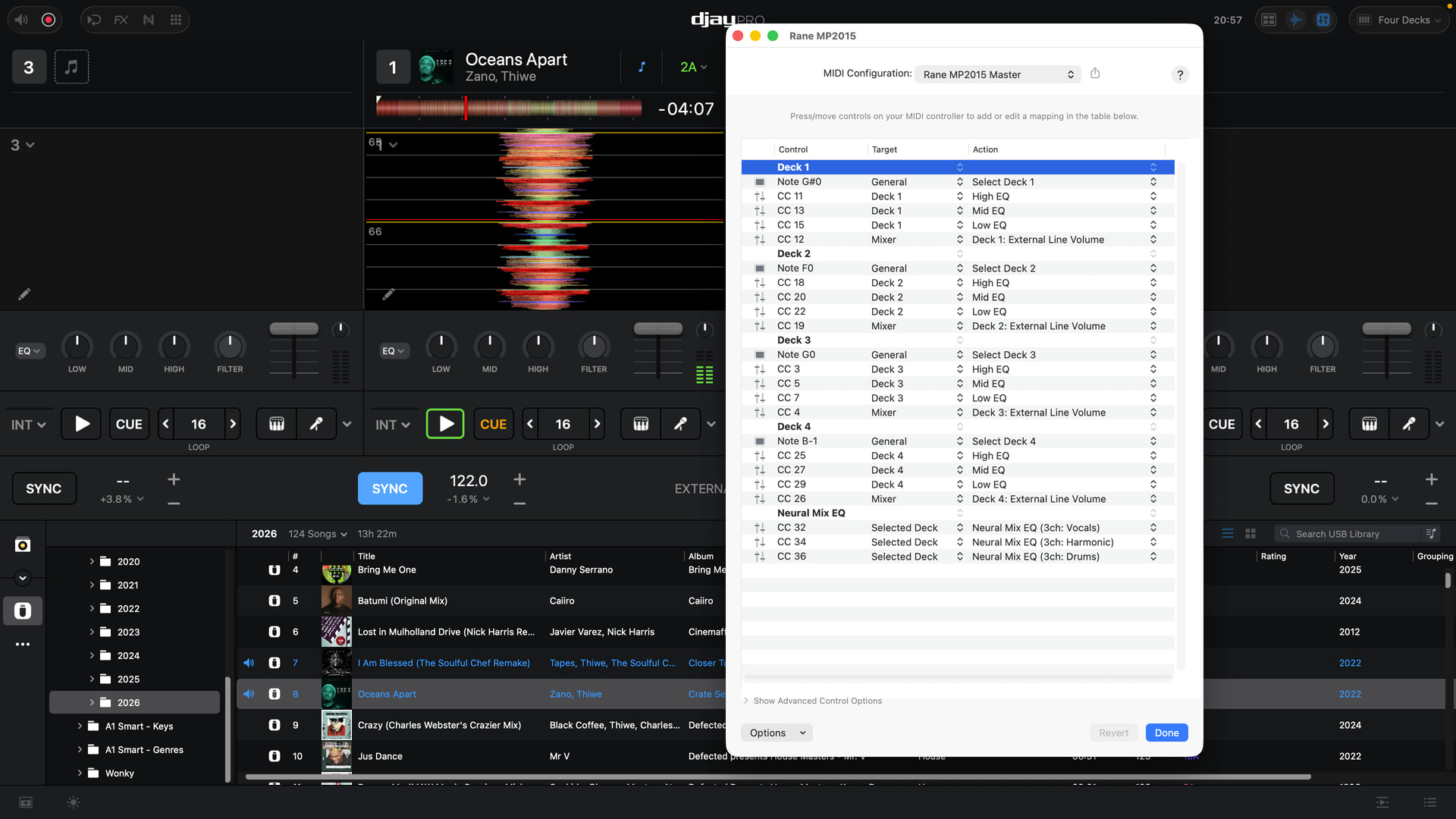
The video is still uploading to iCloud so should be available soon, but here’s the revised MIDI mapping and a screenshot for visibility.
Top Tip! Don’t have Neural EQ mode enabled in the software AND THEN use the normal channel EQ knobs on the mixer or you will manipulate the Neural Mix EQ - because it’s a toggle in the software.
I simply demonstrated that in the video so you could see the changes being made. But don’t leave that mode enabled! Why is this so important??
Because the native mixer EQ is tied to the knob regardless, so if you manipulate Neural Mix EQ on the normal channel knobs you will create a double, unwanted effect. How do I prove this?
A great example would be to take the Harmonics out using the Mid EQ knob and then put it back to 12 o’clock and then do the same with the Sub channel Mid EQ. You will lose the Harmonics but it’ll be a lot cleaner sound because you haven’t ALSO killed the standard Mid frequencies across the whole mix. Compare them both and you’ll see what I mean.
After a time, you’ll just know which channel has what NM settings through memory and visual cue on the waveform itself.
By all means do toggle on NM EQ mode to visually check but just remember to switch it off again before you have to manipulate the channel EQ on a given channel.
I hope that all makes sense.
Cheers
James
Rane MP2015 Master 2.djayMidiMapping (6.8 KB)
2 Likes
Thanks again @James_Gillies! Super helpful stuff here!
1 Like