Device model: MacBook Pro M4
Version of operating system: macOS Tahoe
Version of djay: Version 5.6.1
Hardware/controllers used: Rane ONE MKII
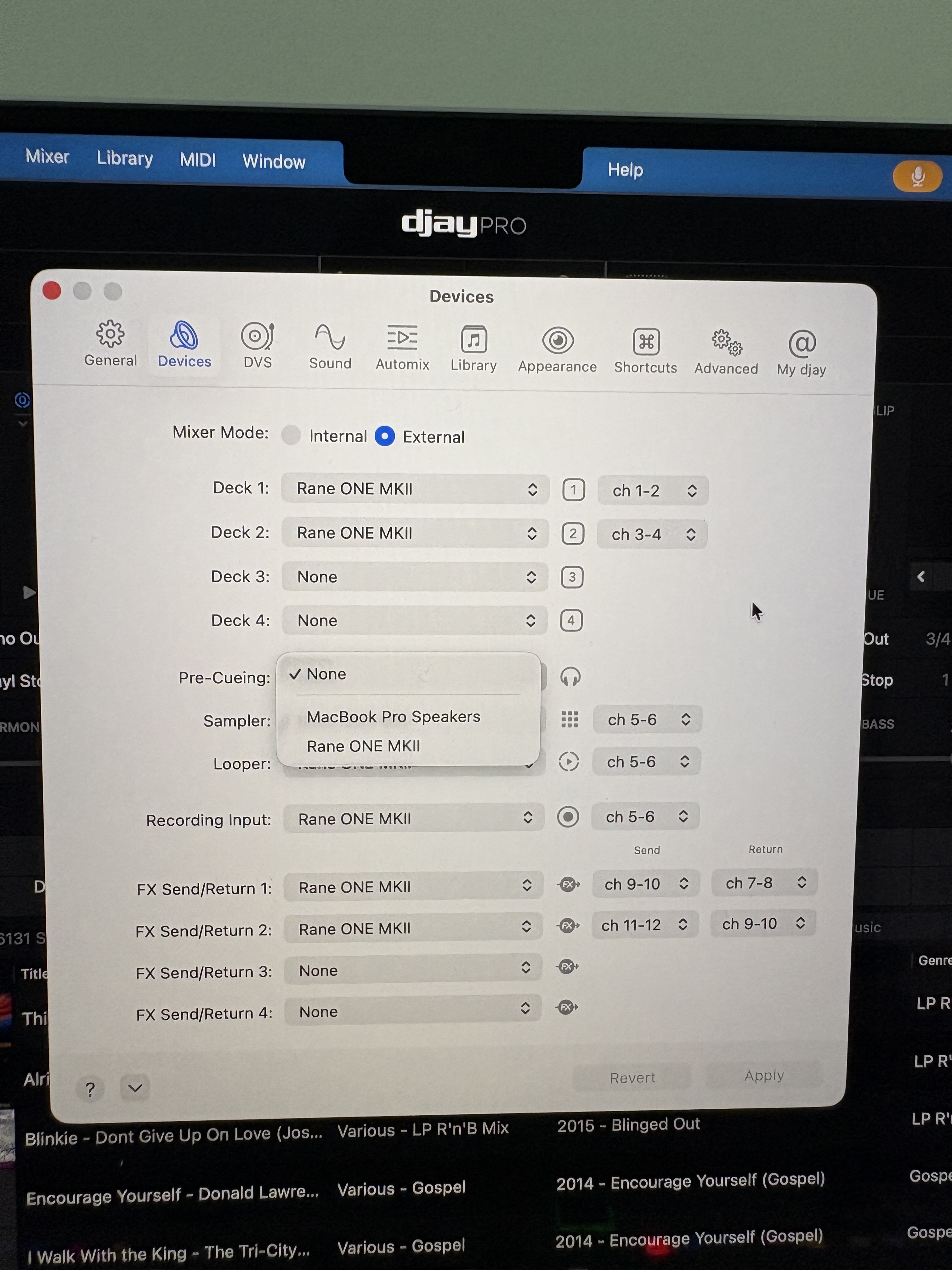
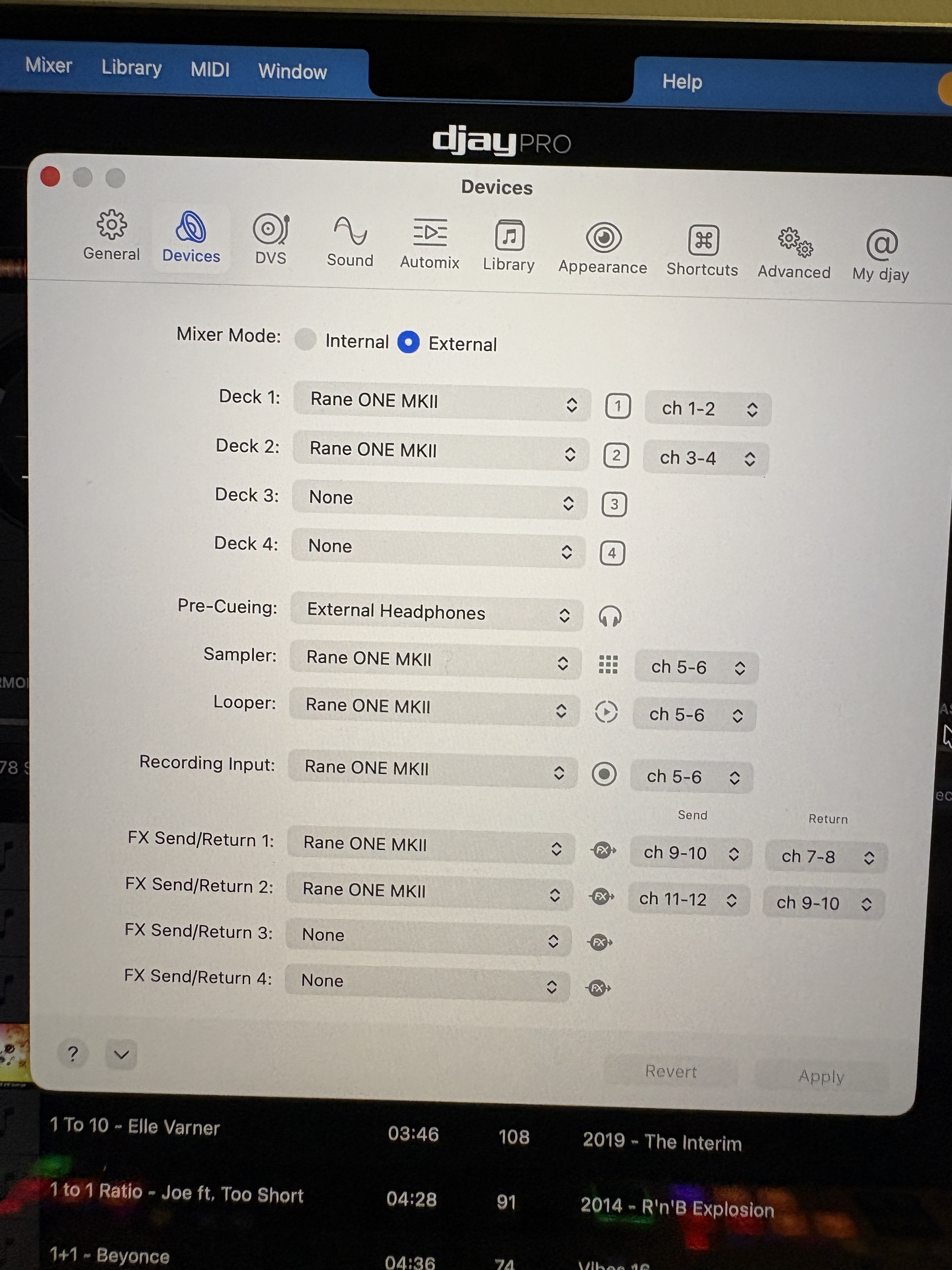
When using the Rane ONE MKII in External Mixer Mode with Pre-Cueing set to “External Headphones”, the audio routing completely breaks and the hardware cue system becomes non-functional.
Steps to Reproduce:
Connect Rane ONE MKII
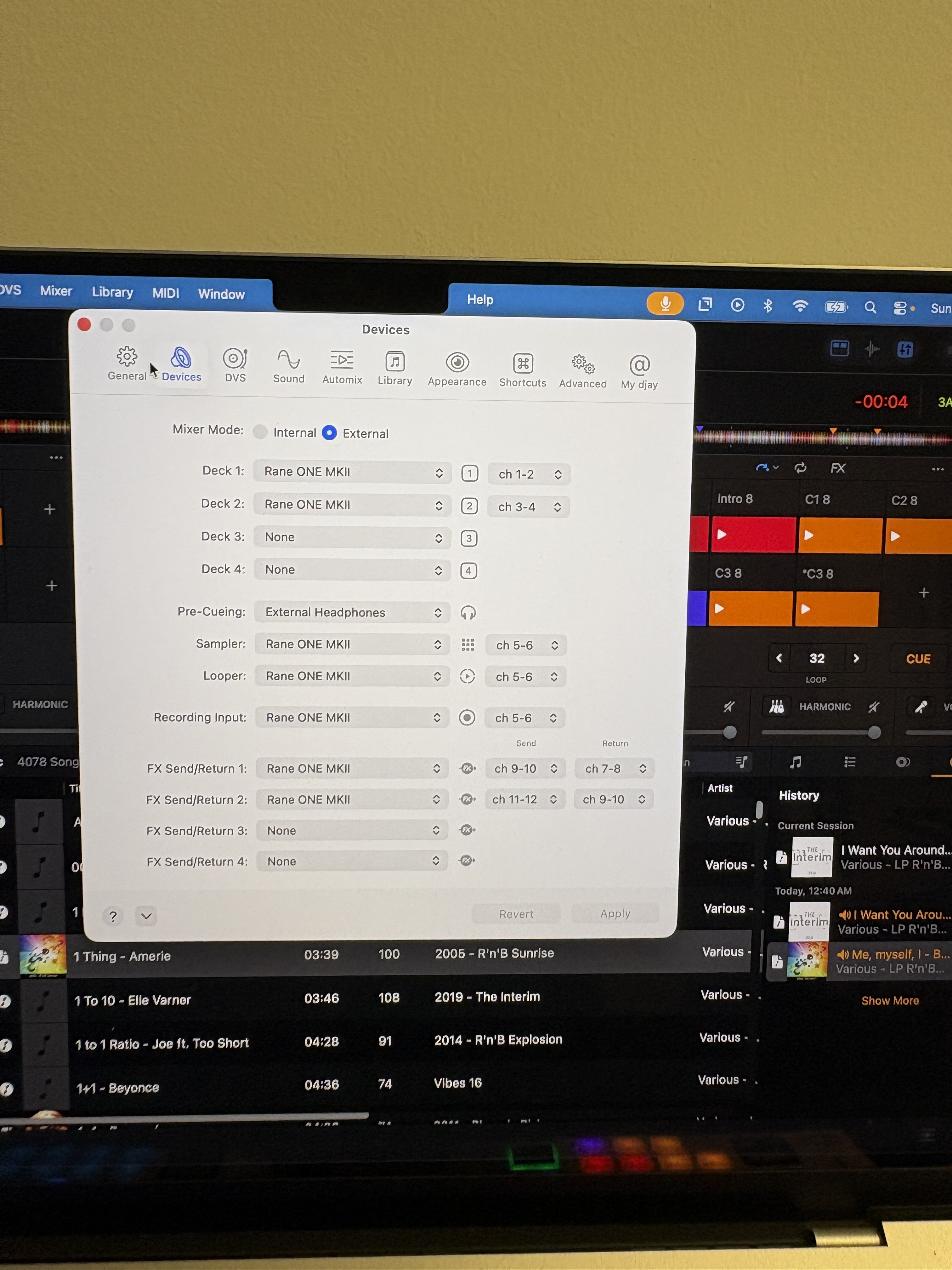
Set Mixer Mode to “External”
Configure Deck 1: Rane ONE ch 1-2, Deck 2: Rane ONE ch 3-4
Set Pre-Cueing to “External Headphones”
Load tracks on both decks
Press cue button on the Rane for Deck A
Switch cue button to Deck B
Expected Behavior:
Rane headphone output should only play the deck selected by the hardware cue button
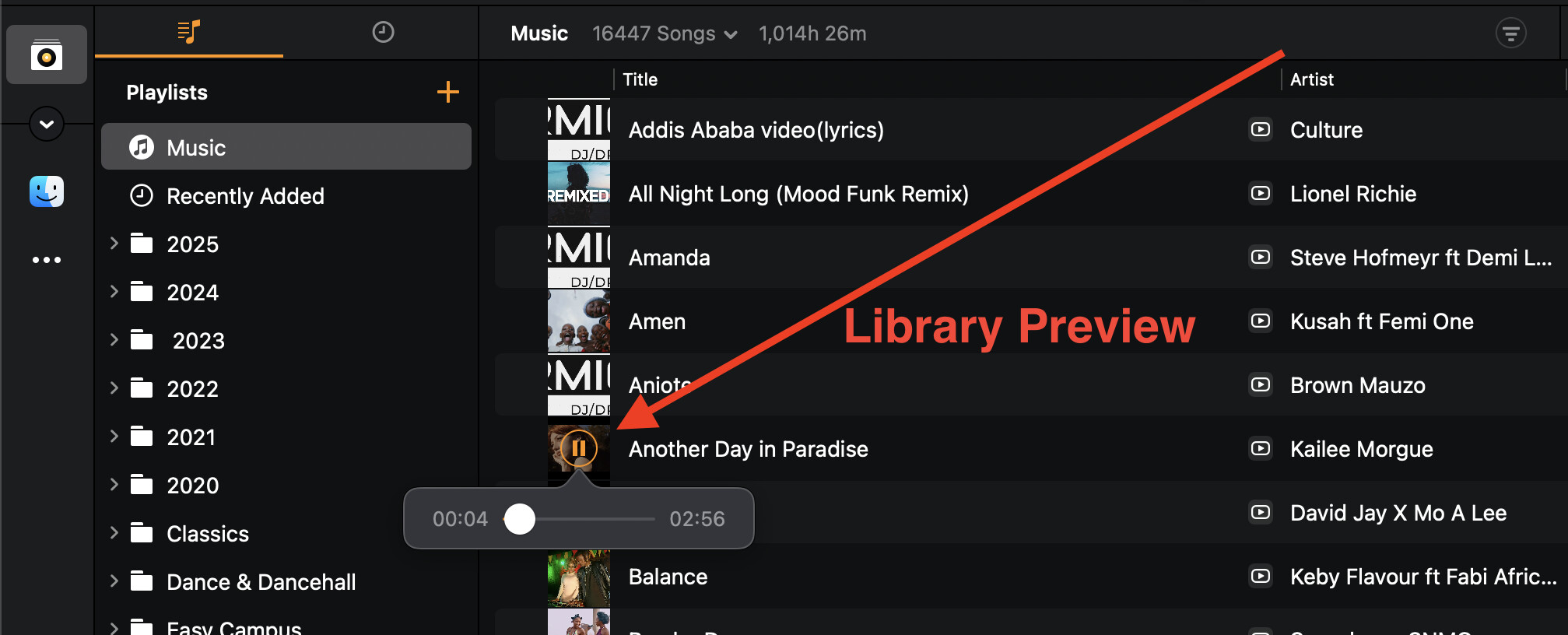
Laptop headphone output should only play library preview audio when clicking tracks
The two outputs should be completely independent
Actual Behavior:
Audio from BOTH decks plays through laptop headphones simultaneously, regardless of which cue button is pressed
Audio continues playing through laptop headphones even when the headphone cable is physically unplugged from the Rane controller
The Rane’s hardware cue buttons become erratic or non-functional
All deck audio gets incorrectly routed to the laptop headphones instead of respecting the hardware mixer’s cue system
Workaround:
Setting Pre-Cueing to “NONE” restores proper Rane cue functionality, but completely eliminates the ability to preview library tracks through any output.
Request:
Please fix the audio routing so that in External Mixer Mode:
Hardware mixer cue buttons control what goes to the mixer’s headphone output (deck monitoring)
Library preview only sends preview audio to the designated Pre-Cueing output (laptop headphones)
These two audio paths remain completely independent and don’t interfere with each other
This would allow DJs to monitor loaded decks through the hardware mixer’s cue system while previewing new tracks from the library through a separate headphone output.
That’s your expected behaviour, but it’s wrong for djay. The system setup as you described is causing djay and rane to “complain back”
The correct setup for external mixer mode is to route everything to the mixer (if you route headphone cue back to laptop, you’re basically breaking th setup, so the behaviour would definitely be unexpected/erratic as you discovered.
To be more exact, there is absolutely no way you can cue tracks from 2 different soundcards! You can’t have a headphone on the Rane and another headphone on the laptop both pre-cue’ing- that has never happened in any dj software I know of. The only function your laptop soundcard can do safely in this setup (which I don’t advise) is BOOTH output.
Caution: The second issue you are about to run into, with your setup is severe audio distortion caused by aggregate audio which djay does in cases like this.
So why does the software give me the option to route pre-cue to External headphones in external mixer mode? I’m just going by what the software shows as being available and selectable.
Although it defaults to “none” there’s a dropdown which indicates the ability to change or reroute to somewhere else.Thx.
I know the frustration - I can’t answer though…
But I can tell you no 2 headphones can work both pre-cueing same or different tracks - one plugged to laptop, another plugged to controller.
Thanks for explaining. Maybe someone from Algoriddim can explain why they’ve included a feature that technically has no way of working as it just doesn’t make sense. It either shouldn’t be there or it’s a bug.
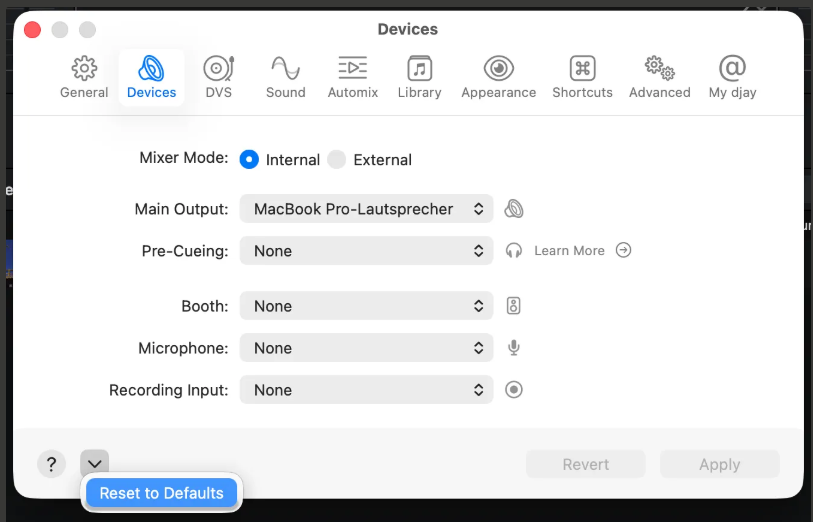
Hi @Reign712, sorry to hear you’re experiencing this issue. It most cases, you should be using the default audio devices configuration. This is set automatically when you connect your hardware to djay. In your case, you can simply press the Reset to Defaults button at the bottom of the Audio Devices Settings window and everything should work as expected - routing both the main output and pre-cueing through your DJ hardware.
In most circumstances, we do not recommend splitting the main output and pre-cueing across multiple devices (ex. laptop headphone socket and DJ controller), as this creates an aggregate audio device which can cause performance issues, latency and sound degradation. While aggregating audio devices can work fine, some combinations of audio devices can be unreliable e.g. if they don’t support the same sample rates or if their clocks cannot be brought in sync.
That being said you can try adjusting the settings in the “Audio MIDI Setup” system app to see if that helps:
While djay is running and configured with an aggregate device, select the “Aggregate-Audio-Device” device in the “Audio Devices” window of Audio MIDI Setup.
Try disabling “Drift Correction” for one or both devices that are being aggregated.
Try adjusting the sample rate of the aggregate device.
Try changing the “clock source” of the aggregate device.
If that doesn’t solve your issue, I recommend that you send both the main and pre-cueing audio to the same device.
Hi, thanks for your response, but I think there’s a misunderstanding possibly because how I explained it.
Just for clarification I’m not using an aggregate audio device. I’m simply using djay’s built-in settings with “Pre-Cueing: External Headphones” enabled in External Mixer Mode.
The bug:
When “Pre-Cueing: External Headphones” is enabled, djay incorrectly routes ALL audio (including deck audio) to the laptop headphones, completely bypassing the Rane’s hardware cue system.
Expected behavior:
“Pre-Cueing: External Headphones” should ONLY route library preview audio to the laptop headphones. The Rane’s hardware cue buttons should continue controlling deck monitoring independently.
This seems like a software routing bug in External Mixer Mode, not an aggregate device configuration issue. Do you expect this to be fixed any time soon?
Thanks for clarify @Reign712. I don’t have access to this hardware to check or confirm myself. However, I have passed this onto our hardware engineering team for comment. However, several team members are away on vacation this week. In the meantime, I recommend that you “Reset to Defaults” your audio device settings to use this hardware with it’s intended audio configuration. Thanks!
And the pheadphone pre-cue which is activated either by clicking headphone-cue icon on djay or button/knob on controller ALL ROUTE AUDIO TO SAME HEADPHONE irrespective of where that headphone is connected (laptop or mixer), for as long as the particular headphone is the one set as “Pre-Cue” device
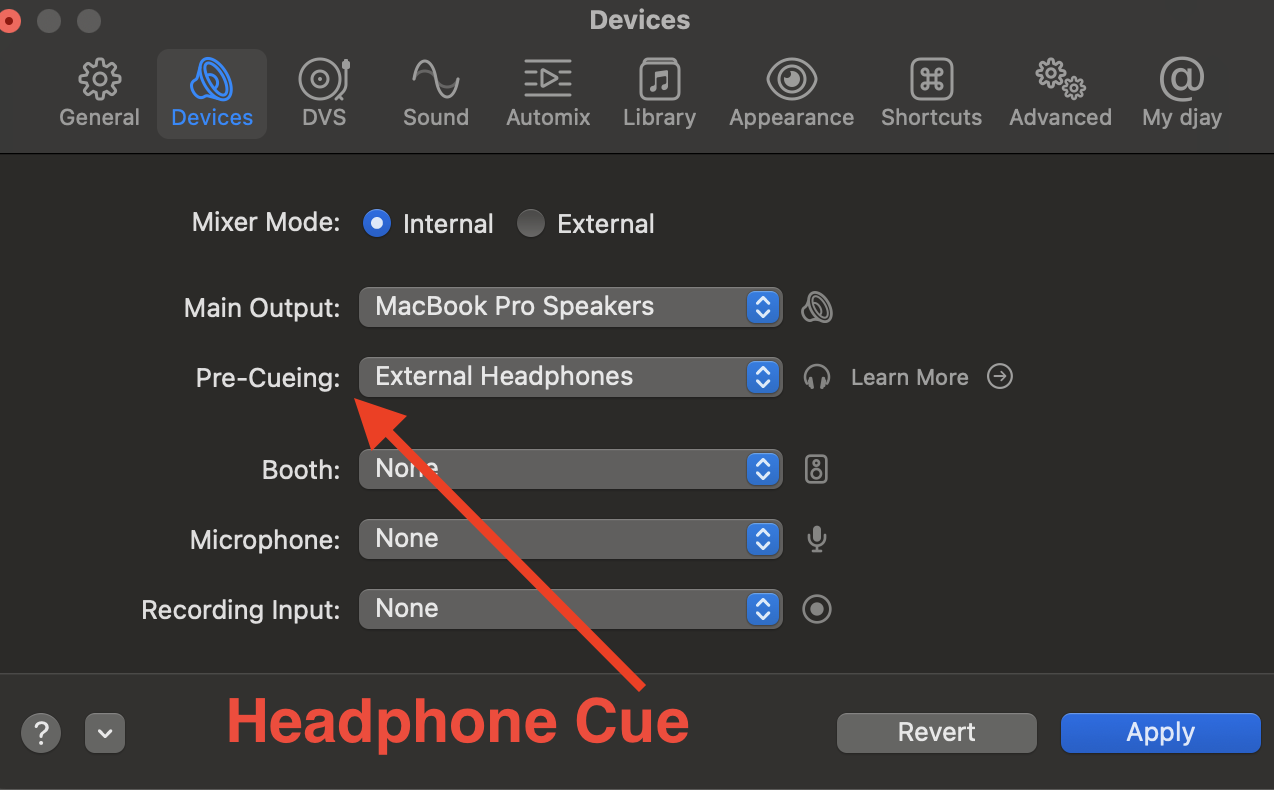
Both library preview and headphone pre-cue will pass sound to whatever you set here:
No matter whether a controller is connected or not, and whatever the type of controller it is. This setting sticks as it supports ONLY one soundcard (headphone on either laptop only or controller only not on both).
In summary:
If your device setting in screenshot above is saying “Pre-Cue to Rane”, everything will go to Rane headphone
If your device setting in screenshot above is saying “Pre-Cue to External Headphones” (on laptop), everything will go to laptop headphone
By “everything” I mean both Library Preview, and the regular Headphone Cue
There’s no bug - it’s just the way it is - seen it in rekordbox and CDJ’s too
If you still believe I misunderstood your expectation, then am sorry (in advance).
@Reign712 please also note that “Library Preview” as Armigo showed above is not supported on External Mixer devices. This feature only works on Internal Mixer Mode devices.
Ok so I just opened the app and the ability to select pre-cue headphone under External is no longer there…which was my point…it was either a bug or a non-workable option which I suppose would still be classified as a bug but all resolved. Not sure what happened between yesterday and today but somehow the headphone option has magically disappeared. Go figure. Thanks for the help and happy holidays to you both.