


Slak good day, i just wondering if you have by any chance come across
anyone djing with djay pro on a macbook pro with just a laptop and manage
to have a
tailored and created a set of keyboard shortcuts that gives a good work
flow djing with just a laptop.
If you do, can you please help me access it.
thanks.
Hi Reuben, honestly I would be seriously considering picking up a cheap DJ controller as the experience is immeasurably better. A Numark Mixtrack Pro FX is currently £175 on Amazon and will provide you with lots of tactile controls for Djay.
The thought of DJing with only a laptop to me just sounds like a terrible experience.
Hi @Reuben_Williams, I’ve moved your comment to its own Question topic so that it’s easier to get community feedback on it. I don’t personally know of anyone here using a laptop only, but hopefully they see this topic and can offer some suggestions.
I tend to agree with @STU-C, that even a low cost DJ controller will provide a much better DJing experience with better audio routing and sound quality. In the meantime, I recommend that you experiment with different keyboard shortcuts to see what works best for your personal workflow and DJing style. Chances are, that someone else’s shortcuts will require some tweaking anyway to achieve ideal results. I hope that helps!
2 Likes
Well that’s exactly the controller I have already set my eyes on, and I’m already working on it, the simple reason why I need keyboard shortcuts is because, sometimes there are gigs that I absolutely don’t need a controller, cause there budget is lower and don’t need much, Two Tops, a laptop and a microphone is more than enough for events like that.
1 Like
To be fair though, you are the one deciding not to use a controller - unless the client instructed you to only use a laptop (which I think is unlikely).
OK so the budget is lower, but to be booked as a DJ and turn up with just a laptop…something I’d certainly never do, and if I were the client I would also expect the DJ to have DJ equipment.
I’ll leave it to Stu to tell you about the gig he did recently - where he actually was using a controller.
1 Like
Yeah I think you guys have a serious point,
So I might as well just get the Numark controller suggested, £175, yeah
let me work on that guys.
And thanks for the advice, you guys have just injected me with a target to
Hit.
Thanks again guys.
2 Likes
You’re welcome @Reuben_Williams. Happy to help!
1 Like
Have a shop around in that price range or whatever you can stretch to as there may be some more suitable options that fit your needs. I only mentioned the Numark as I have one myself, but there are loads of other cheap controllers you can potentially use.
Edit: something like the Hercules impulse 500 looks a great option.
1 Like
Yeah I think you guys have a serious point,
So I might as well just get the Numark controller suggested, £175, yeah
let me work on that guys.
And thanks for the advice, you guys have just injected me with a target to
Hit.
Thanks again guys.
1 Like
Here’s the link to Stu’s story: Innovation. Which companies are doing it? - #45 by STU-C
Hi again @Reuben_Williams, linked below is our complete list of supported hardware on macOS.
Of these, you may want to consider something from the following short list of more budget friendly devices:
- AlphaTheta DDJ-FLX2
- Pioneer DDJ-200
- AlphaTheta DDJ-FLX4
- Hercules DJControl Mix
- Hercules DJControl Mix Ultra
- Hercules DJControl Inpulse 200 MK2 or MK3
- Hercules DJControl Inpulse 300 MK2
- Numark DJ2GO2 Touch
- Numark Party Mix II
- Numark Mixtrack Platinum FX
- Reloop Buddy
- Reloop Ready
Sometimes I do, but honestly it’s full of automix sesions and /or massive use of crossfader FX
I started off with rekordbox dj, on laptop prior to buying my first ever dj controller (ddj-800), so I bought KB rekordbox keyboard Covers at first to get my memory printed.
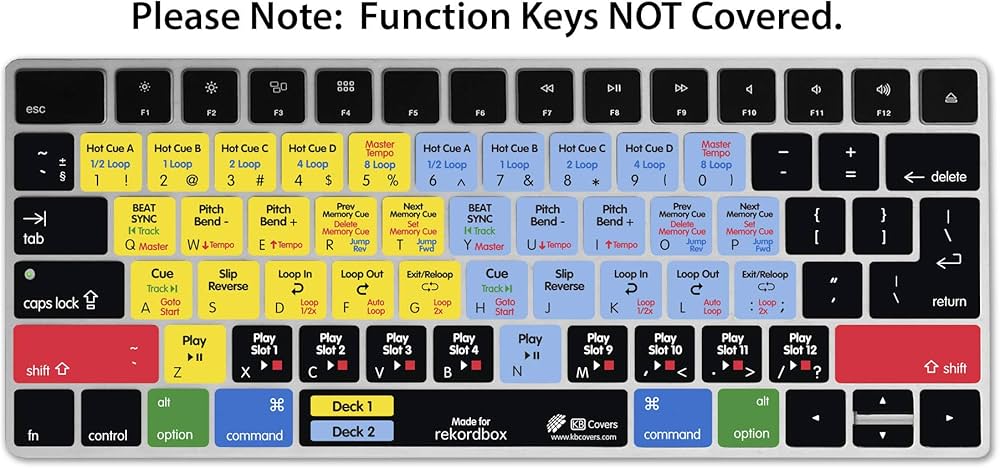
I got so used to those shortcuts that when I began using djay pro, the first thing I ever did was to map the exact same shortcuts in djay
Here I share with you the key bindings file if you like to use that too
Rekordboxoid.djayKeyBindings (6.7 KB)
Just put it in Finder >>Music >>djay >>Key Bindings then launch djay and choose the shortcut “Rekordboxoid” as here:
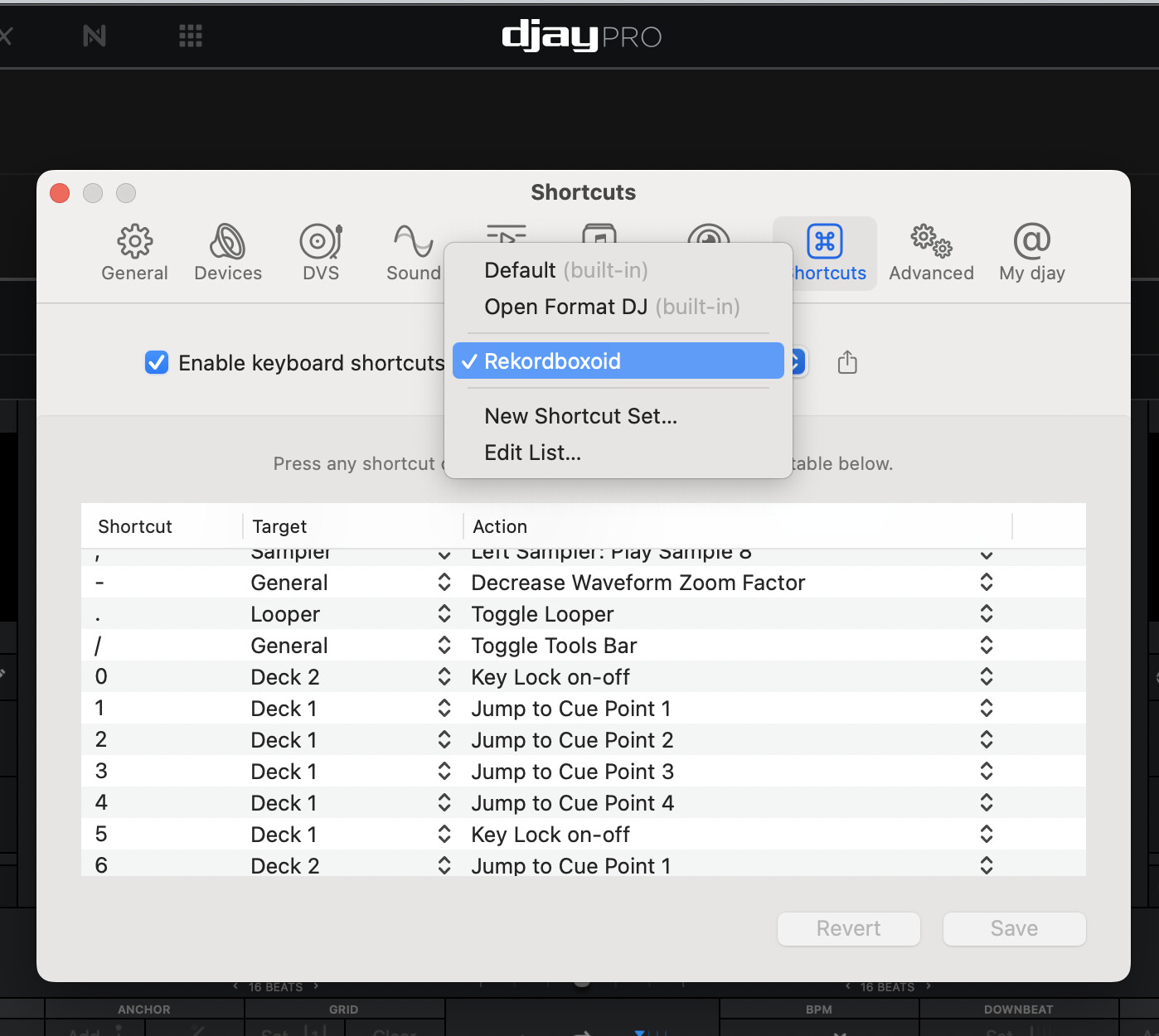
Better yet, you can creat your own shortcuts from that template
1 Like
Nice! Thanks for sharing @Armigo. I used to have one of those MacBook keyboard covers for Traktor Pro way back in the day…
1 Like
Personally, I use a blank keyboard shortcut file, and only add commands that I really, really need. It is great peace of mind, just the minimum needed for DJing on the laptop, nothing more, nothing less.
1 Like
can i take a look at the one for laptop Djing, pls


