Device model: 2023 MacBook Pro M3 Max Version of operating system: macOS 26.0.1 Version of djay: 5.5
Summary of the issue:
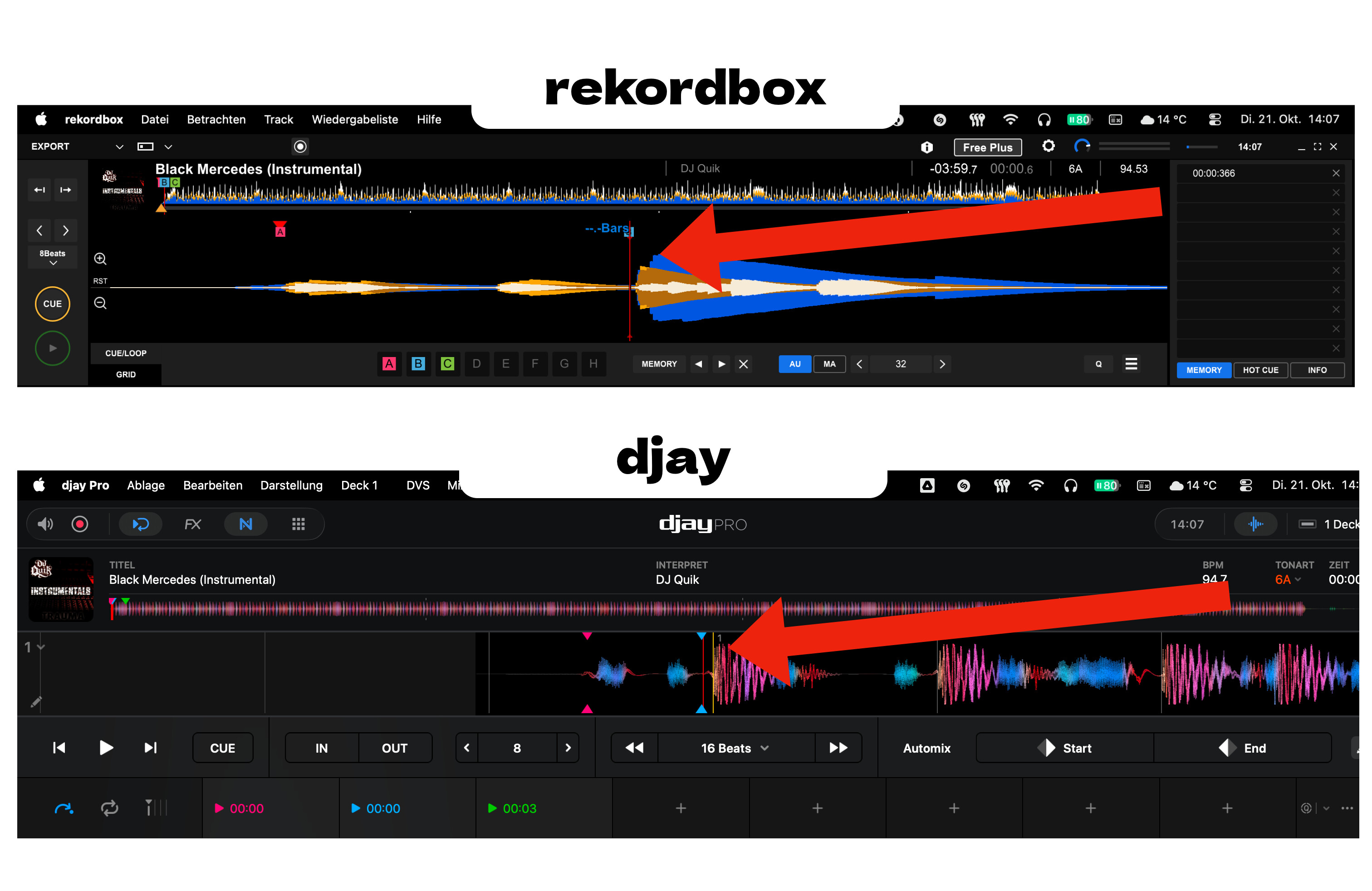
Part 1 – Cue Point Offset Between Rekordbox and djay
When using the Rekordbox XML export feature to access cue points and track data in djay, I noticed that the cue points displayed in djay do not perfectly align with those in Rekordbox. They appear slightly shifted, even though the beat grid and BPM information are consistent between both applications.
I’m wondering if this offset might be related to differences in waveform visualization or grid rendering between Rekordbox and djay, meaning the cues could technically be placed correctly in time but appear misaligned visually due to how waveforms are drawn in each app.
It would be helpful to know whether this is a known behavior or if cue point precision is expected to be 1:1 accurate when using the XML import method.
I’ve attached a screenshot for this part showing the exact comparison between Rekordbox and djay for reference.
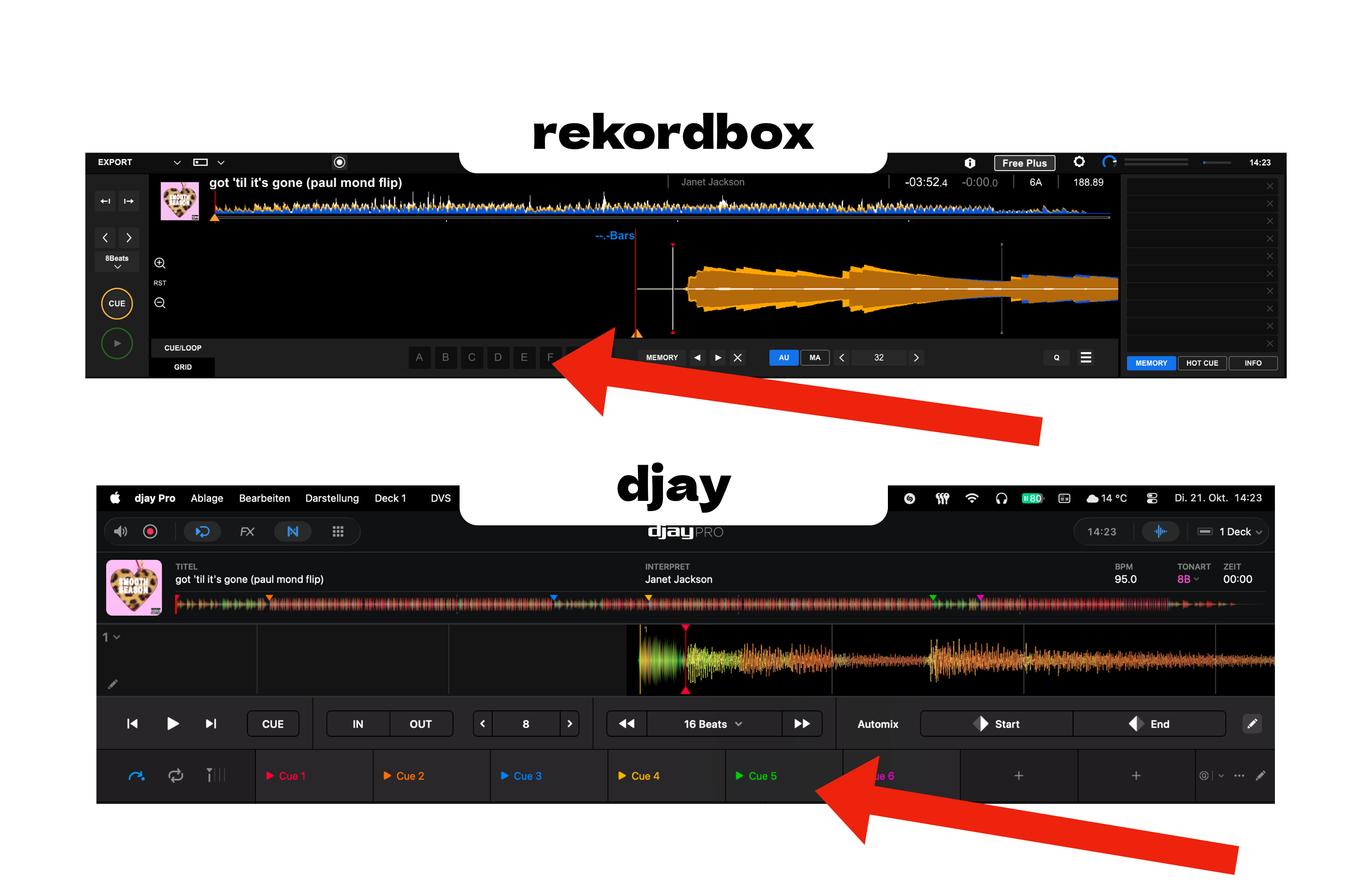
Part 2 – Missing / Unexpected Cue Points After XML Import
Additionally, I noticed that some tracks show cue points in djay that do not exist in Rekordbox, even though the XML export comes directly from Rekordbox with no cues set on those tracks.
It’s unclear whether djay is generating default cue markers automatically or if there might be a parsing inconsistencyin how the XML file is read.
Would appreciate clarification or guidance from the community or Algoriddim team on:
Whether slight cue point shifts are expected due to waveform visualization differences
Why some tracks display cue points in djay that don’t exist in Rekordbox
I’ve also attached a screenshot for this part to illustrate the discrepancy.
Just a heads up when it comes to using DJay Library exported to USB stick with todays update. Just tested djay library on my XDJ-AZ with a USB stick and they’re inconsistencies with the Beatgrids on the AZ. Same songs align perfectly in DJay. But are off-sync in on the AZ. So I can’t rely on the grids. Even tho Djay created them. Guess it’s “by ear” or using DJay on my AZ.
I for one has noted cue shift in the recent 5.4.4 update too, but i am not exactly sure how it happened…I can only guess it’s encoder shift (MixMaster G from ATGR is the guru in these things)
My workflow is different though: I don’t use External apps feature but I organise my tracks first in serato (cue pointings), before load them onto djay so my cues in djay are basically serato cues read by djay. I used to have no shits whatsoever but in v5.4.4 I noted some irregularities in a few tracksnand haven’s got an answer to what exactly happened.
About your unexpected cues:
I can confidently tell you: those cues were in the track from some other software (highest suspicion: Mixed in Key, or even djay itself). The track was used somewhere else in another software. The only software I know that names its cues as Cue1, Cue2, etc is MIK, but then again they should have shown in serato
Hi again @trebbis, could you please share a couple of the MP3 files that you are experiencing this issue with? You can share them here or send them to me in a DM. Thanks!